
You may want to check OneSignal’s Solar2D repository. If those two are related, it may be a good idea to create an issue on that repository.
The new version (3609) no longer has a RuntimeError.
Note, I still needed to add to build.settings:
android {
        minSdkVersion = "16",
}
Thanks!
I still get the below error:
> Task :App:checkReleaseDuplicateClasses FAILED
                FAILURE: Build failed with an exception.

                * What went wrong:
                Execution failed for task ':App:checkReleaseDuplicateClasses'.
                > 1 exception was raised by workers:
                  java.lang.RuntimeException: Duplicate class com.google.android.gms.internal.measurement.zzbv found in modules jetified-play-services-measurement-16.5.0-runtime.jar (com.google.android.gms:play-services-measurement:16.5.0) and play-services-measurement-base-17.1.0-runtime.jar (com.google.android.gms:play-services-measurement-base:17.1.0)
                  Duplicate class com.google.android.gms.internal.measurement.zzbw found in modules jetified-play-services-measurement-16.5.0-runtime.jar (com.google.android.gms:play-services-measurement:16.5.0) and play-services-measurement-base-17.1.0-runtime.jar (com.google.android.gms:play-services-measurement-base:17.1.0)
                  Duplicate class com.google.android.gms.internal.measurement.zzdf found in modules jetified-play-services-measurement-impl-16.5.0-runtime.jar (com.google.android.gms:play-services-measurement-impl:16.5.0) and play-services-measurement-base-17.1.0-runtime.jar (com.google.android.gms:play-services-measurement-base:17.1.0)
                  Duplicate class com.google.android.gms.internal.measurement.zzdg found in modules jetified-play-services-measurement-impl-16.5.0-runtime.jar (com.google.android.gms:play-services-measurement-impl:16.5.0) and play-services-measurement-base-17.1.0-runtime.jar (com.google.android.gms:play-services-measurement-base:17.1.0)
It seems the conflict is because of Appodeal Admob. When I disabled Appodeal Admob, it was built without errors.
I just released my App to Google and Apple Store with the latest build.
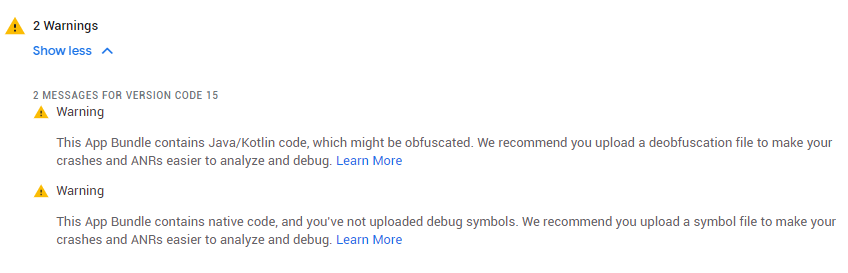
You can upload android native symbols. We don’t have any obfuscation in java side
2 Likes
I also updated OneSignal plugin for the latest build.
Anyway. If you still have some unresolved issues please let me know. I will fix them swiftly. I just updated OneSignal plugin so it uses latest SDK and I confirmed with one of the users that it works.
@vlads, This issue in 3607 also broke notifications.v2 and I can no longer create builds of our apps. Building with 3606 works, 3607 is broken, confirmed. Can you please resolve asap?
On my Android 9 device…
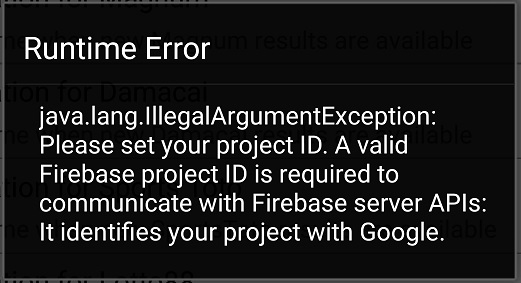
Runtime Error:
java.lang.illegalArgumentException: Please set your project ID. A valid Firebase project ID is required to communicate with Firebase server APIs: It identifies your project with Google.
2 Likes
I use 3606 to build but the latest one gives error with the Appodeal SDK when Admob is enabled. When disabling it, I can build though.
Sounds like this reported issue : https://github.com/coronalabs/corona/issues/111
i am also facing this notification problem on 2020.3609
can’t get notification token, and will throw an eror about firebase id.
	08-15 20:30:23.282  1805  1841 I Corona  : ERROR: Runtime error
	08-15 20:30:23.282  1805  1841 I Corona  : java.lang.IllegalArgumentException: Please set your project ID. A valid Firebase project ID is required to communicate with Firebase server APIs: It identifies your project with Google.
	08-15 20:30:23.282  1805  1841 I Corona  : Java Stack Trace:
	08-15 20:30:23.282  1805  1841 I Corona  :      com.google.android.gms.common.internal.Preconditions.checkNotEmpty(com.google.android.gms:play-services-basement@@17.3.0:8)
	08-15 20:30:23.282  1805  1841 I Corona  :      com.google.firebase.iid.FirebaseInstanceId.checkRequiredFirebaseOptions(com.google.firebase:firebase-iid@@20.2.3:52)
	08-15 20:30:23.282  1805  1841 I Corona  :      com.google.firebase.iid.FirebaseInstanceId.getInstance(com.google.firebase:firebase-iid@@20.2.3:2)
	08-15 20:30:23.282  1805  1841 I Corona  :      com.google.firebase.iid.FirebaseInstanceId.getInstance(com.google.firebase:firebase-iid@@20.2.3:1)
	08-15 20:30:23.282  1805  1841 I Corona  :      plugin.notifications.v2.LuaLoader$GetDeviceToken.invoke(LuaLoader.java:292)
	08-15 20:30:23.282  1805  1841 I Corona  :      com.ansca.corona.JavaToNativeShim.nativeKeyEvent(Native Method)
	08-15 20:30:23.282  1805  1841 I Corona  :      com.ansca.corona.JavaToNativeShim.keyEvent(JavaToNativeShim.java:489)
	08-15 20:30:23.282  1805  1841 I Corona  :      com.ansca.corona.input.RaiseKeyEventTask.executeUsing(RaiseKeyEventTask.java:68)
	08-15 20:30:23.282  1805  1841 I Corona  :      com.ansca.corona.CoronaRuntimeTaskDispatcher$TaskEvent.Send(CoronaRuntimeTaskDispatcher.java:179)
	08-15 20:30:23.282  1805  1841 I Corona  :      com.ansca.corona.events.EventManager.sendEvents(EventManager.java:100)
	08-15 20:30:23.282  1805  1841 I Corona  :      com.ansca.corona.Controller.updateRuntimeState(Controller.java:319)
	08-15 20:30:23.282  1805  1841 I Corona  :      com.ansca.corona.graphics.opengl.CoronaGLSurfaceView$CoronaRenderer.onDrawFrame(CoronaGLSurfaceView.java:434)
	08-15 20:30:23.282  1805  1841 I Corona  :      com.ansca.corona.graphics.opengl.GLSurfaceView$GLThread.guardedRun(GLSurfaceView.java:1625)
08-15 20:30:23.282 1805 1841 I Corona : com.ansca.corona.graphics.opengl.GLSurfaceView$GLThread.run(GLSurfaceView.java:1380)Yes, exactly. This notifications.v2 broken has a dedicated issue here: builds 3607, 3608 and 3609 broken
Vlad has already responded that he’s working on it.
Hello.
It seems that Google added a new value to google-services.json. Make sure to use build 3610+ enable google-services.json in build settings android.useGoogleServicesJson = true and ensure the json file itself contains project_id value.
same issue on admob. I can build with minSdkVersion = “16”, but the apk crash
With the build 3610 I still have the issue :
ava.lang.RuntimeException: Unable to get provider com.google.android.gms.ads.MobileAdsInitProvider: java.lang.IllegalStateException:
- The Google Mobile Ads SDK was initialized incorrectly. AdMob publishers *
- should follow the instructions here: *
- https://googlemobileadssdk.page.link/admob-android-update-manifest *
- to add a valid App ID inside the AndroidManifest. *
- Google Ad Manager publishers should follow instructions here: *
- https://googlemobileadssdk.page.link/ad-manager-android-update-manifest. *
at android.app.ActivityThread.installProvider(ActivityThread.java:6591)
at android.app.ActivityThread.installContentProviders(ActivityThread.java:6079)
at android.app.ActivityThread.handleBindApplication(ActivityThread.java:5985)
at android.app.ActivityThread.access$1200(ActivityThread.java:201)
at android.app.ActivityThread$H.handleMessage(ActivityThread.java:1679)
at android.os.Handler.dispatchMessage(Handler.java:106)
at android.os.Looper.loop(Looper.java:201)
at android.app.ActivityThread.main(ActivityThread.java:6864)
at java.lang.reflect.Method.invoke(Native Method)
at com.android.internal.os.RuntimeInit$MethodAndArgsCaller.run(RuntimeInit.java:547)
at com.android.internal.os.ZygoteInit.main(ZygoteInit.java:873)
Caused by: java.lang.IllegalStateException:
- The Google Mobile Ads SDK was initialized incorrectly. AdMob publishers *
- should follow the instructions here: *
- https://googlemobileadssdk.page.link/admob-android-update-manifest *
- to add a valid App ID inside the AndroidManifest. *
- Google Ad Manager publishers should follow instructions here: *
- https://googlemobileadssdk.page.link/ad-manager-android-update-manifest. *
at com.google.android.gms.internal.ads.zzza.attachInfo(com.google.android.gms:play-services-ads-lite@@19.3.0:33)
at com.google.android.gms.ads.MobileAdsInitProvider.attachInfo(com.google.android.gms:play-services-ads-lite@@19.3.0:3)
at android.app.ActivityThread.installProvider(ActivityThread.java:6586)
... 10 moreI tried with the build 3610 but I got the same error:
Transform artifact play-services-measurement-sdk-16.5.0.aar (com.google.android.gms:play-services-measurement-sdk:16.5.0) with DexingWithClasspathTransform
AGPBI: {“kind”:“error”,“text”:“Type com.google.android.gms.measurement.internal.zzgn is referenced as an interface fromcom.google.android.gms.measurement.internal.AppMeasurementDynamiteService$zza.”,“sources”:[{}],“tool”:“D8”}
                > Transform artifact play-services-measurement-api-16.5.0.aar (com.google.android.gms:play-services-measurement-api:16.5.0) with DexingWithClasspathTransform
                AGPBI: {"kind":"error","text":"Type com.google.android.gms.measurement.internal.zzgn is referenced as an interface from `com.google.android.gms.measurement.AppMeasurement$OnEventListener(classpath class)`.","sources":[{}],"tool":"D8"}

                FAILURE: Build failed with an exception.

                * What went wrong:
                Execution failed for task ':App:checkReleaseDuplicateClasses'.
                > 1 exception was raised by workers:
                  java.lang.RuntimeException: Duplicate class com.google.android.gms.internal.measurement.zzbv found in modules jetified-play-services-measurement-16.5.0-runtime.jar (com.google.android.gms:play-services-measurement:16.5.0) and play-services-measurement-base-17.1.0-runtime.jar (com.google.android.gms:play-services-measurement-base:17.1.0)
                  Duplicate class com.google.android.gms.internal.measurement.zzbw found in modules jetified-play-services-measurement-16.5.0-runtime.jar (com.google.android.gms:play-services-measurement:16.5.0) and play-services-measurement-base-17.1.0-runtime.jar (com.google.android.gms:play-services-measurement-base:17.1.0)
I already had project_id in google-services.json and useGoogleServicesJson in build.settings was set to true. However, I downloaded google-services.json file again. Added minSdkVersion = “16” too. None of the builds worked. Only if I disable Appodeal’s Admob on build.settings, I can successfully build.
Have the same problem with 2020.3635 version Solar
upd:
changed in build settings from [“plugin.appodeal”] and [“plugin.appodealAdaptersA”] by com.cabagomez to
[‘plugin.appodeal.base’] = { publisherId = ‘com.coronalabs’ },
[‘plugin.appodeal.GoogleAdMob’] = { publisherId = ‘com.coronalabs’ },
[‘plugin.appodeal.StartApp’] = { publisherId = ‘com.coronalabs’ },
[‘plugin.appodeal.Unity’] = { publisherId = ‘com.coronalabs’ },
[‘plugin.appodeal.Yandex’] = { publisherId = ‘com.coronalabs’ },
then got the error
AGPBI: {“kind”:“error”,“text”:“Default interface methods are only supported starting with Android N (–min-api 24): void com.google.android.exoplayer2.Player$EventListener.onIsPlayingChanged(boolean)”,“sources”:[{}],“tool”:“D8”} FAILURE: Build failed with an exception. * What went wrong: Execution failed for task ‘:App:mergeDexRelease’. > Could not resolve all files for configuration ‘:App:releaseRuntimeClasspath’. > Failed to transform exoplayer-core-2.11.7.aar (com.google.android.exoplayer:exoplayer-core:2.11.7) to match attributes {artifactType=android-dex, dexing-enable-desugaring=false, dexing-is-debuggable=false, dexing-min-sdk=16, org.gradle.category=library, org.gradle.libraryelements=jar, org.gradle.status=release, org.gradle.usage=java-runtime}. > Execution failed for DexingNoClasspathTransform: /Users/alexey/.gradle/caches/transforms-2/files-2.1/eb66c4ac2bcc3f20425f39b6e35c8508/jetified-exoplayer-core-2.11.7-runtime.jar.
after that I messaged Vlad and he helped me
Need to create folder AndroidResources in project folder if you haven’t had yet
then create corona.gradle file
inside the file:
android {
compileOptions {
sourceCompatibility JavaVersion.VERSION_1_8
targetCompatibility JavaVersion.VERSION_1_8
sourceCompatibility ‘1.8’
targetCompatibility ‘1.8’
}
}
That’s all. Appodeal with Admob will work!
upd: upd:
Guys, please write about your errors and solutions. It can help somebody to solve the problem faster in the future.
Share my case.
- build on MacBook.(“Big Sur” updated)
- Using Solar2D.3637
- 256 error occurs when using the official Appodeal plugin.
[my solution]
-
I created the “corona.gradle” file with the following contents in the "My Project \ AndroidResources \ " folder.
android {
compileOptions {
sourceCompatibility 1.8
targetCompatibility 1.8
}
}
what is the actual error? A few lines above that error you should see a text that explains what the error is.
reproduce text
Feb 26 14:32:10.023 Using openjdk version "1.8.0_242-release"
                OpenJDK Runtime Environment (build 1.8.0_242-release-1644-b3-6915495)
                OpenJDK 64-Bit Server VM (build 25.242-b3-6915495, mixed mode)
Feb 26 14:32:12.851 Using openjdk version "1.8.0_242-release"
                OpenJDK Runtime Environment (build 1.8.0_242-release-1644-b3-6915495)
                OpenJDK 64-Bit Server VM (build 25.242-b3-6915495, mixed mode)
Feb 26 14:32:16.080 BUILD SUCCESSFUL
                Total time: 2 seconds
Feb 26 14:33:08.581 AGPBI: {"kind":"error","text":"Invoke-customs are only supported starting with Android O (--min-api 26)","sources":[{}],"tool":"D8"}
                AGPBI: {"kind":"error","text":"Default interface methods are only supported starting with Android N (--min-api 24): void com.criteo.publisher.CriteoAdListener.onAdClicked()","sources":[{}],"tool":"D8"}
                AGPBI: {"kind":"error","text":"Default interface methods are only supported starting with Android N (--min-api 24): void com.google.android.exoplayer2.Player$EventListener.onIsPlayingChanged(boolean)","sources":[{}],"tool":"D8"}

                FAILURE: Build failed with an exception.

                * What went wrong:
                Execution failed for task ':App:mergeDexRelease'.
                > Could not resolve all files for configuration ':App:releaseRuntimeClasspath'.
                   > Failed to transform ads.networks.criteo-1.6.1.6.aar (io.bidmachine:ads.networks.criteo:1.6.1.6) to match attributes {artifactType=android-dex, dexing-enable-desugaring=false, dexing-is-debuggable=false, dexing-min-sdk=16, org.gradle.category=library, org.gradle.libraryelements=jar, org.gradle.status=release, org.gradle.usage=java-runtime}.
                      > Execution failed for DexingNoClasspathTransform: /Users/myname/.gradle/caches/transforms-2/files-2.1/394ae0e3eef74bb0504401292e25cce4/ads.networks.criteo-1.6.1.6-runtime.jar.
                         > Error while dexing.
                           The dependency contains Java 8 bytecode. Please enable desugaring by adding the following to build.gradle
                           android {
                               compileOptions {
                                   sourceCompatibility 1.8
                                   targetCompatibility 1.8
                               }
                           }
                           See https://developer.android.com/studio/write/java8-support.html for details. Alternatively, increase the minSdkVersion to 26 or above.

                   > Failed to transform exoplayer-core-2.11.7.aar (com.google.android.exoplayer:exoplayer-core:2.11.7) to match attributes {artifactType=android-dex, dexing-enable-desugaring=false, dexing-is-debuggable=false, dexing-min-sdk=16, org.gradle.category=library, org.gradle.libraryelements=jar, org.gradle.status=release, org.gradle.usage=java-runtime}.
                      > Execution failed for DexingNoClasspathTransform: /Users/myname/.gradle/caches/transforms-2/files-2.1/b25e5f7242714a0667329671ce69570f/jetified-exoplayer-core-2.11.7-runtime.jar.
                         > Error while dexing.
                   > Failed to transform criteo-publisher-sdk-4.0.0.aar (com.criteo.publisher:criteo-publisher-sdk:4.0.0) to match attributes {artifactType=android-dex, dexing-enable-desugaring=false, dexing-is-debuggable=false, dexing-min-sdk=16, org.gradle.category=library, org.gradle.libraryelements=jar, org.gradle.status=release, org.gradle.usage=java-runtime}.
                      > Execution failed for DexingNoClasspathTransform: /Users/myname/.gradle/caches/transforms-2/files-2.1/967944fe0946975fb9f82eabd44c420b/criteo-publisher-sdk-4.0.0-runtime.jar.
                         > Error while dexing.

                * Try:
                Run with --stacktrace option to get the stack trace. Run with --info or --debug option to get more log output. Run with --scan to get full insights.

                * Get more help at https://help.gradle.org

                BUILD FAILED in 51s
Feb 26 14:33:09.582 Android build failed (256) after 56 seconds
Feb 26 14:33:09.982 ERROR: Build Failed: Error code: 256
Feb 26 14:33:09.982