Mail on Android - Attachment not ok

Great deano! Glad it’s working for you. Can you tell us, when you open the email does the attachment appear in-line as an image or as a bunch of nonsense text? Have you tried it with two images attached instead of just one (if that’s appropriate for your app)?

Joshua, I just tested the sample app “Networking/ComposeMailSMS” and… it works perfectly on my Nook! Which is encouraging, I think. The difference I see between the code in the sample and my own code is that I’m grabbing my images from a folder inside baseDir=system.DocumentsDirectory while the sample is grabbing images from the root of baseDir=system.ResourceDirectory. I’ve also tried using jpgs, and forming the email as text based rather than html based, but with the same results.

So, currently, on Nook, using my code, I can attach only one image to an email and it comes into the email client looking like garbage text rather than a nice, inline graphic. If I attempt to attach two or more images then none of them is actually attached to the email and none get sent. And to answer your question, No, I’m not deleting the images after I send the email.

I guess one thing I can try is to pull the stored images out of the subfolder they are in put them in the root of the documents directory. If that doesn’t fix things then maybe the problem is with the images simply being in the Documents directory. I’m curious if deano is seeing any of the same issues I am since it sounds like he is also using the Documents directory to store the images.

EDIT: Moving the images out of the subfolder didn’t work. Same problems. I then did a test with my own code where, instead of using the images from the documents directory I used a couple images in the resources directory and… it worked! So it seems like nook is having problems translating images in the documents directory for use in email. Joshua, is there anything else I can test or provide you to get this resolved? I’m rapidly approaching my deadline. I do appreciate your time on this issue!

EDIT 2: See my reply below, my problem is solved and it had nothing to do with the documents directory. It was spaces in file names that was the culprit.
[import]uid: 9422 topic_id: 19798 reply_id: 134469[/import]
AH-HA!!! Nice catch Stephen!

That’s definitely a bug on our end. On Android, we have to provide file paths as local URLs to the mail app and the problem is that we’re not % encoding the URL. I’ll write up a separate bug report for this. Thank you so much for isolating this. [import]uid: 32256 topic_id: 19798 reply_id: 134522[/import]

@Stephen - the white background i am putting in is simply the size of the full screen resolution. This is a drawing app and when i take a picture of what you drew in the gMiddle2 layer of my app, i need a white background so it looks the same when you get it in your email.

Ok i have done more testing with my display groups and have isolated the problem a bit further i believe.

This app i am working on is a simple Drawing app. when you draw a line on the screen i am saving that line in a temporary display group, and after you lift our finger i apply special effects to the line in the temporaty display group and then do a gMiddle2:insert(gTempGroup) , this means that ALL of the objects i am technically putting in my gMiddle2 display group are groups themselves. So. my gMiddle2 display group is a group of groups.

Now to test my problem, i put a picture directly into my gMiddle2 group (a green Yes oval):
[lua] function testObject()
local testObj = display.newImageRect(gMiddle2,“images/common/yes.png”,whatsX(592,248),248*ssy,true)
testObj.x = _x/2
testObj.y = _y/2
end[/lua]

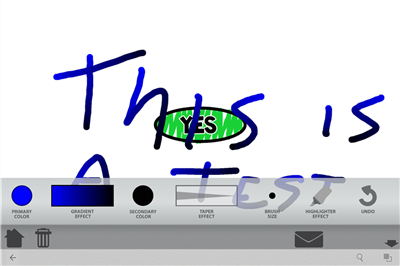
I then draw a few lines (which get inserted into gMiddle2 as a group for each line segment:
Before Sending Email

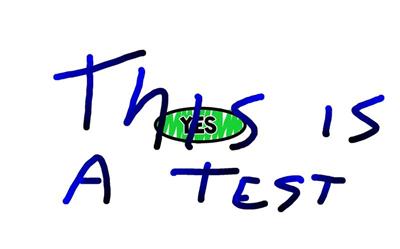
Then i click on my email button and i get this picture in my email:
What i get in my email
which is exactly all the objects i should see in it.

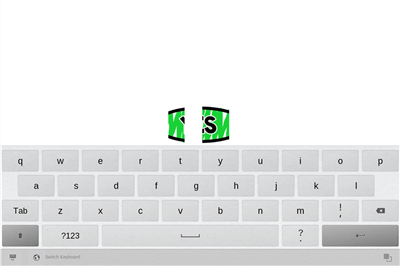
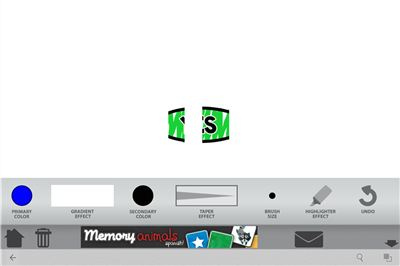
now right after i hit the send button from the nook email interface i get this display:
Right After sending Email

now i close the keyboard and i see this:
Right After closing Nook Keyboard

So… whats this mean to me? well, any objects i place directly into the gMiddle2 display group show up as expected after sending the email… sort of… any group inside the group, appears that everything may have turned… white? thats why i am only seeing part of the Green yes Oval?

Now is this a bug? i dont know. but i do know that objects directly into 1 display group seem to be playing nice, where groups inside of that group are not. :slight_smile: thanks for all the feedback !

Note: i noticed my gradient tool also turned a solid white, which is in my gForeground1 group. It also is a group in a group.

Note2: I did test the suspend resume feature and This problem is not related to the email function I have this identical behavior on a suspend and resume… but so far i only tested this on a nook HD+ (on the android side) i will test on other android devices. (it works fine on a iPad)

Tested on additional android devices, and Yes its the same problem. I will have to re-work how i am handling the objects groups and groups. So thank you for helping me get on the same page.! [import]uid: 88147 topic_id: 19798 reply_id: 134805[/import]

team1,

I think you’ve ran into a bug in our OpenGL rendering system. Would you mind sending us your project (or a small equivalent project) that would allow us to reproduce it on our end please? You can send it to us via the “Report a Bug” link at the top of this web page. Please indicate which device and Android OS version this bug occurs on.

Also, would you mind testing this on an iOS device too please? Just draw something like you did, press the home button to suspend, and then resume your app and see if the same issue occurs. If it occurs on an iOS device too, then please indicate so in your bug report.
(Note: The mail popup on iOS does not suspend the app. So, you have to press the Home button to reproduce this suspend/resume issue.)

Thanks in advance. [import]uid: 32256 topic_id: 19798 reply_id: 134865[/import]

I just submitted the bug report. I included my whole project (which is a work in progress) because i didn’t have time to trim it down to just a test app.

I tested the suspend on the iPad3 i have and i don’t see the problem occur at all.

if you need more information feel free to contact me directly at rgleason@learninggems.com

[import]uid: 88147 topic_id: 19798 reply_id: 134876[/import]

Ok new problem with Build #978 on a Nook HD+ i am using.

After i send the email and get the proper attachement. when i go back to my app. the Display Group that i took a capture of before sending the email seems to become… Blank.

here is the code i am using that works on a Ipad and Kindle just fine. but when this runs on a Nook HD+ after the email is send and the email api drops me back into the app… the display group has been removed from the screen, or is no longer visible, or items in the display group are deleted?

I notice the display group disappears when i click on my email button right before the email i actually see the email window pop up.

[lua] function emailAction(event)
if event.phase == “ended” or event.phase == “canceled” then
if soundFXMode == “on” then mysounds.play(4,0) end
local background = display.newRect(gMiddle2,0,0,_x,_y)
background:setFillColor(255,255,255)
gMiddle2:insert(background)
background:toBack()

local tempFileName = “MyPicture.jpg”
display.save( gMiddle2, tempFileName )

print(“Sending email”)

local options =
{
subject = "[Learning Gems - My Whiteboard] - My Picture: "…tempFileName,
isBodyHtml = true,
body = “[html] Learning Gems - My Whiteboard [/html]”,
attachment =
{
{ baseDir=system.DocumentsDirectory, filename=tempFileName, type=“text” },
},
}
native.showPopup(“mail”, options)

timer1 = timer.performWithDelay(300,function() background:removeSelf();print(“background Removed”) end)
end
return true
end[/lua] [import]uid: 88147 topic_id: 19798 reply_id: 134636[/import]

@team1

I’m noticing similar issues on the Nook Color as well. When returning from a mode that completely interrupts my Corona App, such as picking images from the image library, or sending an email, certain display groups/images will lose their content and become a solid color, or if there are a bunch of images in the same group they will all inherit the same image texture.

I don’t see these artifacts on iOS devices or the simulator. (On iOS the image library and email apps are drawn on top of the app as an overlay, rather than completely taking over the screen as on the Nook, so there’s probably some major differences in how the platforms handle textures for that transition).

I’m not sure but I think I saw this problem before the #978 fix, so it might not have anything to do with that. Maybe a different, Nook specific bug? [import]uid: 9422 topic_id: 19798 reply_id: 134650[/import]

When an Android app gets suspended, all of its images/textures that are loaded into OpenGL get dumped from memory. We have no choice in this matter. Corona then automatically reloads all images back into OpenGL when the app is resumed. On iOS, all images/textures in memory are retained… so this is a big difference in behavior between the two operating systems.

Now, the above will be a problem if you are displaying images from memory instead of from file. This is because when your app is resumed, there is no image file for Corona to load to restore the image back to the screen via OpenGL. The following APIs load images into memory and do not save to file, so you will have encounter these problems when suspending/resuming:
http://docs.coronalabs.com/api/library/display/capture.html
http://docs.coronalabs.com/api/library/display/captureBounds.html
http://docs.coronalabs.com/api/library/display/captureScreen.html
http://docs.coronalabs.com/api/library/media/show.html

Regarding the capture APIs, that is by design. They were designed to take a screenshot directly into memory as an optimization so that developers can use these screenshots “temporarily” for storyboard screen transitions and for creating photos with effects/cropping. The display.save() function is significantly slower compared to these APIs because it writes to file, so these faster capture APIs were needed to work-around this issue. Note that the display.save() will not have this suspend/resume problem because the screenshot can be restored from file… provided that you do not delete or overwrite the file.

Regarding the media.show() function, you’ll have the same problem unless you tell it to save to file. Otherwise, the selected photo in memory will be gone when your app resumes.

So bottom line, we don’t actually see the above as a bug… because there is no way to work-around this issue without saving to file and doing so introduces a huge performance issue. But notice that we provide a means to persist the image to file, allowing developer to work-around this issue. The best we can do is document this.

Now, if the image that is failing to be displayed does have a corresponding file, then that would be different. That would clearly be a bug on our part that we would have to address. If this is what’s happening to you, then have a look at the Android log when your app gets resumed to see if you are running into any out-of-memory errors. [import]uid: 32256 topic_id: 19798 reply_id: 134675[/import]

Thanks for those details, Joshua. Very informative. In my case the images are composited display groups so they don’t have a corresponding saved file. However, I do have a way to save the state of my display so I think I can just redraw my display once the email app has released control back to my app.

Which brings up, how do I detect when the email app is done? The corona docs say that native.showPopup(“mail”, options) returns true/false depending on if it opens or not, but I think I need to detect when it closes, not if it opens. I also need this ability in order to close the native keyboard since for some reason the email app doesn’t close the keyboard when it’s done. I’m only seeing this problem on the Nook Color.

EDIT: looks like I can detect the return from email by setting up a Runtime listener for an applicationResume event.

-Stephen [import]uid: 9422 topic_id: 19798 reply_id: 134680[/import]

Happy to help Stephen. If it helps you further, you can use [lua]display.save()[/lua] to save the resulting grouped images to file so that it can be easily restored later, with the only issue being that it will degrade performance due to the extra file I/O… but at least the choice on how to handle this is completely yours.

Regarding detecting if the e-mail was sent, there is no way to detect this. Neither iOS or Android provide an API for detecting this. At least none that I’ve seen. This is especially an issue for when the device does not currently have Internet access, in which case, the mail app keeps a local draft and waits for Internet access to be restored before sending the e-mail. This means that your app has no idea when to delete the attached file, because you certainly don’t want to delete it before the draft has been sent. Kind of an annoying problem, eh? Perhaps the correct solution is to delete the files when your app is exited?

The [lua]native.showPopup()[/lua] function is “supposed” to returns true if it was able to successfully display the mail popup window. Although, we have an outstanding bug report indicating that it always returns true (at least on iOS) even if it fails to bring up the mail popup due to the end-user not setting up a mail account on the device. I have not confirmed this issue for myself, but it is still flagged as an open bug in our system. I would hope that iOS display a message to the user to set up their mail account. I’m an Android developer here, so I’m sorry about not confirming this for myself.
[import]uid: 32256 topic_id: 19798 reply_id: 134712[/import]

@Joshua,

Yeah, the native.showPopup return value didn’t help me, but detecting a runtime system event “ApplicationResume” let me get rid of the native keyboard and redraw my display objects once the mail app closed, so both are problems solved for me. And I actually never get rid of the images, I’m storing them in the user’s documents folder since they are re-used by my app.
[import]uid: 9422 topic_id: 19798 reply_id: 134721[/import]

I understand, however i am still not sure i am on the same page… here is why, In the example i posted above, i am using the display.save and saving the image capture to a file.

More importantly what i am seeing is with my display groups. i have the following display Groups in the overall app:
[lua] local gBackground1 = display.newGroup()
local gBackground2 = display.newGroup()
local gBackground3 = display.newGroup()
local gMiddle1 = display.newGroup()
local gMiddle2 = display.newGroup()
local gMiddle3 = display.newGroup()
local gForeground1 = display.newGroup()
local gForeground2 = display.newGroup()
local gForeground3 = display.newGroup()[/lua]

when i do a Display.save, i am only taking a snapshot of the gMiddle2 group, and that works fine, it attaches to the email now and send it off. however when i get returned to my app.

All of my display groups that should be showing something ARE… Except for the gMiddle2 group. that 1 group and only that group disappears (visually)

My understanding of what your saying … means all of my other groups should also be gone unless i re-display them. I don’t see why only my 1 display group is …getting lost… I can take a screenshot of before and after if that will help.

[lua] function emailAction(event)
cleanTempLine()
if event.phase == “ended” or event.phase == “canceled” then
if soundFXMode == “on” then mysounds.play(4,0) end
local background = display.newRect(gMiddle2,0,0,_x,_y)
background:setFillColor(255,255,255)
gMiddle2:insert(background)
background:toBack()

local tempFileName = “MyPicture.jpg”
display.save( gMiddle2, tempFileName )

print(“Sending email”)

local options =
{
subject = "[Learning Gems - My Whiteboard] - My Picture: "…tempFileName,
isBodyHtml = true,
body = “[html]I made this picture with Learning Gems - My Whiteboard [/html]”,
attachment =
{
{ baseDir=system.DocumentsDirectory, filename=tempFileName, type=“text” },
},
}
native.showPopup(“mail”, options)

timer1 = timer.performWithDelay(300,function() background:removeSelf();print(“background Removed”) end)
end
return true
end[/lua] [import]uid: 88147 topic_id: 19798 reply_id: 134730[/import]

The suspend/resume thing I was talking about only involves image files (or the lack of image files really). Groups and all other display objects are retained.

Are you sure that you are not deleting your captured image when resuming your app?
The big difference between iOS and Android when it comes to showing the mail popup is that Android suspends your app and iOS doesn’t and shows the mail popup within your app. I recommend that you have a hard look at how you are handling system events. Also, have a look at the Android log to check for any errors.

If you think you’ve ran into a bug, then send us a small test project for us to reproduce this issue via our “Report a Bug” link at the top of this web page. [import]uid: 32256 topic_id: 19798 reply_id: 134733[/import]

@team1

I see in your code you are putting a white rectangle as a background behind the image you are sending via email, then after you send it you delete the background. It’s not clear how big the rectangle is since you’re using _x, _y for the width and height. Maybe it’s much bigger then your image and then when you delete it it causes the display group to shift off screen? Just a guess since I don’t see anything else strange in your code.

You could try removing all the background related code and see what happens to your missing display group. If the same problem remains then at least you could eliminate the background as a cause. [import]uid: 9422 topic_id: 19798 reply_id: 134736[/import]

@Stephen - the white background i am putting in is simply the size of the full screen resolution. This is a drawing app and when i take a picture of what you drew in the gMiddle2 layer of my app, i need a white background so it looks the same when you get it in your email.

Ok i have done more testing with my display groups and have isolated the problem a bit further i believe.

This app i am working on is a simple Drawing app. when you draw a line on the screen i am saving that line in a temporary display group, and after you lift our finger i apply special effects to the line in the temporaty display group and then do a gMiddle2:insert(gTempGroup) , this means that ALL of the objects i am technically putting in my gMiddle2 display group are groups themselves. So. my gMiddle2 display group is a group of groups.

Now to test my problem, i put a picture directly into my gMiddle2 group (a green Yes oval):
[lua] function testObject()
local testObj = display.newImageRect(gMiddle2,“images/common/yes.png”,whatsX(592,248),248*ssy,true)
testObj.x = _x/2
testObj.y = _y/2
end[/lua]

I then draw a few lines (which get inserted into gMiddle2 as a group for each line segment:
Before Sending Email

Then i click on my email button and i get this picture in my email:
What i get in my email
which is exactly all the objects i should see in it.

now right after i hit the send button from the nook email interface i get this display:
Right After sending Email

now i close the keyboard and i see this:
Right After closing Nook Keyboard

So… whats this mean to me? well, any objects i place directly into the gMiddle2 display group show up as expected after sending the email… sort of… any group inside the group, appears that everything may have turned… white? thats why i am only seeing part of the Green yes Oval?

Now is this a bug? i dont know. but i do know that objects directly into 1 display group seem to be playing nice, where groups inside of that group are not. :slight_smile: thanks for all the feedback !

Note: i noticed my gradient tool also turned a solid white, which is in my gForeground1 group. It also is a group in a group.

Note2: I did test the suspend resume feature and This problem is not related to the email function I have this identical behavior on a suspend and resume… but so far i only tested this on a nook HD+ (on the android side) i will test on other android devices. (it works fine on a iPad)

Tested on additional android devices, and Yes its the same problem. I will have to re-work how i am handling the objects groups and groups. So thank you for helping me get on the same page.! [import]uid: 88147 topic_id: 19798 reply_id: 134805[/import]

team1,

I think you’ve ran into a bug in our OpenGL rendering system. Would you mind sending us your project (or a small equivalent project) that would allow us to reproduce it on our end please? You can send it to us via the “Report a Bug” link at the top of this web page. Please indicate which device and Android OS version this bug occurs on.

Also, would you mind testing this on an iOS device too please? Just draw something like you did, press the home button to suspend, and then resume your app and see if the same issue occurs. If it occurs on an iOS device too, then please indicate so in your bug report.
(Note: The mail popup on iOS does not suspend the app. So, you have to press the Home button to reproduce this suspend/resume issue.)

Thanks in advance. [import]uid: 32256 topic_id: 19798 reply_id: 134865[/import]

I just submitted the bug report. I included my whole project (which is a work in progress) because i didn’t have time to trim it down to just a test app.

I tested the suspend on the iPad3 i have and i don’t see the problem occur at all.

if you need more information feel free to contact me directly at rgleason@learninggems.com

[import]uid: 88147 topic_id: 19798 reply_id: 134876[/import]