Ah ha!
Now to figure out why it crashed director threw an error on the end of game screen where I tried to set my score like there was a syntax error (which doesnt happen in the simulator)
[import]uid: 19626 topic_id: 20394 reply_id: 79934[/import]

Ah ha!
Now to figure out why it crashed director threw an error on the end of game screen where I tried to set my score like there was a syntax error (which doesnt happen in the simulator)
[import]uid: 19626 topic_id: 20394 reply_id: 79934[/import]
@robmiracle You probably called request with the wrong parameters or wrong format. Are you following the tutorials above? Category must be a string and value a number. [import]uid: 36054 topic_id: 20394 reply_id: 79935[/import]
the value of the “Category” was wrong, but the parameter types were correct. I’m picking parts out of the tutorial above to fix things from where I was trying to go from the release notes.
Now I’m getting the game isn’t recognized again. May be a version number issue this time.
EDIT:
Grrrrr… I’m getting the game is not recognized error again… and I’m using the sandbox account I created a few minutes ago that was working…
I think I’m GC cursed. I couldn’t get it working through OF and now I’m not able to get native working… [import]uid: 19626 topic_id: 20394 reply_id: 79939[/import]
I think you have to make sure your bundle identifier is fully qualified (no wildcards) and matches what you registered on iTunes Connect. Make sure you either use a developer provisioning profile registered with the fully qualified id, or explicitly set the CFBundleIdentifier in your build.settings.
Also, I’ve read elsewhere that sandbox mode sometimes gets wonky and you can’t get back into it unless you completely remove the app you are testing from your device and reinstall it.
[import]uid: 7563 topic_id: 20394 reply_id: 79941[/import]
I always use fully qualified bundle identifiers. I rebuilt using a development profile instead of an adhoc. I also deleted the app from the phone before reinstalling it.
It made login again and it said the login wasn’t setup, yet it remember some of the things I set earlier. Show leaderboards is bring up a GC screen like it should… but my score isn’t posting.
EDIT: Okay, I’ve put in some native.alerts and verified that I am getting a success back from setting the score. But when it goes to show the leaderboard or if I go into GC directly, there are no scores.
[import]uid: 19626 topic_id: 20394 reply_id: 79945[/import]
I confirmed there is a bug in our stuff with loadAchievements. I pushed in a fix for that which will appear in the next daily build. I also fixed the ‘identifier’ misspelling. There will also be 4 new API functions to retrieve images. A first sample code project is also very near. Though Monday is a holiday, so I’m not sure when all this will appear. (I just noticed somebody broke the build last night. I didn’t hear if that person fixed it.)
[import]uid: 7563 topic_id: 20394 reply_id: 79971[/import]
robmiracle: When you set your score, make sure you are setting it on the right leaderboard. You may have different leaderboards each with different high scores. I think the idea is that for example, I score 100 on easy, but 20 on hard, I want to track them differently because getting higher scores on hard is harder and not fair to compare to easy.
Also, there doesn’t seem to be any way to reset a high score on Apple’s server. And if you have never set a score for a specific board, when you request the score, you will get no data.
[import]uid: 7563 topic_id: 20394 reply_id: 79975[/import]
Right now I only have the one leaderboard.
Here’s my iTunes config:
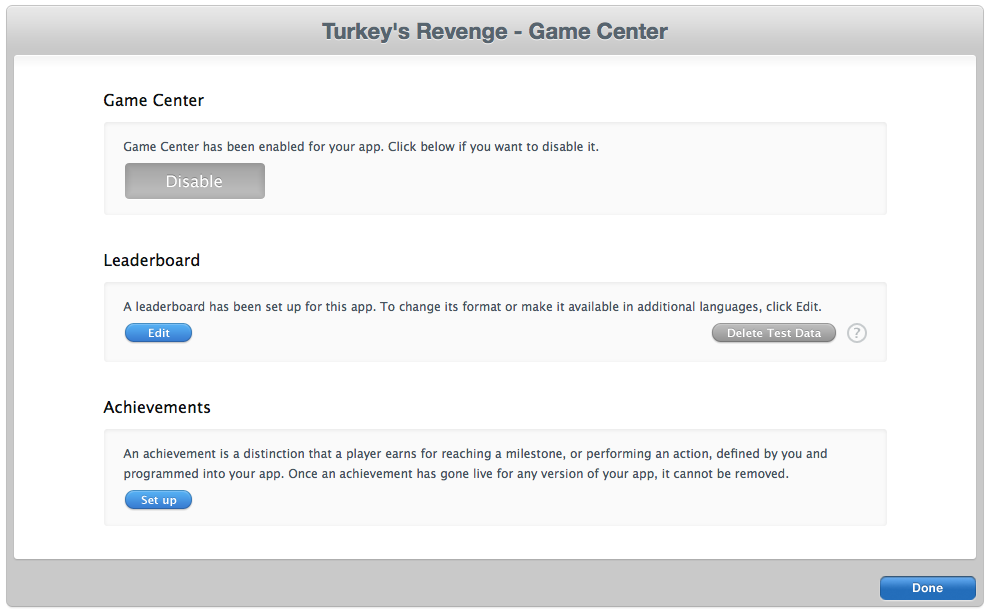


So I only have one leaderboard “Main” with an id of “highscores”
in my main.lua:
local gameNetwork = require("gameNetwork")

local function gcLoginCallback(event)
 \_G.gamenetworkEnabled = event.data
 return true
end

local function authorize()
 gameNetwork.init("gamecenter", gcLoginCallback)
end
In my gameover.lua:
 local function postScoreSubmit(event)
 print\_r(event)
 if event.errorCode then
 native.showAlert("Error", event.errorMessage, { "Ok"})
 else
 native.showAlert("Success", event.name, { "Ok"} )
 end
 end

 if \_G.gamenetworkEnabled == true then
 native.showAlert("seths", tonumber(\_G.gameSettings.score), { "Ok" } )
 gameNetwork.request("setHighScore", {
 localPlayerScore = {
 category="highscores",
 value=tonumber(\_G.gameSettings.score)
 },
 listener=postScoreSubmit})
 end
** and no fussing for me using globals!!! Director 1.4 app by the way.
I get the popup “seths” showing my score. I get a popup “Success” saying it did it’s thing.
But while logged into my sandbox account (shows sand box when my app starts), if I show the leaderbaords from within the app:
 local function showLeaderboard()
 if \_G.gamenetworkEnabled == true then
 gameNetwork.show("leaderboards")
 end
 end
It brings up the leaderboard but says there are no scores.
If I go into game center while logged into the sandbox account, I see the game. It has grabbed the icon, shows that there is one player, but never shows that there is a score.
Something is amiss…
And I’m at a loss. This is the same frustration I had with trying to get OF to work with GC. It looked like everything was in place, but it would never ever register the scores. So I have to be screwing something up on the iTunes side of things… [import]uid: 19626 topic_id: 20394 reply_id: 80053[/import]
Instead of showing the leaderboard, what happens if you request “loadScores”? Do you get the correct numbers back? [import]uid: 7563 topic_id: 20394 reply_id: 80111[/import]
Very interesting.
I did a json.encode on the returned event.data and dumped it out in an alert. I have a table with the following values:
value:226,
date: Saturday Jan 14, 2012 12:42 AM Eastern Standard Time
ShouldSetDefaultLeaderboard: false
category: highscores
playerId: some string
formattedValue: 226
context: 0
rank: 1
Yet when I try to view the leaderboard from within game center, nothing shows up. That score may very well have been one I set last night. This run my score was less than 226.
Also today I noticed a nice red “Sandbox” block over top of the “Me” button while in gameCenter.
[import]uid: 19626 topic_id: 20394 reply_id: 80114[/import]
Thank you for the quick acknowledgement and turnaround on this issue! [import]uid: 117383 topic_id: 20394 reply_id: 80355[/import]
Any more thoughts on my Dilemma?
[import]uid: 19626 topic_id: 20394 reply_id: 80375[/import]
@Rob: I have the same config and all like you. My app has not yet been submitted. I don’t seem to get that GC working either…
EDIT: it might be because of my profile 
EDIT2: not working at all  [import]uid: 90610 topic_id: 20394 reply_id: 80380[/import]
@blasterv’s I’m having trouble the score being posted to Gamecenter. Everytime my game finishes when I check in gamecenter the score is not in game center. What I did before gamecenter was save high score local with no network so like this
[code] local scores = ice:loadBox( “scores” )
local high3 = scores:retrieve(“best3”)
print(high)
local score = 0
local time = 0
local ui = require(“ui”)
local highText = display.newText("", 0,0,“Arial”,22)
highText.x = display.contentWidth/2
highText.y = display.contentHeight/3
highText:setTextColor( 0,0,0 )
local highScore = scores:retrieve(“best3”)
if highScore ~= nil then
highText.text = "HighScore: "… scores:retrieve(“best3”)
end
local function show_highScore()
gameOver = not gameOver
scores:storeIfHigher( “best3”, score )
scores:save()
local highText = display.newText("", 0,0,“Arial”,22)
highText.x = display.contentWidth/2
highText.y = display.contentHeight/2
highText:setTextColor( 0,0,0 )
if score > high3 then
if score > scores:retrieve(“best3”) then
highText.text = "New HighScore: "… scores:retrieve(“best3”)
print(“new high score”)
else
highText.text = "New HighScore: "… scores:retrieve(“best3”)
end
end
end
timer.performWithDelay(time, show_highScore, 1) [/code]
That how I save my score locally so how would I use that for this
[code]function updateHighScore(board, score)
if gamenetworkEnabled == true then
gameNetwork.request(“setHighScore”, { localPlayerScore={ value=tonumber(scores), category=board }})
end
end
To put it on gamecenter
[import]uid: 17058 topic_id: 20394 reply_id: 80402[/import]
There were several posts about this on the Apple Developer Forums, but in every case, they said it was a caching issue and in one case, it eventually showed up, in another it took hitting from another account to trigger it, i.e. they logged in via the Xcode simulator apparently with a different sandbox account causing a flush.
But in my case, I started this Friday night. There has been more than enough time for it to post if it’s a time thing. I’ll try the Xcode simulator different account to flush it trick later.
Very frustrating… [import]uid: 19626 topic_id: 20394 reply_id: 80408[/import]
@robmiracle so what you do mean? Then what should I do [import]uid: 17058 topic_id: 20394 reply_id: 80417[/import]
You should be patient, and wait until I can test what I’ve learned and then I’ll report back. I was going to try in on break earlier, but account services for GC’s sandbox was down.
I don’t know what you should do yet. Research continues.
[import]uid: 19626 topic_id: 20394 reply_id: 80429[/import]
@robmiracle so I should wait till Corona does a tutorial for GameCenter [import]uid: 17058 topic_id: 20394 reply_id: 80431[/import]
Waiting on an Ansca blog post on the subject would be helpful. This is really cutting edge techniques that we don’t have documentation on. It’s not completely stable yet (daily builds, not the stable release), so unless you have to have this working in your first release of your first game, waiting isn’t a bad thing.
But I was reporting about a problem with the leaderboards not showing successfully posted scores. You replied what to do. And for the problem of leaderboards not showing scores, I’m going to do a test later and see if I can get that working.
As for you and your code, I replied with some suggestions over in your other thread. [import]uid: 19626 topic_id: 20394 reply_id: 80438[/import]
All right folkses!!!
The leaderboard problem may be solved!
I logged out of GameCenter which was logged in with the sandbox account I had been testing with. I launched my app on the phone. When it asked for me to login or create a new account, I chose new account. I played the game, died and I saw it submit the score. When I went back into the game, found my show Gamecenter Leaderboard button it launched the leaderboard game center screen and I saw two scores where previously non had existed.
Spread the news!!!
[import]uid: 19626 topic_id: 20394 reply_id: 80489[/import]