
Hey all,
I’m building a demonstration app with native-ish appearance using widgets (derived from WidgetDemo), but I have the following problem. After I built the app for Android, on my device the textField boxes remain on top of everything when I switch tabs of my app. Other objects like buttons and text labels go away, but textField objects stay on top.
Look here:
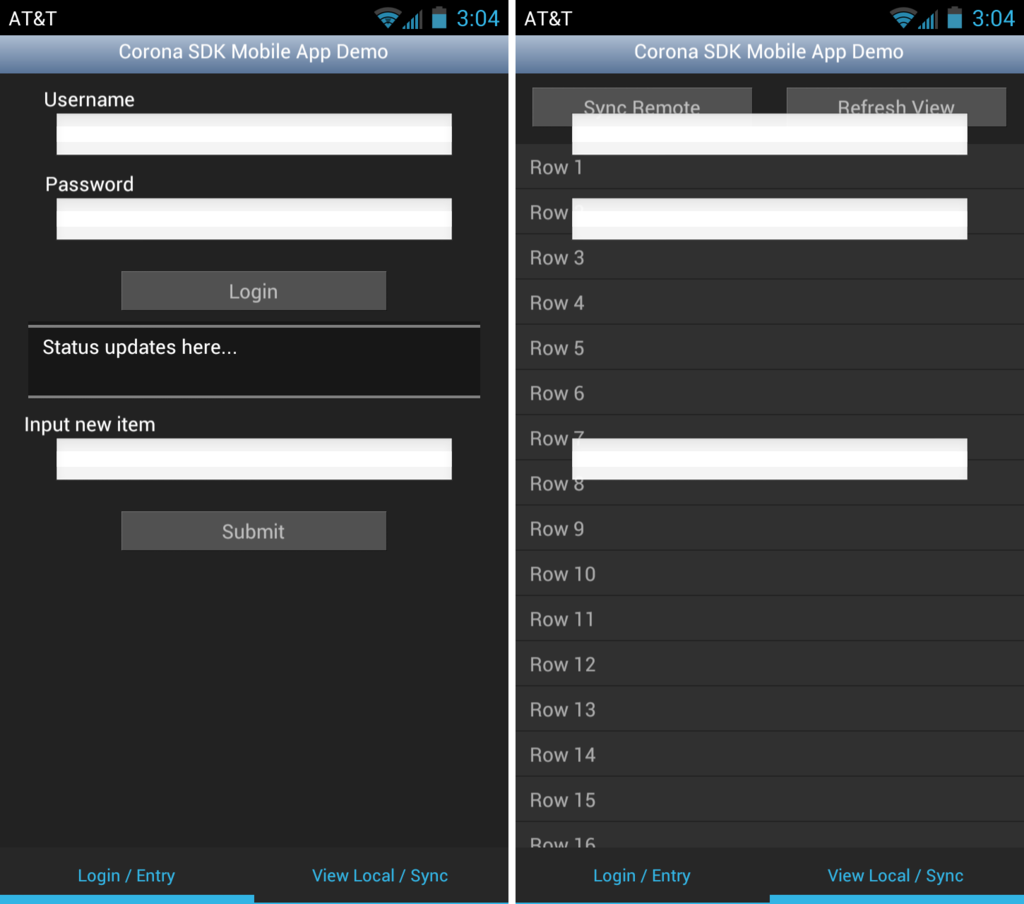
That’s Android 4.1.2 if it matters. It doesn’t do that in the Corona Simulator. I don’t know if it does that in iOS, I don’t have any way to test.
The textField objects have been inserted into the sceneGroup like the rest, however they behave differently.
Here is the code for my textField:
local usernameField = native.newTextField( 15, 80, 280, 30, fieldHandler ) usernameField.font = native.newFont( native.systemFont, 14 ) usernameField.anchorY = 0 usernameField.x = screenCenter sceneGroup:insert( usernameField )
How do I fix this? Is it a Corona bug?
Thanks in advance.