Defining multiple target devices in build.settings?

Hello Solar2D world!

I ran a search in the forum.

“Defining multiple target devices in build.settings”

And, I was a bit surprised that nothing jumped out at me.

I can begin to imagine (and understand) why a developer must choose a target device right out of the gate.

Perhaps the app/game is defined ‘specifically’ for a single device,
and is not intended to be ran on anything other than that single targeted device.

Also, I can imagine why a developer can NOT expect the app/game
to run on EVERY device out there;

nor all devices that Solar2D can target, all in one build;
.apk and .ipa files aside.

With all that said, my initial understanding of Solar2D’s ability,
is that it can target multiple devices (cross-platform deployment) using one ‘code base’.
And I do know that Solar2D does indeed do that.

However, I personally have not been able to find a build.settings file where, for instance,
it at least defines target builds for the ‘three most popular aspect ratios’ available.

2:3 – Though this is my content area Aspect Ratio
3:4
16:9

I’m sure it is right under my nose, as many things have been when searching for answers;
or that I have indeed read but it just hadn’t clicked yet;
and, for some reason is always just out of reach of my efforts to find them,
if not simply understand them.

I definitely don’t put that at the fault of this forum or online documentation.
And I do my best not to be lazy and post another redundant “Johnny-Come-Lately” inquiry;
Pestering those that have seen it all too many times and responded, graciously, countless times before.

And perhaps my understanding of targeting multiple devices is completely nil.

Happily, I have read both of the following, several times of course!:
Project Configuration
Project Build Settings

And though it seems to ‘set the stage’ as to how to target multiple devices,
to my newbie-eye, those online docs alone, leave me a bit wanting.

In short, I was just wanting to peak under the hood of a build.settings file
that at least targets the three common aspect ratios mentioned.

Also, while we are at it, perhaps, target three of each,
ie. in both Android and Apple devices.

Android
A phone or two?
A tablet or two?

-- build.settings
settings =
{
    android =
    {
 		-- Nothing I have seen targets multiple Android devices
    },
}

Apple
A phone or two?
An iPad or two?

-- build.settings
settings =
{
    iphone =
    {
	-- Nothing I have seen targets multiple Apple devices
    },
}

For better or for worse, I have chosen to target the Amazon Fire breed of devices.

Though, I am not setting my content area to any specific Fire Tablet aspect ratio
or a literal (1 to 1 mapping) ie. point-to-pixel correspondence for a specific Fire device screen size.

Of course, I have gone through the graphical motions of creating a background.png
that covers even the longest of aspect ratios that I have come across, namely, 21:9;
and, that looks acceptable on the devices within those Stubby and Lengthy screens,
at least as seen in the Solard2D simulator.

To that end, I have (so far) found a background of 1866pts x 900pts that covers it all!

Meaning, (again, as viewed in the Solar2D simulator)
there are NO black bars on any virtual device available.

To be sure, I am still not 100 percent sure about this choice of ‘over-sized’ background.

1866pts x 900pts

And I am still working on those details.

But, if I am wanting to (in the future at least) to try and target many devices,
I may as well cover this ‘l o n g’ device issue right out of the gate.
Even though, I intend my game to run on a ‘stubby’ Tablet, though, preferably, not exclusively.

I am far from needing to build to (cross-platform) or multiple devices at this time,
and again, plan on focusing my attention on my personal Amazon Fire for debug/test/builds.

But I figure I may as well pull that veil of ignorance aside,
and at least see what I have ahead of me.

That is, aside from recoding my 10 year old prototype-game all over again.
I trust it won’t take me as long this time.

In short, I don’t want to build just for Amazon Fire,
though, if that’s all that were available to me, I would still do it,
and would not complain.

I guess I am just still ignorant of my target device options, and how-to’s.

Anyone care to share a build.settings file
that I can see and intimidate myself, by acknowledging my current lack of understanding
when it comes to this issue?

Preferably one that targets cross-platform
and perhaps a phone and tablet from each Android and Apple?

Or, is this issue covered in the Android and Apple specific online documentation
that I am basically clueless to?
If so, oops! Sucks to be me.

Regardless, can I still ‘cheat’ off of your example, (so to speak)
even though I don’t plan on (nay, refuse to) copy and paste it blindly in my build.settings,
as it may not suit my particular goals?

Thanks again

Johnny Come Lately
AKA Gilby

:slight_smile:

build.settings is fixed - you, the dev, adapt accordingly to different resolutions.

1 Like

In a few more words:

build.settings is the wrong file. It only holds per-platform build config (orientation, permissions, plugins, plist entries, etc.). It never lists devices or aspect ratios.

Content area (your 2:3), scale mode (“letterbox”, “zoomEven”, etc) and other values in your config.lua adapts to every display.

You can further write how display objects and such are handled in your actual game’s code. For positioning display objects, you can use something like my screen.lua module to easily position objects on any screen.


Cross-platform just means choosing the target at build time (Fire is an Android build). You then build for that target platform. If you want, you can build for other platforms as well.

Also, just a heads up on your background again: no single image fills every aspect ratio at native resolution without upscaling and losing quality. Even if we’re just talking about Android, you’ve got phones with 3200x1440px, 2560x1440px and 1920x1080px screens, and tablets with 2560x1600, etc. If you have a background of 1866x900px, it’d be too small for all those screens. It’d also be in the wrong aspect ratio too. You’d need to upscale it and crop it during runtime.

The reality is that there’s no background that fits all needs. The easiest option is to calculate how much the image needs to be scaled up length or height wise and then do that, and then accept that the image will be blurry and cropped on some devices, or you can create a background that consists of several components that adjust their positions dynamically.

2 Likes

Secretly, you can write code in lua in config.lua to calculate those key variables.

XeduR has already explained using images as backgrounds, so to add an open answer, maybe you can also check if TileMap or Nine-Patch is something you’re interested in?

1 Like

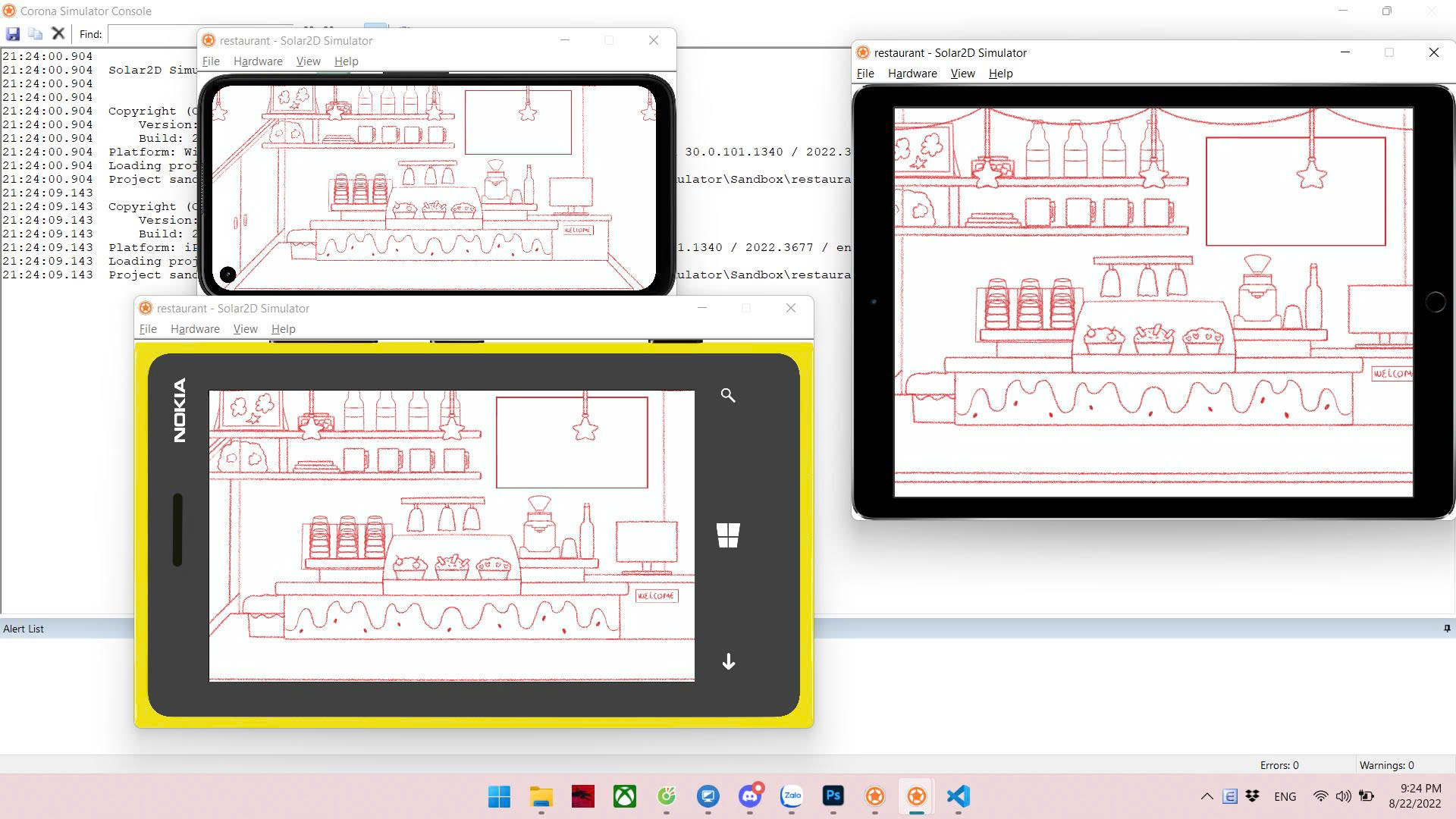
Regarding the background, I have an example: for games with a fixed scene, I keep the gameplay area in a 3:2 aspect ratio, and in 16:9, 20:9, 21:9, etc., it still displays but doesn’t affect gameplay (it’s for decoration to prevent the background from looking empty).

In that sketch, all gameplay takes place at the pastry counter; everything else remains unaffected.

3 Likes

@Xedus,

Lots to process (in the brains) on the target device and build(s) for other platforms and what-not;
and, how many devices will display my game in an acceptable manner.

You said:

“Cross-platform just means choosing the target at build time (Fire is an Android build).
You then build for that target platform. If you want, you can build for other platforms as well.”

Ignorantly, I thought there were only two platforms. Apple and Android.
Aside from possibly TV’s and various Desktop computers.
Hewlett Packard isn’t android, and it isn’t Apple.

Again, I assumed there were only two types of ‘mobile’ devices.
Apple and Android.

I was aware that Amazon was on the Android bandwagon at least.
Mainly because I knew it wasn’t Apple!
Not that that knowledge helped me.

But a ‘Build’ is still a mystery to me.
Will have to mull all that over.
You fried my brains! Thanks. :slight_smile:

Getting close to getting out of the simulator at least,
and into the test/debug/live/build.
At least on my FIRE.

Got my Amazon Developer Account,
and my Google Play Store via Android Developer Account.
I’m not even thinking about setting up the Apple side of test/builds
…just yet! I do have an apple developer account, but that’s it.

I’m sure I am making it more difficult than needs be.
But I don’t know enough to make it easier.

I guess, somewhere in my mind, if I have an .apk file,
I’m good to go for the android platform,
and likewise with an .ipa, I’m good to go for Apple platform.

I figured with those two, I am ready to conquer the world!
TV’s and Desktops aside, perhaps, and other “platforms” I am oblivious too?

At first, I didn’t even think I had to specify in the config.lua
OR build.settings what specific device(s) were eligible for my game,
or that I specifically wanted to target.

It just slowly became a mystery when I heard about targeting a device, in the singular sense.

Targeting ‘several builds’ is perhaps a better way of wording something I still do not quite understand? As opposed to taking it so literally as to the “target device” I have in mind?

Sorry for all the ad hoc questions sprinkled throughout this brain-fry reply of mine.

I definitely kicked open a bees nest here.
But at least that door is open.

When the smoke clears, or the bees!,
I will take another look around and see where I am.
Deer in head lights at the moment.

Thank you for your help.
You are too generous, as are many here.

I will not take your assistance for granted, nor expect you to hold my hand to the finish line.

Lots to take in, I will take what you have said and mull it over.
It will gel eventually. Juggling lots at the moment.

But I guess that’s the nature of the beast.

As far as my background, I guess I ‘assumed’ that 1866 x 900 would be my implied @1x default.
And I could @2x @4x and such.

I have spent more time thinking about the landscape WIDTH
than I have landscape Height as far as covering ‘all’ screens.

The background that I have designed works superbly
via the simulator virtual devices, as I have mentioned.

At first, I even liked Roaming Gamers 200res idea.
‘Where one size fits all’.
But I figured that was just a nifty bandaid.
Clever, but just looks ‘OK’, as RoamingGamer put it himself.

And I knew that monster resolutions had to be lurking out there.
But, again @2x @3x @4x @5?

As far as my background goes, and fitting (and not fitting) on other devices,
I did adapt an approach where in my L O N G WIDTH background.png,
( again with @2x, @4x in mind ), there is at least “filler” content in those outer fringes
beyond my content area that will mildly entertain the user/player.

On tablets, the player never sees it, while on long devices it is there to be seen.

Definitely didn’t think I needed to manually ‘crop’ anything at run time!
Thanks for the heart attack!
Geez, give it to me slow, DOC!

I just figured if my background was too L O N G for a given device,
as long as the device had enough texture memory to store the entire oversized background.png in RAM, then, anything that fell beyond a device’s screen edge was simply not visible,
(self-cropped in my mind) as there are no screen pixels to show off that pixel dust.

But, for me to crop at runtime? Scary stuff!
I’ll have nightmares tonight with a mobile device wearing a Jason Vorhees mask!

I will post a mock-up of my background image idea, in the coming days.
I feel, the way my game is graphically designed,
I have an acceptable amount of wiggle room with my particular background and gameplay set up.

Some game designs may not be so lucky.
I’m pretty sure I am ok.

It feels good not to be completely alone here.

As soon as I iron out these initial details,
I assume I will disappear for a few months while coding the game from scratch …again!

Just need to get a few of the ‘initialization’ matters in check at the outset.

To be sure, since I now know that build.settings is not the place to target any given number of devices, and that config.lua is set up to define my single CODE-BASE Content Area, then, the take away question/answer here is:

Will I have multiple .apk’s and eventually, multiple .ipa’s, instead of one each?

Is that the subtle miss-understanding that I had?

Again, I thought all I needed was one .apk and one .ipa.
And somewhere else I would target several devices employing those two package files?

Man, I hope I at least got that right for now.
If not, deer in head lights turns to dead deer in the road.

I said it before, I must say it again.
Thanks for your time.

What a ride.

Gilby

@Clang,

“The Dude Abides”
The Dude

Far be it from me to tell you that API usage in the config.lua is a big NO-NO!

“Shame, Shame! know your name.”
Data – The Goonies :wink:

ie. I know that-that voodoo API magic is not supported, but seems to work, use at your own risk.
You rebel!

I’m leaving that sleeping beast alone.
Thanks for trying to corrupt my mind though. :slight_smile:

Also, I am going to do my best to do everything I need to do using solely, Solar2D.

I’m not a huge plug-in fan, though I know there are plugins (especially advertisements),
that I can not avoid.

But believe me, I’m keeping my first game as bare-bones as possible.

I will be posting a mock up of my background/game-board to show where I stand on this issue.
I think I’m golden, that is, once I decide on an acceptable background size.

Not that I expect to have a cure-all background. Just covering enough bases.
Not them all.

TileMap or Nine-Patch?
Watch your language!

That’s GREEK to me! – foreshadowing an up coming post! Stay tuned!

I am going to do my best to figure out how I can complete my game without added exponential learning curves. ie. TileMap or Nine-Patch.

But, thanks for reminding me that there is a lot out there, that I am unaware of.

Besides, SVG? I’m a ‘raster’ man, …man.
Yeah Mon, iree iree!

I do appreciate your suggestions.
Keep throwing them my way, maybe one will stick.

Thanks for helping me out.

Gilby

@Kan98,

I have actually read a post, countless times, over the past 7 months, where you posted the same image!

“How to handle higher aspect ratios”

I actually copied and pasted that entire post to my computer
(along with many other helpful posts that I wanted to further absorb)
in case the internet went down!

When you commented that there were:

“3 popular ratios (tablet 4:3, pc 16:9, phone 21:9)”

I thought I had been given some Top Secret Intelligence,
and indeed I was, and that was months ago!

But, at the time, it didn’t sink in as to how to (shut up) and simply use those three aspect ratios.
I was too busy reinventing the wheel.
I think I got it now. Partly anyway.

And as chance would have it, and by shear, dumb luck, (via trial and error)
I fell into the exact same sort of background.png that you show in that image,
but I came up with that background.png 10 years ago!

Of course back then it was 2048 X 1024!

Don’t laugh! :wink:

As I stated above, in a different reply, I will be sharing a mock up of that ‘game-board’ soon enough,
and why I feel confident, that even though I can not possibly have the perfect background for every device, this is a close as I can get to covering lots of bases.

As you said, in your words:

“it’s for decoration to prevent the background from looking empty”

Thanks for reenforcing my hunch, that is awesome.

It’s nice to be corresponding with someone from a post that had a profound effect on me.
Namely, the TOP SECRET INTELLIGENCE you gave me.

Of course, many on this forum have rocked my world, and they never knew it.

I will be posting something soon enough that I worked on the past two days, regarding content scaling; and, while I was making it, I was reminded (in part) about those “3 popular ratios”.

I am excited to share it.
You know you have found it, when you read something about,

“Walking like an Egyptian.”

Thanks for your advice.

I know I am getting close to solving this background/game-board issue.

Gilby

1 Like

Hey, @XeduR , I just realized I have been typing your name as Xedus!

Not even capitalizing the s! How rude of me.

Sorry about that.

That’s an honest mistake, huh?

I’m laughing so hard, I’m no longer embarrassed.

Oh well, better late than never.

Keep being you, XeduR!

Gilby

@Kan98

At the behest of @solar_dev I just did my very first chatGPT on this issue of background size!

Thanks solar_dev you have changed my world!

I even signed in.
Did not pay the $20 bucks though.
And $200? I’ll take the zero!

As you can imagine, I gave chatGPT something to think about.
Let’s just say I was V E R Y specific.

First, I watched a 10 minute youtube video on using chatGPT.
So, I was cocked and loaded by the time I hit it up.

The results are staggering. Mind opening to say the least.
I look forward to sharing the results once I sort out the array of numbers
that chatGPT graciously showered upon me.

I assume it was pay back for the heaping pile of text I fed it.

I know I am close to putting this baby to bed.

“Well, we put that baby to bed.”
From the movie, Summer School

I had to share this.

I will let you guys know what I end up using after sorting through this AI response.

Rocked my world!

Too cool.

Gilby

1 Like

ChatGPT or similar things are pretty good for quick searching, but they require double or triple checking, as when information is missing, they often create “imaginary” information that looks very much like the correct answer.

The correct way to use it is not to ask it to solve the problem, but to ask it to provide guidance, and we will find the answer ourselves from the clues it provides.

1 Like

On a paid plan the context window is basically huge now. Overtime it “learns” your core functions and your coding style and matches it pretty good.

I am now at a >95% trust level on output code that it will just work, is well guarded and highly optimized - without any hallucinations!

So much better now than a year or two ago. As always, YMMV, but time spent training is time well spent.

It is also handy for HTML, PHP, SQL, JS, APIs.

I find the image generation to be genuinely useful for rapid prototyping and discussing ideas before writing a single line of code.

1 Like

“ALLL Righty Then!”
Ace Ventura
:zany_face:

Note taken!

Not surprisingly, I asked the question three different ways!
Of course, unwittingly, I was asking it to ‘solve a problem’.

Nonetheless, I am going to sift through my first 3 attempts/responses.
See what I get, and take it from there.

Thanks for your insight! Too cool.
I will try the way you suggested too, for sure.

Check this out.

When I asked it a second question hours later,
I started out by asking IT if it remembered me.
And if IT remembered my first question.

IT said that it did not have memory ‘explicitly available’ to recall our first conversation.

I took that as I did not pay the $20 bucks! lol @solar_dev

Check this out , after asking IT a shovel full of questions, I asked it this:

“chatGPT, I assume you know everything,
and I am envious of that, but I am trying to keep you on your toes.*

You do know what the meaning of the phrase,
’Keeping you on your toes means, right, chatGPT?

Do you have toes, chatGPT?”

What I was doing, I guess to put it in ‘new-generation-slang”

I was “TROLLING” chatGPT!

Here is ITS response!

“Keeping someone on their toes”
Yes, that’s an idiom meaning to keep someone alert, attentive, and ready to respond.

Do I have toes?
No. Fortunately for me, that means I never stub them on furniture.

Blew my mind!

Lastly, I did find out that chatGPT is a liar.
A little white lie, so no harm done.

Remember I asked IT if it remembered our first conversation, and it said NO?

Well, in its second response to me, IT actually quoted, word for word, something I actually said in that VERY FIRST conversation.

I was not offended.
We lie to the ones we love in non-malicious ways, for their own benefit.

Besides I know better than to fully trust it.

Thanks again, Kan98 and solar_dev!

You-Be-The-Kan!

I guess that makes you The-DEV, solar_dev.

“Evil, like it’s the fruits of the devil. Evil!”
The movie, So I married an Axe Murderer

:slight_smile: