
Draw a Parallelogram

How do you draw a Parallelogram with fill color. I looked up the api and all I found was newCircle and newRect. I tried drawing one by using newLine but I can’t fill the inside of the shape. I tried to create multiple lines to make a parallelogram shape with filled colors but this is causing my game to run very slow even in the emulator.

The shape should look something like this
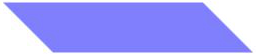
skewedrect_zpse50ea9b3.png

Probably going to be easier with the release of Graphics 2.0, which should be able to skew a rectangle.

I see but is there anyway I can acheive this right now? Graphics 2.0 is not available yet, and I’m using the starter version of corona so it would not be available until the next public build.

May not work for you but you can make a rectangle, then another rect in same color as your background and rotated it and place on top etc.

May not be the ideal solution but for now the only way to do this might be to provide a parallelogram image, load it with display.newImageRect() and then use X & Y scale to size it according to your runtime needs. Not sure if this will do for what you have in mind but its an idea… Good luck! 

Why not using a bitmap mask? Would be the best solution I think.

Just use display.newRect and mask it. Use a mask that is big enough for all your parallelograms and scale the mask down for smaller ones. Then rotate it for the desired angles.

Thanks for the feadback guys. But I cannot use pre defined images, since I’m producing random shapes. I guess I’ll have to wait for Graphics 2.0 to come out.

So what’s the problem with my approach using a bitmap mask?

With that it’s possible to create all sorts of parallelograms with only one mask.

And who knows when graphics 2.0 will be available for starters.

Probably going to be easier with the release of Graphics 2.0, which should be able to skew a rectangle.

I see but is there anyway I can acheive this right now? Graphics 2.0 is not available yet, and I’m using the starter version of corona so it would not be available until the next public build.

May not work for you but you can make a rectangle, then another rect in same color as your background and rotated it and place on top etc.

May not be the ideal solution but for now the only way to do this might be to provide a parallelogram image, load it with display.newImageRect() and then use X & Y scale to size it according to your runtime needs. Not sure if this will do for what you have in mind but its an idea… Good luck! 

Why not using a bitmap mask? Would be the best solution I think.

Just use display.newRect and mask it. Use a mask that is big enough for all your parallelograms and scale the mask down for smaller ones. Then rotate it for the desired angles.

Thanks for the feadback guys. But I cannot use pre defined images, since I’m producing random shapes. I guess I’ll have to wait for Graphics 2.0 to come out.

So what’s the problem with my approach using a bitmap mask?

With that it’s possible to create all sorts of parallelograms with only one mask.

And who knows when graphics 2.0 will be available for starters.