Ok i think ive done it…
Its shody, and i havent test it with any other long strings, but for the current string im using it works  haha.
haha.
Heres what it looks like atm…
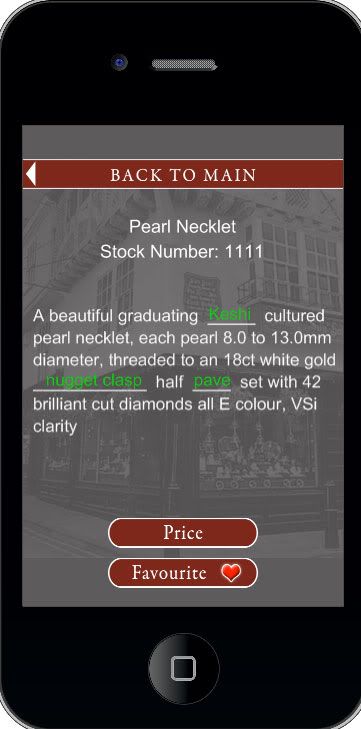
Incase anybody wants to know now or in the future here is the code…
This block of code is what i made to find the words i want to replace, set those words to _____ and then create a new clickable word in its place…
 -------------------------------------------------------------------------------------
-- \*\*\* check for words i want to replace, and create new text objects for them \*\*\*
--------------------------------------------------------------------------------------
--Setup new arrays for words i want to replace and where they are in the string etc...
local repString = {}; local repStringLength = {}; local repStringPos = {};
--Loop through the database of glossary words.
for i=1, #glossWord do
 local word = tostring(glossWord[i])

 if word == "Nugget Clasp" or word == "Pave" then
 word = string.lower(word)
 end

 stockDesc = string.gsub(stockDesc, word, function (s)
 local nw = "\_"
 local loc = string.find(stockDesc, s)
 local length = string.len(s)

 for i=2, length do
 nw = nw.."\_"
 end
 nw = " "..nw.." "

 repString[i] = s
 repStringPos[i] = loc
 repStringLength[i] = length

 return(nw)
 end)
end

--Create the long list of text, wrapped to 40 characters per line...
local textBox = wrappedText(stockDesc, 40, 17, "Helvetica", {255,255,255},"","" )
textBox.x = 10; textBox.y = \_H\*0.35
extraGroup:insert(textBox)
--Add in our new button words...
for i=1,#repString do
 local pos
 local word = repString[i]
 if repStringPos[i] ~= nil then
 pos = repStringPos[i] + repStringLength[i]
 end
 local line

 --Reset the pos var so that is starts at 0 each line.
 --Set the line var so i know where to set the Y position of the new text objects..
 if pos ~= nil then
 if pos \<= 40 then
 line = 0
 elseif pos \> 40 and pos \<= 80 then
 line = 1
 pos = pos - 40
 elseif pos \> 81 and pos \<= 120 then
 line = 2
 pos = pos - 80
 elseif pos \> 121 and pos \<= 160 then
 line = 3
 pos = pos - 120
 elseif pos \> 161 and pos \<= 200 then
 line = 4
 pos = pos - 160
 elseif pos \> 201 and pos \<= 240 then
 line = 5
 pos = pos - 200
 end

 pos = pos - repStringLength[i]
 end

 if word ~= nil and word ~= "nil" then
 local text
 local function changeScene(event)
 if event.phase == "ended" then
 chosenWord = text.id
 save()
 director:changeScene("glossary","moveFromTop")
 end
 return true
 end
 --Add the new words here, which are clickable and take me to the glossary..
 text = display.newText(word,8+(pos\*7.4),(\_H\*0.35)+22\*line,"Helvetica",34)
 text.xScale = 0.5; text.yScale = 0.5; text:setReferencePoint(display.CenterLeftReferencePoint);
 text:setTextColor(20,200,20,255); text.id = i;
 text:addEventListener("touch", changeScene)
 extraGroup:insert(text)
 end
end
and this block is a slightly modified text wrapping function i used from the code exchange, by gilbert 
[code]
– *** Text Wrapping Functions ***
local function wrap(str, limit, indent, indent1)
indent = indent or “”
indent1 = indent1 or indent
limit = limit or 72
local here = 1-#indent1
return indent1…str:gsub("(%s+)()(%S+)()",
function(sp, st, word, fi)
if fi-here > limit then
here = st - #indent
return “\n”…indent…word
end
end)
end
local function explode(div,str)
if (div==’’) then return false end
local pos,arr = 0,{}
– for each divider found
for st,sp in function() return string.find(str,div,pos,true) end do
table.insert(arr,string.sub(str,pos,st-1)) – Attach chars left of current divider
pos = sp + 1 – Jump past current divider
end
table.insert(arr,string.sub(str,pos)) – Attach chars right of last divider
return arr
end
local function wrappedText(str, limit, size, font, color, indent, indent1)
str = explode("\n", str)
size = tonumber(size) or 12
color = color or {255, 255, 255}
font = font or “Helvetica”
–apply line breaks using the wrapping function
local i = 1
local strFinal = “”
while i <= #str do
strW = wrap(str[i], limit, indent, indent1)
strFinal = strFinal…"\n"…strW
i = i + 1
end
str = strFinal
–search for each line that ends with a line break and add to an array
local pos, arr = 0, {}
for st,sp in function() return string.find(str,"\n",pos,true) end do
table.insert(arr,string.sub(str,pos,st-1))
pos = sp + 1
end
table.insert(arr,string.sub(str,pos))
–iterate through the array and add each item as a display object to the group
local g = display.newGroup()
local i = 1
while i <= #arr do
local t = display.newText( arr[i], 0, 0, font, size )
t:setTextColor( color[1], color[2], color[3] )
t:setReferencePoint(display.CenterLeftReferencePoint)
t.x = 0
t.y = (size*1.3)*(i-1)
g:insert(t)
i = i + 1
end
return g
end
[/code] [import]uid: 69826 topic_id: 17859 reply_id: 68365[/import]

 [import]uid: 13097 topic_id: 17859 reply_id: 68346[/import]

