I made a topic about this about a week ago in the “New Users Start Here” sub-forum, but I think it belongs better here or in the Game forum (and I couldn’t move/edit the old one because of some forum bug). I called it “Corona Rapid Prototype”, but the name was confusing and I wasn’t really happy with it.
You can find the original post here.
I now call it Gumbo. Okay, that might be confusing too, but at least it sounds good. And tasty.
Gumbo is a drag and drop tool for creating Corona maps/levels/GUI. You can easily create objects that you give properties, images and physics. You then click a button to generate Lua code, which you can copy and paste into your project. Within minutes you can have a working prototype.
The result:
Features including:
* Create objects and move them around
* Resize/crop objects
* Rotate objects
* Clone objects
* Add physics
* Keyboard shortcuts
* Create Lua
* Polygon Shape Editor
Limitations including:
* No saving. Waiting for a more complete structure before I implement that.
Try it here: http://www.nerderer.com/Gumbo
[import]uid: 13180 topic_id: 5505 reply_id: 305505[/import]
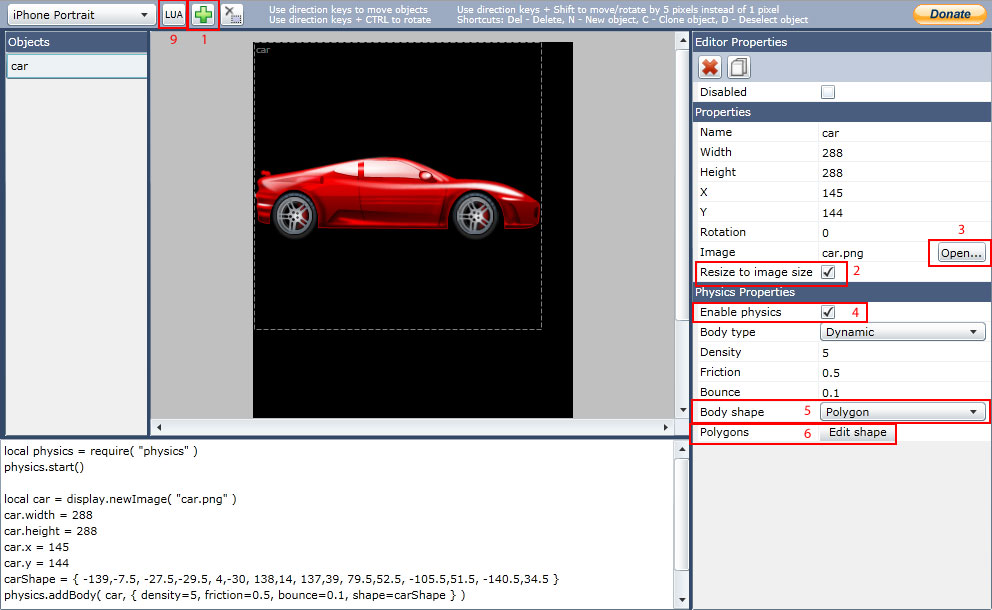
What’s new in the latest version of Gumbo is the Polygon Shape Editor. It lets you create your shape simply by clicking where you want the polygons to be placed.
How to use it in some simple steps:
Add a new object by clicking the Plus icon (or shortcut N on the keyboard when the canvas area is selected)
(Check “Resize to image size”. This will resize your object to the dimensions of your imported image.)
Import the image you want to use
Check “Use physics”
For Body shape, select Polygon
Click “Edit shape”
A window for editing your shape will now show. Click on the image to start creating your shape.
Save and Close
To export your shape and object click the Lua icon at the top of the page
[import]uid: 13180 topic_id: 5505 reply_id: 18611[/import]
I assume you’re limited to 8 points shapes like Corona. Anyway you can add more than 1 complex body to a single image seamlessly? [import]uid: 10835 topic_id: 5505 reply_id: 18638[/import]
At the moment there is no support of multiple shapes in one object. However, I do agree that it would be very useful, and I’ve already been thinking about adding support for it. [import]uid: 13180 topic_id: 5505 reply_id: 18670[/import]
Adobe Air probably wouldn’t work, but that’s okay.
There’s built in support for “detatching” your application in Silverlight 4. This will make it work outside of the browser, and it’ll behave more like a normal desktop app. There are some things I’d have to do to make it work, but I promise that I will look into it. You can also include an icon for it when it’s offline, so if anybody feels like drawing a nice Gumbo-icon… [import]uid: 13180 topic_id: 5505 reply_id: 18863[/import]
@Nerderer, use the gamesalad bowl and fill it with shrimp
hahaha…sorry, couldn’t help it
On a serious note, I would like to know how we could utilize your tool with ‘Lime’.
On a side scrolling / platform / RPG game, we need to make big backgrounds, your tool only shows iphone/ipad sizes, no room to properly layout (I tried adding an image 1024px width on iphone mode but the scrollbars didn’t work).
@infusedreams, perhaps you could add the missing pieces that GS needs into yours.
Hey, that shrimp is not too bad. I was really thinking more about a bowl with gumbo, but this might just work too. [import]uid: 13180 topic_id: 5505 reply_id: 18979[/import]
Yes, I’m aware that the scrollbars won’t show when you add something that’s bigger than the canvas area. I just noticed it yesterday, but I’ll try to fix it within a few days. [import]uid: 13180 topic_id: 5505 reply_id: 18980[/import]
Whoa. This is awesome! And love the suggested logo - it’s very appealing (and tasty-looking)… +1 vote [import]uid: 18734 topic_id: 5505 reply_id: 19107[/import]
Well, it was released a week before SpriteDeck and it’s free. When I started making this tool there was not anything similiar, besides Lime, which is in a way very different. To be honest I believe that SpriteDeck was released earlier just because they saw my tool.
SpriteDeck seems like a really nice tool though, and probably has lots of functions that Gumbo is missing. [import]uid: 13180 topic_id: 5505 reply_id: 19260[/import]
Cheers Nerderer.
I’m just starting my adventures with Corona and have a SpriteDeck licence, so I’ll try put both applications through their paces and see how they stack up! [import]uid: 8889 topic_id: 5505 reply_id: 19273[/import]
I’m sure that SpriteDeck is more more competent in most areas.
However, I started building this since there was no other tool available. I started doing that three weeks ago, on my free time. I thought that other people might enjoy it too, so I shared it.
SpriteDeck on the other hand is built by, I quote, “one full time and one part time developer”. That’s a lot more time to develop.
I have one more positive thing about Gumbo, besides that it’s free, that you can’t do with SpriteDeck - you can use it on any computer that’s connected to the web. [import]uid: 13180 topic_id: 5505 reply_id: 19276[/import]
There are three things I would like to see though.
The ability to add more than one physics shape to an object. That would be perfect.
Secondly I really would like to see an offline version that I can just run locally on my computer.
Finally the ability to import multiple png files at once and drag and drop them into the stage.
For simple layout work it is very good.
Thank you
Mike R [import]uid: 9950 topic_id: 5505 reply_id: 19283[/import]
To install it, right click anywhere in the application and select “Install…”. Automatic updates should also work, even from the stand-alone version. If you want to uninstall it again, just right click anywhere and select the uninstall option.
I had to make a minor change to the keyboard buttons though. In Mac, in the offline version, you’ll have to use Cmd/Apple to rotate objects instead of CTRL. In the webversion you can use both, though. [import]uid: 13180 topic_id: 5505 reply_id: 19298[/import]