How to build a background at runtime instead of packaging a background.png?
I promise you, that the following verbose and verbatim, verbiage in this post is well-worth the read.
Not just for the newbie, such as I, but for many-a-helpful-has-been! 
A grateful thanks in advance.
“Johnny come lately, the new kid in town.”
The Eagles
I know that nothing I am about to present here is neither new or ground breaking.
That being said…
“It’s the future of gaming.”
J.P. From the movie, Grandma’s Boy
But, seriously!
Firstly, I am still working out the details as to the size
(and perhaps MORE importantly) the aspect ratio for my background.png
The awesome @Xedus and Kan98 have been graciously and gently hitting me over the head with knowledge and suggestions,
though, that knowledge has not quite yet sunk into the ole’ ‘Brainasium’, just yet.
But enlightenment is in the cards! At hand, as it were.
For this post, I am not concerning myself with that little wrinkle of deciding on the size of my background;
a colossal wrinkle, that indeed, I must iron out before I begin coding my game. And I will.
But for now, I can at least mentally move forward without that wrinkle being resolved.
This post, though touching on background size, is more concerned with building a game board at runtime.
And posing questions as to the pros and cons to that approach, given the ‘demands’ of my game board.
Upfront, my game is based on an original card game.
Well, it started out looking like a typical card game,
but after I had gotten deeper into the graphic nature of my gameplay,
it certainly no longer appears as a typical card game.
By which I mean, my cards are not dragged or finger-swiped into place.
And the game has taken on a tile-flipping scheme.
Allow me to ‘briefly’ explain.
When designing the key features for my background,
I realized that the way that I have assembled it (in photoshop)
I could easily do that in Solar2D, AND, that I didn’t need a background.png AT ALL.
When I had that eureka moment,
I felt like an apple had just hit me on the head.
Turns out, it was just a light bulb.
Same thing, right?
ROBOT VOICE:
“I - am - a - geeniuus”
J.P. From the movie Grandma’s Boy
After sweeping apple-red tinted glass from the floor
I still realized that, of course, I need ‘something’ as a background, I assume anyway,
but, it wasn’t what I had initially visualized as a ‘background’
that is, before I had my eureka moment.
(Spoiler alert!, instead of packaging a background.png,
I chose to create a simple, solid sky-blue display.newRect(SVG)
as a background at runtime.
I know, genius right? Why didn’t you think of that?!
“Leave the decisions to me, Kane!
There is a reason why I am the creator of E.D.S.3,
and you’re just a tester.”
J.P.
I have stated before, that I am a die hard “raster” man.
Yeah, MAN, iree! iree!
and that I am not even from Jamaica.
Though I do have island blood running through these veins,
as my mother was born and raised on the beautiful Hawaiian island of Kauai.
But, I digress, and you probably could care less.
Digressions aside.
My point?, using an SVG graphic element is totally against my usual modus operandi,
but, I think I like this idea nonetheless.
That is, as I will still be using my 3D-rendered (rastered) background elements
ie ‘building blocks’ that I modeled in Lightwave3D’,
(that I assembled in photoshop)
and instead, will be assembling that game board block by block at runtime in Solar2D.
Now, in my mind, this runtime game board idea slowly became confused with the background.png
that I need to decide on first in order to deal with those black bars …being in letterbox mode.
And more specifically, how everything will fit (or not fit, as we know) on any given device,
with the game cards lining up (x,y)-wise relative to that background/game board.
Obviously, one benefit by not using one or more background.png(s) in my packaged build files,
would been the decrease in those .api or .ipa file sizes …duh!
btw: I am initially targeting for Amazon Fire.
And anything else that will accept my .api build, and later .ipa build for iPads.
When I may create additional builds from my single code base.
Am I getting closer, Xedus?
That too, (the build process) is still a very fog-of-war area for me personally.
Keeps me up at night.
Let me set the scene.
My game takes place on the side of a towering castle wall.
Passing clouds in the near and far-off distance,
give the player a haunting-hint as to how high this Grand, Towering Castle truly is.
Hope you are not afraid of heights!
Constructed (in photoshop) from different sized 3D-rendered castle blocks (modeled in LightWave3D,
my Grand, Towering Castle is a sight to behold.
Actually, it’s a bit more modest than that,
but hey, it works.
So, behold it!
– See image below …and BEHOLD it while you are at it!
Note: this image is NOTHING like my actual game board,
and is for the purposes of this post.
Let me set a more realistic scene.
Using just 16 different “castle block” graphics,
collectively occupying no more than a 380x480 area on a 512x512 image sheet,
I was able to build a game board (block by block)
in photoshop into a 1866pt x 900pt background.png canvas size.
(ignore my background.png dimension size for the time being, Xedus!
I will see the light soon enough!
But, again, my brilliant idea, was to bypass the background.png file ALL together,
and exchange it for a simple (cringe-worthy) memory-friendly SVG object.
All the while, layering my castle wall (block by block) in Solar2D (at runtime)
above that beautiful, breathtaking, sky-blue, backgroundVectorRect vista.
Regarding my decision to build the castle wall in Solar2D
instead of packaging a background image,
I do not know how much better off I am, if at all,
for building my BIG, TOWERING, CASTLE WALL out of 16 variously-shaped blocks;
THAT IS, as it takes 279 separate display.newImageRect() objects to create that Grand Towering Castle wall!
Meaning, have I lost or gained any advantages by coding the construction of my game board, block by block in Solar2D?
Put another redundant way, did I save on texture memory, and build-package size,
at the ridiculous expense of potentially verbose, monstrous code clogging up device RAM during gameplay?
I sure as heaven don’t know.
To build my particular castle wall game board,
there are 10 horizontal rows of castle blocks
spanning ‘nearly’ to the outer edges (but not entirely)
of the 1866pt x 900pt landscape width.
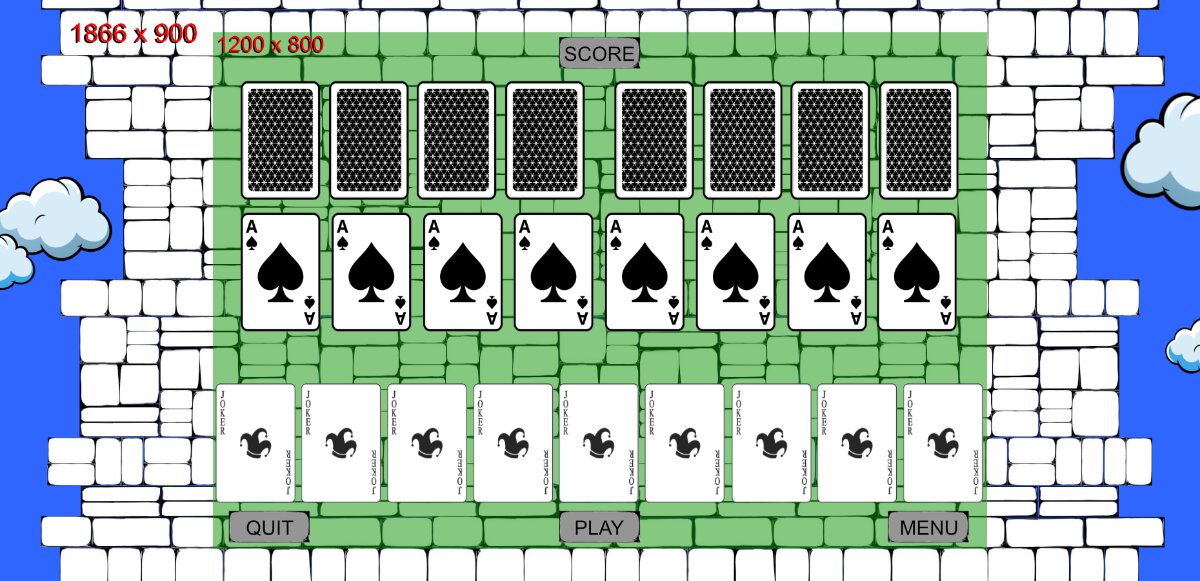
Again, the sample graphics that I have used for this post
are nothing like the game board I have designed for my actual game.
Mystique, baby!
“Oh, behave, baby.”
Austin Powers
Nor do these cards look anything AT ALL like the cards in my game,
nor is the number of cards or placement accuratly depicted here.
This was just used to give you an idea of the overall game board layout,
and what I am dealing with.
Side note:
Rob had commented how there are basically two types of ‘game’ design.
- A design where the spacing ‘between’ objects must be fixed and identical across varying device screens.
- A design where the spacing ‘between’ objects may spread out and vary across varying device screens.
One of the examples Rob used to describe these options was that of a ‘standard’ card game.
Specifically, how the cards follow design plan number 2 above.
Namely, that the cards vary in distance between them,
depending on available screen real-estate space.
When I first read Rob’s description, I freaked out (momentarily for months)
as I had decided (before reading that) that I was going to ‘lock’ my cards
to very specific screen locations.
Admittedly, I did this out of shear ignorance,
because I DID NOT want to place my cards around the screen relative to screen edges,
as I was intimidated by the:
SCARY-VARIABLES for positioning UI elements relative screen edges.
-- NIGHTMARE VARIABLES FOR THE NEWBIE!
display.actualContentHeight
display.actualContentWidth
display.contentCenterX
display.contentCenterY
display.contentHeight
display.safeActualContentWidth
display.safeActualContentHeight
display.safeScreenOriginX
display.safeScreenOriginY
display.screenOriginX
display.screenOriginY
display.viewableContentHeight
display.viewableContentWidth
And as a newbie, only knowing how my game appeared in the solar2D simulator,
and NOT how it WILL appear on varying and unpredictable actual devices out there,
I was freaking out, because I thought I was already starting out
on the wrong foot to begin with.
I know now that a card game does not HAVE to be coded to act like a standard card game,
(where spacing DOES vary between them).
And, that I as the developer, I have 100 percent creative control over my game’s destiny,
and can have my cards forced to specific game board locations.
And now that I know about the SAFE Content Area defined in config.lua,
and, how to safely play in that 'sandbox, I’m good to go!
Once I finally figure out the size of my (crisp-yet-cringe-worthy) background SVG!
So, looking at the game board above,
the reasoning behind locking my cards
to specific game board locations,
will not be apparent with this example game board.
As it just looks like these cards could very well be spaced at varying distances,
as well as be dragged anywhere the player chooses over those castle blocks.
But, my graphic design/gameplay utterly DEPENDS
on the cards being locked to explicit, specific (x,y)'s.
And, what is also not apparent,
is that, I do not use the traditional finger swipe
or finger dragging to manipulate the cards.
Instead, simple single/double taps are all that I use for my entire game,
unlike many card games out there that drag or swipe cards around.
One issue that I can not foresee
is the fact that I do not know how ‘memory-friendly’
my code will be to create ALL of the blocks at runtime,
and that must exist in RAM during game play.
Since I do not have a computer science degree,
my understanding of efficient code and RAM-gobblling-code
is another fog-of-war area for me.
“School! Hee, hee! I didn’t need school.”
J.P.
With that in mind, I have created,
what I can honestly only describe as a “verbose” gameBoard.lua MOD.
Seasoned programmers could certainly write more concise code.
But I’m stuck with bloated, verbatim code,
as many newbies probably and unwittingly are when they first begin coding.
Perhaps mine is not as bad as all that?
Let’s find out.
This gameBoard.lua MOD stores specific variables for every (x,y) gameBoard card location,
as well, it is used for storing the HEAPING PILE of variables for all the display.newImageRect(s)
called to create and store EACH castle block.
Note: Currently, there are 279 display.newImageRect() function calls
needed to build my castle wall/game board!
279 castle blocks in total …per game level.
You would think that 279 not being 280 does not sit well in my mind.
You would be right! And I will change that to 280 soon enough.
Skies the limit, right?
RAM-wise?
Also note: gameBoard.lua is required() in the gameLevel.lua composer scene
-- gameLevel.lua

local composer   = require( 'composer')
local scene      = composer.newScene()
local gameBoard  = require('gameBoard')
local blockGroup -- display group populated below

-- While I am here, I honestly do not know
-- if I should declare 'local blockGroup' at the top of my .lua file
-- or instead, in the create() function along with the local background

-- For some reason it feels like it belongs up here.
-- It may not even matter.


function scene:create( event )
	local sceneGroup = self.view

    -- SVG! Raster-man no likie!
	local background = display.newRect( centerX, centerY, 1866, 900 )
	-- Color the background sky-blue, perhaps a gradient?
    -- Yeah! Man! iree! iree!

    -- sky-blue
    local paint = {0.52941176470588, 0.8078431372549, 0.92156862745098}
	background.fill = paint

	sceneGroup:insert( background )
    background.x = centerX
    background.y = centerY

	blockGroup = display.newGroup() -- Holds all castle blocks for game board
	sceneGroup:insert( blockGroup ) -- Layered above SVG background

	gameBoard.makeBoard( blockGroup ) -- Called to build castle wall/game board at runtime
end

return gameLevel
The VERBOSE, MONSTER MOD
-- gameBoard.lua
-- Not a scene as is gameLevel.lua


local centerX = display.contentCenterX -- = 600 (Half of 1200)
local centerY = display.contentCenterY -- = 400 (Half of 800)

local imageSheetData = require('imageSheetData')

-- Function inside imageSheetData.lua
local imageOptions   = imageSheetData.getSpriteSheetData()

-- Currently a 512x512.png
local imageSheet     = graphics.newImageSheet('images/imageSheet.png', imageOptions)


gameBoard = {}


--[[
There are 102 separate gameboard.vars for storing specific (x,y) screen locations.
As well as 'hard coded' screen locations for BUTTONS, SCORE and UI elements.

Note: After, reading Rob's Content Scaling post,
and creating my own "Rosetta Stone to Content Scaling" post,
I have gained confidence that I can now place these UI elements relative to screen edges.
But for now, I will show them as they are now.
As this was done prior to seeing that light!


ex. There are 51 game board positions for cards to occupy at any given time.
(51 x 2 = 102 seperate x's and y's)

This number has NOTHING to do with the number of cards in my game.
and is 100 percent coincidental that it nearly matches the number of cards in the age-old-game,
'52 card pick-up'!
--]]


-- Three card position examples:

-- Card deck is at center (not depicted in the image)
gameboard.deckX = centerX
gameboard.deckY = centerY

-- Just below the deck position and slightly to the left of the game screen.
gameboard.hand1X = centerX-200
gameboard.hand1Y = centerY+145

-- Some place other than the deck.
-- Note: The deck is completely empty when cards are dealt.
gameboard.draw1X = centerX-360
gameboard.draw1Y = centerY-245

-- SCORE Text positioned near the top, but,
-- 'hard coded' just inside of my content area of 'height' 800pt
gameboard.scoreX = centerX
gameboard.scoreY = centerY - 370
-- Again, later I plan on positioning this SCORE relative to the 'unpredictable' top screen edge,
-- and not relative to the content center.


-- BUILD THE GAME BOARD

-- There are currently 279 variables for all 279 castle blocks
-- ex. For Row 1 Block 1

-- Declare and initialize with a valid value,
-- will store a newImageRect() shortly below.
gameBoard.row1Block1 = 0


-- Function to build the gameBoard at runtime
-- The calling function passes sub-display group to gameBoard.lua for access
gameBoard.makeBoard = function( blockgroup )

	local blockGroup = blockgroup

	-- Sample code for creating 'ONE' castle wall block.
	gameBoard.row1Block1   = display.newImageRect(imageSheet,3,116,48)

	-- The following block is in the upper left of my gameboard and,
	-- is beyond the safe zone of my content area, aka "filler zone"
	-- This particular block is only visible on tall phones, ex. iPhoneX-ish.

    gameBoard.row1Block1.x = centerX-812
    gameBoard.row1Block1.y = centerY-449

	blockGroup:insert( gameBoard.row1Block1 )

	-- The code for the 278 remaining display.newImageRect() calls
	-- ie. to build the rest of my Grand Castle Wall.
	-- Behold its Grandness! Huzzah!

	-- ex.
	-- gameBoard.row2Block2   -- repeat code above
	-- thru
	-- gameBoard.row10Block26 -- repeat code above
	-- etc. for all 279 castle blocks
	-- Soon to be 280 blocks! ('You still here?' ...Ferris Beullar)

end -- makeBoard()

return gameBoard
In conclusion, gameboard.lua contains approx. 2,475 LINES of code!;
needed to code/construct the game-board’s 279 newImageRect() gameBoard.vars.
as well as, to store all game board positions, (102 gameBoard.vars).
For a total of 381 variables in gameboard.lua!
– Hence. VERBOSE MONTER MOD
Note: This image sheet is currently 512x512
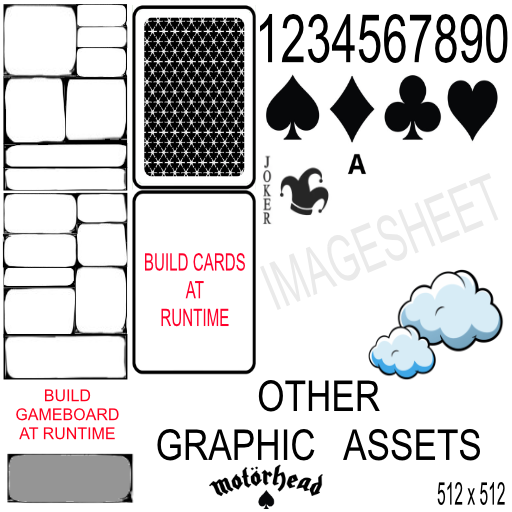
@Kan98
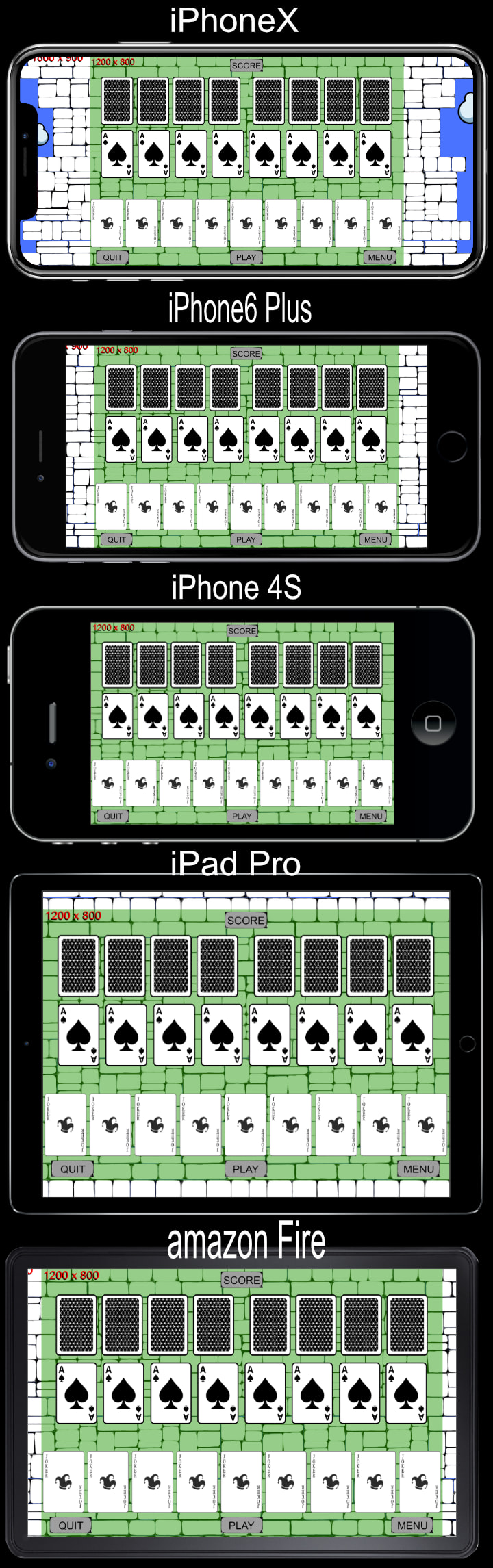
As seen in the ‘devices’ image further below,
(not in the image sheet just above)
I find that my background/game board,
on the taller iPhone X, for example, is accepatable;
even though there is no game interactivity
in those outer fringes of my game world. – BEHOLD!
The green area (as per usual) depicts my 1200 x 800 safe content area
ie. guaranteed to display on all devices as defined in config.lua
To the left and right of the castle tower
(approaching the edges of even the tallest of screen sizes),
the player can see vertical slices of blue sky.
The perfect place for perhaps a passing cloud.transition.to()?
Eye candy anyone?
“I - am - a - geeniuus”
J.P.

Note: During gameplay, the top and bottom of the castle tower is not visible;
and the player has no idea how tall the castle tower is,
nor how far they are from the earth’s surface.
In my game world, the Earth is not flat, not round,
but, like our Earth, is spherical!
ie. aside from the North/South-poles being squished,
and its equator bloated, due to centrifugal forces,
and the malleable nature of our "solid" Earth,
Mother Earth be a blue beach ball .

return "But, I digress! :)"
“It’s bouncing around the web like a beach ball at a Nickleback concert.”*
Douglas Bubble-Trousers from the movie, Hot Rod
When the player has won,
they are transported to the top of the Towering Castle Wall,
to behold its great height and Rastered beauty!
When they lose?
To the castle dungeon with ya!
Behold the dank-damp-darkness!
– Similar to the gameBoard.lua, but builds (at runtime) the penthouse suite
castleTowerTop.lua
– Similar to the gameBoard.lua, but builds (at runtime) the dungeon ‘suite’
castleDungeon.lua
On Tablets and iPad, and even on shorter phones,
expectedly, the ‘field of view’ is narrow, such that,
you see only castle wall blocks from screen edge left
all the way to screen edge right.
ie. There is NO blue sky at these game screen edges.
There are also blocks from screen top
all the way down to screen bottom.
That is, a grid of Castle Wall blocks.
“Wall to wall” and “Ceiling to ceiling”, so to speak.
Screen left edge to screen right edge, top to bottom.
Castle Wall Blocks …BEHOLD!
So, on a tablet or shorter phone,
the player will have no idea where the castle wall ends;
nor, that there is a beautiful sky
just out of reach of the human eye
to either the left or right Castle Tower sides.
Now, on the iPhone X, and similar tall-ish devices,
the player’s ‘field of view’ opens up and vertical slices of sky
(left and right) are now visible during game play.
What a difference!
The claustrophobic may breath a sigh of relief.
Again, these are just very narrow,
vertical slices of blue sky to the far left and far right
of the screen/stage where a cloud could pass by in short order.
To me, it seems unfair that tablet/iPad and short-phone users
don’t get to see the beautiful sky outside at either side of the Towering Castle;
but, I am guessing that’s the least of a developer’s concerns
when it comes to pleasing and entertaining the player,
and app-store quality control.
For this post, my main concern was the ‘trade-off’ between saving ‘texture memory’,
(by not having background.png(s) at runtime),
as well as not having them in my ‘bloated’ build package files;
BUT, at the expence of the ‘verbose code-infested RAM’, that is,
due to the creation and variable storage of 279 newImageRect(s).
ie. 16 rastered images.
Also, Kan98, I am concerned as to how well my ‘full screen’ game board,
ie. (super tall phones mostly) passes the smell test at app-store quality control.
Again, I have finally realized how I can position
my BUTTONS and SCORES relative to screen edges,
as opposed to the center.
Meaning, I can reposition them differently than I have here.
That is, they are ‘hard-coded’ so that they are safely in my content area,
and are not positioned relative to the screen edges.
At the time of this writing, I have positioned E V E R Y T H I N G
relative to the center of my game board content;
which worked superbly for the game design plan I had
of NOT allowing my cards to spread out
depending the available screen space available.
QUESTIONS:
- Do you foresee a RAM issue with all of the newImageRect() calls
and 279 variables needed to store those rects,
(gameboard.var1 – of gameboard.var279)
as opposed to just using a single background.png image for my game board/background?
Of course, if I do NOT build my game board at runtime, then,
I will need at least three to five background.pngs.
One for the winning screen, behold!
One for the losing screen, behold!
And two to three for varying gamelevel designs, behold!
Of course, only one background will need to be loaded into memory at any given time,
brief as that may be.
-
Is my game board design a fortunate/lucky design, in that,
it allows me to “FILL” the outer left/right fringes of my game
with ‘eye candy clouds’ to at least make my game ‘full screen’
when it comes to the ‘tallest’ of aspect ratios? -
Should I declare the ‘local blockGroup’ (sub-display group) at the top of my .lua file
or instead, declare and initialize it in the create() function along with the local background?
Perhaps, it does not matter?
After all these details are ironed out,
I need to deal with imageSuffix(es).
Another fog-of-war issue for me.
Though not pitch black fog!
Then, I will be able to hide away for the next year,
and recode my game from the ‘prototype’ that I coded ten years ago!
ROBOT VOICE: “You’ll never finish. This game is falling apart.”
HUMAN VOICE: “No, it’s not. Shut up!”
ROBOT VOICE: “You’re letting everyone down.”
HUMAN VOICE: “No, i’m not! I’m going to make this game,
and it’s going to be the best thing that anyone has ever seen.”
J.P. From the movie, Grandma’s Boy
I want to thank you for your precious, fleeting time.
I wish that I could make these initial posts less ‘verbose’ ( I love that word! ).
But, I find it helps me to walk you/me through this ‘verbatim’ ‘verbiage’ ( two more v-words I love)
in order to make clear my intentions AND current understanding/misunderstandings of said issues.
“V, is for the VERY, extra-ordinary”
Frank Sinatra
It says a lot about you, the reader,
to have made it this far.
And, you must know how grateful I am
that you at least ‘half-care’ to have done so.
My ambitions and abilities (lack there-of as a coder) aside,
it will take helpful, selfless, people
like perhaps yourself, to partially and intermittently
assist me in completing my first game.
Though, fret not,
I do not expect anyone to hold my hand during this long process ahead of me.
And, like I say, once I get back to re-coding my game,
ie. after ironing out these initial graphical/build ‘obstAcles’ – foreshadowing
I will be less likely to post as often (and at such length),
as I have of recent, and, will be posting/asking shorter coding questions that I may have in the future.
Though, I seemed to have been able to learn that on my own;
excluding learning how to use the sort() function for my high scores!
Thanks, starCrunch!
Thanks again to all you ‘rockstars’ of the mobile game industry.
And more importantly…
THANK YOU, SOLAR 2D!
Sorry, I didn’t mean to YELL that!
I’m just EXCITED.
Gilby
“But first you must travel a long and difficult road.
A road fraught with peril…
but fear not the obstacles in your path,
for fate has vouchsafed your reward.
Though the road may wind, yea your hearts grow weary.
But still shall ye follow them. Even unto your salvation.”
From the movie, Oh Brother Where Art Thou.
ROBOT VOICE:
“Adios, turd nuggets”
J.P.
