Hey Guys,
Is there an API to control the camera view of the scene?
For example I want to zoom the “camera view” like this
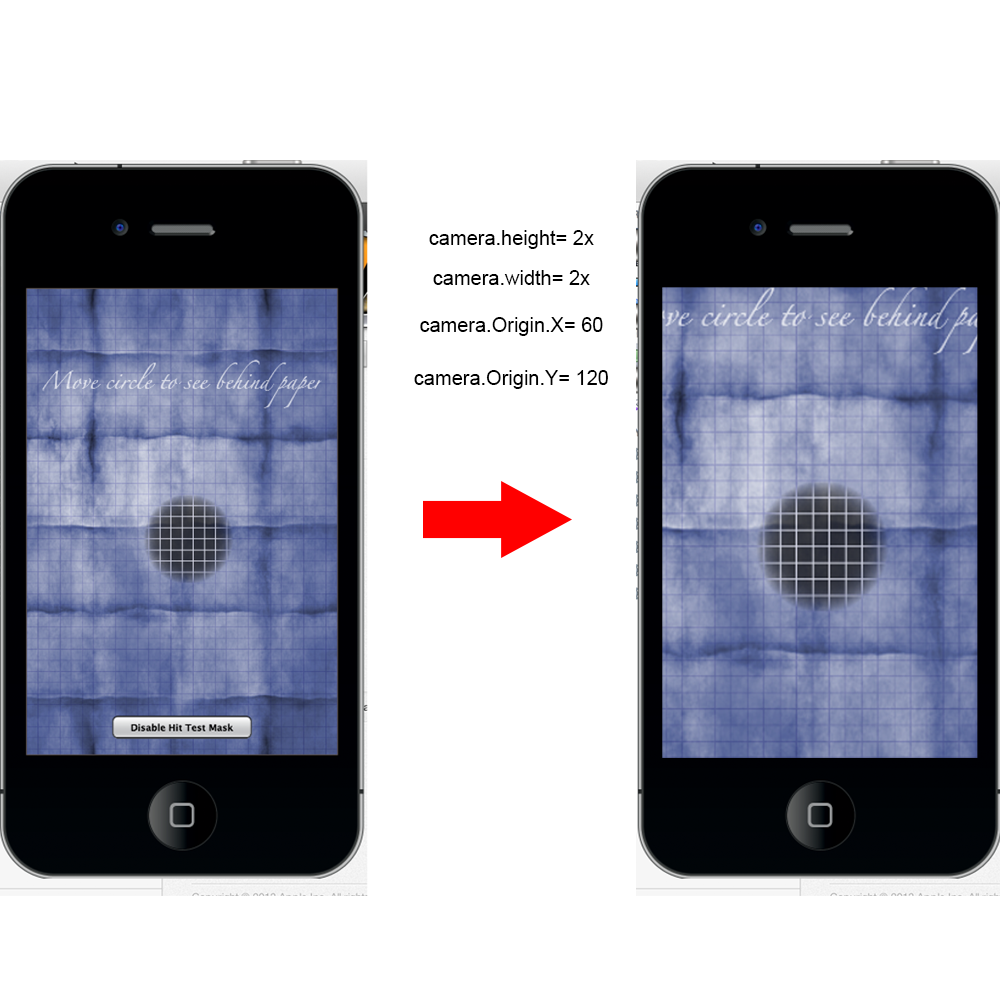
What is the best way to achieve this?
Roy.

Hey Guys,
Is there an API to control the camera view of the scene?
For example I want to zoom the “camera view” like this
What is the best way to achieve this?
Roy.
The (0,0) point of the display group is typically at the top left of the screen, so you would scale up the group using .xScale and .yScale and then shift the group up and left. The amount you shift would be relative to the amount you scale by, so scaling by 2 would require subtracting 1/2 of 1/2 the screen with and height from the x,y values of the group, like this:
local scaleAtX, scaleAtY = display.contentCenterX, display.contentCenterY local scaleBy = 2 grp.xScale, grp.yScale = grp.xScale\*scaleBy, grp.yScale\*scaleBy grp.x, grp.y = grp.x-(scaleAtX/scaleBy), grp.y-(scaleAtY/scaleBy)
I’ve not tested that, but off the top of my head I think that is generally the logic.
The (0,0) point of the display group is typically at the top left of the screen, so you would scale up the group using .xScale and .yScale and then shift the group up and left. The amount you shift would be relative to the amount you scale by, so scaling by 2 would require subtracting 1/2 of 1/2 the screen with and height from the x,y values of the group, like this:
local scaleAtX, scaleAtY = display.contentCenterX, display.contentCenterY local scaleBy = 2 grp.xScale, grp.yScale = grp.xScale\*scaleBy, grp.yScale\*scaleBy grp.x, grp.y = grp.x-(scaleAtX/scaleBy), grp.y-(scaleAtY/scaleBy)
I’ve not tested that, but off the top of my head I think that is generally the logic.