Keeping highscore?

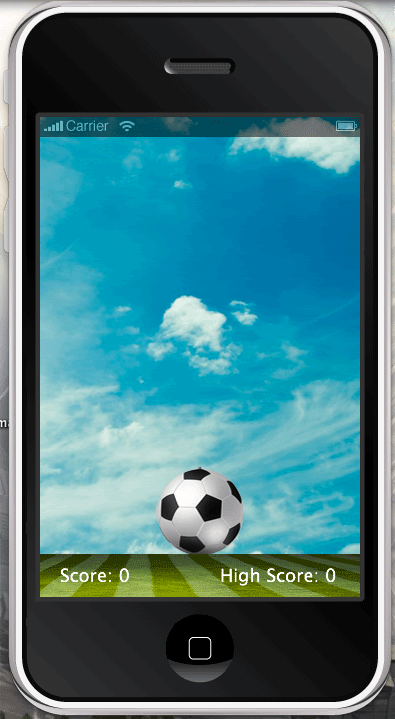
So I have a game where the idea is to juggle a soccer ball. For every time you keep the ball from hitting the ground you get 1 point. Here’s the code I have for the scoring so far:

local scoreTextfield = display.newText( "Score: " .. score, 20, 445, nil, 18)  
scoreTextfield:setTextColor(255,255,255)  
  
local function kick\_ball(e)  
 score = score + 1  
 scoreTextfield.text = "Score: " .. score  
 ball:applyLinearImpulse(0, -2, ball.x, ball.y)  
 if(score == 50) then  
 media.playSound( "Crowdcheer.mp3", true )  
end  
end  

I’m still a bit confused on how to display a highscore that will stay saved even if the application is exited.
Also I’m trying to have the ball move randomly when you click it and seem to be having trouble with that also. Right now I use:

 ball:applyLinearImpulse(0, -2, ball.x, ball.y)  

I’ve tried

 ball:applyLinearImpulse(math.random, ball.x, ball.y)  

however when I do that the ball always shoots down at the ground instead of up in the air. I’ve also tried:

 ball:applyLinearImpulse(math.random, -2, ball.x, ball.y)  

and get the same result as the (0, -2, ball.x, ball.y) code.

Any help would be greatly appreciated.
[import]uid: 72845 topic_id: 11899 reply_id: 311899[/import]

as for the local highscore, you can save any data to a text file… here’s a snippet I took from somewhere on this site:

-- LOCAL HIGHSCORE  
local filePath = system.pathForFile( "score.txt", system.DocumentsDirectory )  
  
-- io.open opens a file at filePath. returns nil if no file found  
--  
local file = io.open( filePath, "r" )  
local highestScore = 0  
  
if file then  
 -- read all contents of file into a string  
 highestScore = file:read( "\*n" )  
 print( "Contents of " .. filePath )  
 print( highestScore )  
  
  
 highestScoreText.text = "BEST SCORE: "..highestScore  
  
 io.close( file )  
  
else  
 print( "Creating file..." )  
  
 -- create file b/c it doesn't exist yet  
 file = io.open( filePath, "w" )  
  
 file:write( 0 )  
 io.close( file )  
  
end   
  
local function saveNewHighscore ()  
  
 if theScore \> highestScore then  
 file = io.open( filePath, "w+" )  
 file:write( theScore )  
 io.close( file )  
 highestScoreText.text = "NEW BEST SCORE: "..theScore  
 else  
 highestScoreText.text = "BEST SCORE: "..highestScore  
 end  
  
end  

[import]uid: 70635 topic_id: 11899 reply_id: 43424[/import]

Thank you so much for your response. I’m still a newbie at this so please bare with me.

This is what I’m looking at:


I’m trying to have the high score displayed on the screen along with the score. Do you have a code example of that by chance?

Thanks for your time [import]uid: 72845 topic_id: 11899 reply_id: 43426[/import]

what’s up with the new generation??? They write what they speak…

Bare means to remove all clothes

whereas what you want to say is bear which means have patience and go though it with me…

now, if you want to go though baring all, sorry mate, you are on own.

cheers,

?:slight_smile: [import]uid: 3826 topic_id: 11899 reply_id: 43449[/import]

Usually when someone takes the time to be a grammar nazi they would make sure the sentence they wrote was flawless. Though* in your generation long winded douchebaggery is deemed acceptable. Thanks for your help.

Cheers [import]uid: 72845 topic_id: 11899 reply_id: 43500[/import]

Note to self : Do not feed the trolls…

?:slight_smile: [import]uid: 3826 topic_id: 11899 reply_id: 43505[/import]

grammar nazis and trolls UNITE!

.
.

“Do you have a code example of that by chance?”

I gave you everything you need.
for example take a look at line 39 of my snippet above.

it says:

highestScoreText.text = "NEW BEST SCORE: "..theScore  

this is how you change the content of a text field.

—> http://developer.anscamobile.com/content/display-objects#Text [import]uid: 70635 topic_id: 11899 reply_id: 43516[/import]

I’m sorry but I’m a complete noob at this, could you show me how to incorporate that into my current code please?

local physics = require("physics")  
physics.start()  
physics.setGravity(0,16)  


score = 0  
local background = display.newImage("soccersky.png")  
   
local ball = display.newImage("soccerball.png")  
ball.x = display.contentWidth/2   
physics.addBody(ball, {bounce = 0.3, friction = .1, radius = 43} )  
ball.name = "ball"  
   
local floor = display.newImage("soccerfield.png")  
floor.x = 100; floor.y = display.contentHeight  
physics.addBody(floor, "static", {density=3,friction=3,bounce=0})  
floor.name = "floor"  
   
local scoreTextfield = display.newText( "Score: " .. score, 20, 445, nil, 18)  
scoreTextfield:setTextColor(255,255,255)  


ballFell = false  
   
local function onCollision(e)  
 if(e.phase == "ended") then  
 print("!")  
 elseif(e.other.name == "floor") then  
 if(score \> 0) then  
 score = 0  
 scoreTextfield.text = "Score: " .. score  
 end  
end  
end  


local floor = display.newRect(320, 0, 1, 480)  
local lWall = display.newRect(0, 480, 320, 1)  
local rWall = display.newRect(0, -1, 320, 1)  
local ceiling = display.newRect(-1, 0, 1, 480)  
  
staticMaterial = {density=2, friction=.3, bounce=.4}  
physics.addBody(floor, "static", staticMaterial)  
physics.addBody(lWall, "static", staticMaterial)  
physics.addBody(rWall, "static", staticMaterial)  
physics.addBody(ceiling, "static", staticMaterial)  
   
local function kick\_ball(e)  
 score = score + 1  
 scoreTextfield.text = "Score: " .. score  
 ball:applyLinearImpulse(1, -2, ball.x, ball.y)  
 if(score == 50) then  
 media.playSound( "Crowdcheer.mp3", true )  
end  
end  
  
   
ball:addEventListener("collision", onCollision)  
ball:addEventListener("touch", kick\_ball)  

I’ll send you cookies and cakes : D [import]uid: 72845 topic_id: 11899 reply_id: 43562[/import]

okay. I do everything for cookies and cakes… :wink:
well… not everything… but I’ll help you with this one.

first, add the highestScore textfield to the stage

local highestScore = 0  
-- show highest score in text field  
local highestScoreTextfield = display.newText( "Best: " .. highestScore, 200, 445, nil, 18)   
highestScoreTextfield:setTextColor(255,255,255)  

now just copy and paste my snippet into your project
and call the save-function when the ball hits the ground:

local function onCollision(e)  
 if(e.phase == "ended") then  
 print("!")  
 elseif(e.other.name == "floor") then  
 if(score \> 0) then  
  
 saveNewHighscore () -- save score if new best  
  
 score = 0  
 scoreTextfield.text = "Score: " .. score  
 end  
end  
end  

you also have to change the names of the textfields to the names you use in your project. (theScore -> score etc)

If you still need help, cookies and cake wouldn’t do.
Next time I want bottle and bird (^_^)

cheers
-finefin [import]uid: 70635 topic_id: 11899 reply_id: 43603[/import]

I’m still confused on what to do : (

I don’t understand the “Call the save function” part.
[import]uid: 72845 topic_id: 11899 reply_id: 43729[/import]

@fakemode,
I do not know how much programming you have done, but… let’s try this without you being a foul mouth…

you need a variable to hold the highScore and the score, so

[lua]local highScore = 0
local score = 0[/lua]

and everytime in your app there is something that updates the score,
you check

[lua]if score > highScore then
highScore = score
end[/lua]

Now, you also want the score to persist, so you have to store that somewhere so that it is available to you the next time you run the app.

so the above code will change to

[lua]if score > highScore then
highScore = score
saveToFile(highScore)
end[/lua]

the saveToFile is a function defined in your code that will save the data to a file on the device and can be defined as

[lua]local saveToFile(theScore)
filePath = system.pathForFile( “score.txt”, system.DocumentsDirectory )

file = io.open( filePath, “w+” )
file:write( theScore )
io.close( file )
end[/lua]

All of this is fine but when you start your app after saving a highScore, it needs to read the previously saved highScore or it will not work as you expect it to.

so
[lua]local loadHighScore()
filePath = system.pathForFile( “score.txt”, system.DocumentsDirectory )

file = io.open( filePath, “r” )
if file then
theScore = file:read( “*a” )
else
theScore = 0
end
io.close( file )

return theScore
end[/lua]

I hope that this can help you

cheers,

?:slight_smile: [import]uid: 3826 topic_id: 11899 reply_id: 43738[/import]

Thank you very much for the break down. I’ve checked and re checked my code and can’t figure out why after I added the new code I still get a blank screen. Did I add this correctly?

  
local physics = require("physics")  
physics.start()  
physics.setGravity(0,16)  
   
  
 score = 0  


local background = display.newImage("soccersky.png")  
   
local ball = display.newImage("soccerball.png")  
ball.x = display.contentWidth/2   
physics.addBody(ball, {bounce = 0.3, friction = .1, radius = 43} )  
ball.name = "ball"  
   
local floor = display.newImage("soccerfield.png")  
floor.x = 100; floor.y = display.contentHeight  
physics.addBody(floor, "static", {density=3,friction=3,bounce=0})  
floor.name = "floor"  
   
local scoreTextfield = display.newText( "Score: " .. score, 20, 445, nil, 18)  
scoreTextfield:setTextColor(255,255,255)  


ballFell = false  


 local score = 0  
local function onCollision(e)  
 if(e.phase == "ended") then  
 print("!")  
 elseif(e.other.name == "floor") then  
 if(score \> 0) then  
 score = 0  
 scoreTextfield.text = "Score: " .. score  
 end  
end  
end  
  
  
 local highestScore = 0  
local highestScoreTextfield = display.newText( "High Score: " .. highestScore, 180, 445, nil, 18)   
highestScoreTextfield:setTextColor(255,255,255)  
-- High Score  
local score = 0  
if score \> highScore then  
 highScore = score  
end  
local saveToFile(theScore)  
 filePath = system.pathForFile( "score.txt", system.DocumentsDirectory )  
   
 file = io.open( filePath, "w+" )  
 file:write( theScore )  
 io.close( file )  
end  
local loadHighScore()  
 filePath = system.pathForFile( "score.txt", system.DocumentsDirectory )  
   
 file = io.open( filePath, "r" )  
 if file then  
 theScore = file:read( "\*a" )  
 else  
 theScore = 0  
 end  
 io.close( file )   
   
 return theScore  
end  
--End high score  
  
   
local floor = display.newRect(320, 0, 1, 480)  
local lWall = display.newRect(0, 480, 320, 1)  
local rWall = display.newRect(0, -1, 320, 1)  
local ceiling = display.newRect(-1, 0, 1, 480)  
  
staticMaterial = {density=2, friction=.3, bounce=.4}  
physics.addBody(floor, "static", staticMaterial)  
physics.addBody(lWall, "static", staticMaterial)  
physics.addBody(rWall, "static", staticMaterial)  
physics.addBody(ceiling, "static", staticMaterial)  
   
local function kick\_ball(e)  
 score = score + 1  
 scoreTextfield.text = "Score: " .. score  
 ball:applyLinearImpulse(-1, -2, ball.x, ball.y)  
 if(score == 50) then  
 media.playSound( "Crowdcheer.mp3", true )  
end  
end  
  
   
ball:addEventListener("collision", onCollision)  
ball:addEventListener("touch", kick\_ball)  

Again thanks, I’ve been trying to figure this stuff out for days now. [import]uid: 72845 topic_id: 11899 reply_id: 43793[/import]

@fakemode,
the key here is consistency…

  1. if you call your variable highScore, then you cannot use highestScore

  2. The functions saveToFile and LoadHighScore do not call themselves

  3. I am a bit confused if this is what you want to do
    [lua] if(score > 0) then
    score = 0
    scoreTextfield.text = "Score: " … score
    end[/lua]
    what you are saying here is that *IF* the score is greater then zero, then make the score ZERO!! and show the score (which is now just made zero)

I guess you need to spend a little time on reading how conditions work and a little on variables, it will do you good in the long term.

cheers,

?:slight_smile: [import]uid: 3826 topic_id: 11899 reply_id: 43813[/import]

In the function loadHighScore(), the line:
theScore = file:read("*a")
turns theScore into a string, so how do you fix it? [import]uid: 8335 topic_id: 11899 reply_id: 46875[/import]

the file:read converts everything to a string, so convert it back to a number using the function tonumber()

theScore = tonumber(theScore)

cheers,

?:slight_smile: [import]uid: 3826 topic_id: 11899 reply_id: 46891[/import]