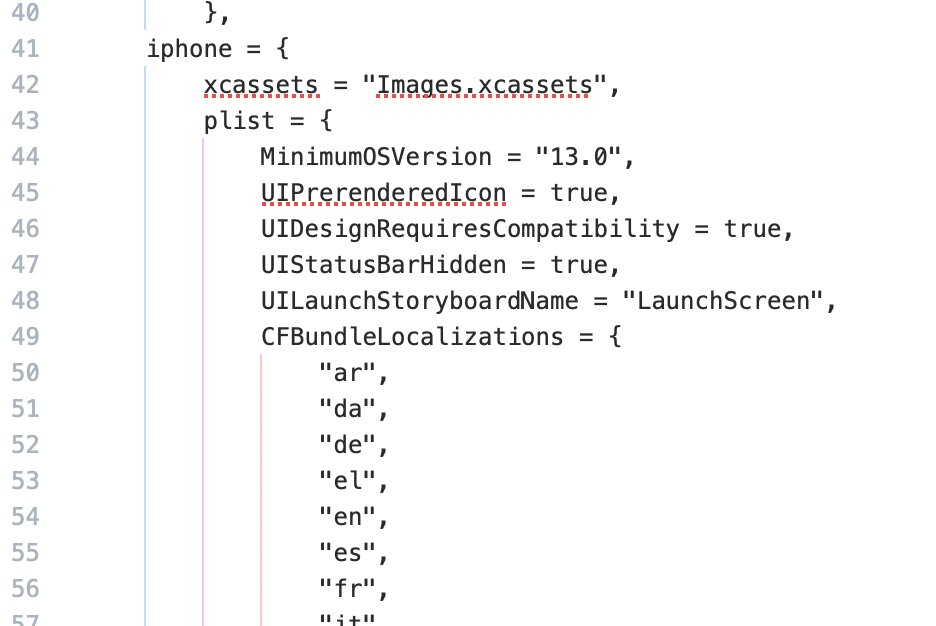
Here are the build.settings setup for my game Maze of Thorns:
the indenting didn’t come over but hopefully you get the idea.
Hope this helps!
Joe
settings = {
orientation = {
default = “landscapeRight”,
supported = { “landscapeLeft”, “landscapeRight”}
},
plugins =
{
[“plugin.steamworks”] =
{
publisherId = “com.coronalabs”,
supportedPlatforms = { macos = true, win32 = true, [“mac-sim”] = true, [“win32-sim”] = true },
},
[“plugin.gpgs.v3”] =
{
publisherId = “com.solar2d”,
supportedPlatforms = { android = true },
},
[“plugin.movie”] = {
– Fire Maple Movie Player: resolved from the local package at
– Solar2DPlugins/com.firemaplegames/plugin.movie//data.tgz
publisherId = “com.firemaplegames”,
supportedPlatforms = {
iphone = true, android = true, macos = true, win32 = true,
[“iphone-sim”] = true, [“mac-sim”] = true, [“win32-sim”] = true,
},
},
},
– The original movie remains in mobile/desktop builds. Apple TV uses sheets.
excludeFiles = {
all = { “Defold” },
tvos = { “funicular5.ogg” },
ios = { “tvos_assets” },
android = { “tvos_assets” },
macos = { “tvos_assets” },
win32 = { “tvos_assets” },
},
splashScreen =
{
enable = false
},
iphone = {
xcassets = “Images.xcassets”,
plist = {
MinimumOSVersion = “13.0”,
UIPrerenderedIcon = true,
UIDesignRequiresCompatibility = true,
UIStatusBarHidden = true,
UILaunchStoryboardName = “LaunchScreen”,
CFBundleLocalizations = {
“ar”,
“da”,
“de”,
“el”,
“en”,
“es”,
“fr”,
“it”,
“ja”,
“ko”,
“nb”,
“nl”,
“pt”,
“ru”,
“sv”,
“tr”,
“zh”,
“he”,
“vi”,
“fa”,
},
– Solar2D’s default iOS template always emits these regardless of usage,
– so they need to be overridden in order to pass Apple’s new automated scan.
– If your app actually does use any of these, set them properly. Don’t duplicate.
NSAppleMusicUsageDescription = “Maze of Thorns does not access your Apple Music library.”,
NSBluetoothPeripheralUsageDescription = “Maze of Thorns does not use Bluetooth.”,
NSCalendarsUsageDescription = “Maze of Thorns does not access your calendar.”,
NSCameraUsageDescription = “Maze of Thorns does not use your camera.”,
NSContactsUsageDescription = “Maze of Thorns does not access your contacts.”,
NSHomeKitUsageDescription = “Maze of Thorns does not use HomeKit.”,
NSLocationAlwaysUsageDescription = “Maze of Thorns does not use your location.”,
NSLocationUsageDescription = “Maze of Thorns does not use your location.”,
NSLocationWhenInUseUsageDescription = “Maze of Thorns does not use your location.”,
NSMicrophoneUsageDescription = “Maze of Thorns does not use the microphone.”,
NSMotionUsageDescription = “Maze of Thorns does not use motion data.”,
NSPhotoLibraryAddUsageDescription = “Maze of Thorns does not access your photo library.”,
NSPhotoLibraryUsageDescription = “Maze of Thorns does not read from your photo library.”,
NSRemindersUsageDescription = “Maze of Thorns does not access reminders.”,
NSSiriUsageDescription = “Maze of Thorns does not integrate with Siri.”,
NSSpeechRecognitionUsageDescription = “Maze of Thorns does not use speech recognition.”,
UILaunchImages = {
{  – iPhone 4 LandscapeLeft
[“UILaunchImageMinimumOSVersion”] = “7.0”,
[“UILaunchImageName”] = “Default”,
[“UILaunchImageOrientation”] = “LandscapeLeft”,
[“UILaunchImageSize”] = “{320, 480}”
},
{  – iPhone 4 LandscapeRight
[“UILaunchImageMinimumOSVersion”] = “7.0”,
[“UILaunchImageName”] = “Default”,
[“UILaunchImageOrientation”] = “LandscapeRight”,
[“UILaunchImageSize”] = “{320, 480}”
},
{  – iPhone 5 LandscapeLeft
[“UILaunchImageMinimumOSVersion”] = “7.0”,
[“UILaunchImageName”] = “Default-568h”,
[“UILaunchImageOrientation”] = “LandscapeLeft”,
[“UILaunchImageSize”] = “{320, 568}”
},
{  – iPhone 5 LandscapeRight
[“UILaunchImageMinimumOSVersion”] = “7.0”,
[“UILaunchImageName”] = “Default-568h”,
[“UILaunchImageOrientation”] = “LandscapeRight”,
[“UILaunchImageSize”] = “{320, 568}”
},
{  – iPad LandscapeLeft
[“UILaunchImageMinimumOSVersion”] = “7.0”,
[“UILaunchImageName”] = “Default-Landscape”,
[“UILaunchImageOrientation”] = “LandscapeLeft”,
[“UILaunchImageSize”] = “{768, 1024}”
},
{  – iPad LandscapeRight
[“UILaunchImageMinimumOSVersion”] = “7.0”,
[“UILaunchImageName”] = “Default-Landscape”,
[“UILaunchImageOrientation”] = “LandscapeRight”,
[“UILaunchImageSize”] = “{768, 1024}”
},
{  – iPhone 6 LandscapeLeft
[“UILaunchImageMinimumOSVersion”] = “8.0”,
[“UILaunchImageName”] = “Default-667h”,
[“UILaunchImageOrientation”] = “LandscapeLeft”,
[“UILaunchImageSize”] = “{375, 667}”
},
{  – iPhone 6 LandscapeRight
[“UILaunchImageMinimumOSVersion”] = “8.0”,
[“UILaunchImageName”] = “Default-667h”,
[“UILaunchImageOrientation”] = “LandscapeRight”,
[“UILaunchImageSize”] = “{375, 667}”
},
{  – iPhone 6 Plus LandscapeLeft
[“UILaunchImageMinimumOSVersion”] = “8.0”,
[“UILaunchImageName”] = “Default-Landscape-736h”,
[“UILaunchImageOrientation”] = “LandscapeLeft”,
[“UILaunchImageSize”] = “{414, 736}”
},
{  – iPhone 6 Plus LandscapeRight
[“UILaunchImageMinimumOSVersion”] = “8.0”,
[“UILaunchImageName”] = “Default-Landscape-736h”,
[“UILaunchImageOrientation”] = “LandscapeRight”,
[“UILaunchImageSize”] = “{414, 736}”
},
{  – iPad Pro Landscape Right
[“UILaunchImageMinimumOSVersion”] = “9.0”,
[“UILaunchImageName”] = “Default-Landscape-1366”,
[“UILaunchImageOrientation”] = “LandscapeRight”,
[“UILaunchImageSize”] = “{1024, 1366}”
},
{  – iPad Pro Landscape Left
[“UILaunchImageMinimumOSVersion”] = “9.0”,
[“UILaunchImageName”] = “Default-Landscape-1366”,
[“UILaunchImageOrientation”] = “LandscapeLeft”,
[“UILaunchImageSize”] = “{1024, 1366}”
},
},
}
},
android = {
googlePlayGamesAppId = “343304951482”,
minSdkVersion = “21”,
versionCode = 14,
– Android 16 compatibility experiment: preserve the existing
– landscape restrictions on large screens. Device testing required.
applicationChildElements = {
[[]],
},
largeHeap = true,
usesExpansionFile = true,
usesPermissions = {
“android.permission.INTERNET”,
“android.permission.WRITE_EXTERNAL_STORAGE”,
},
usesFeatures = {
{ name=“android.hardware.camera”, required=false },
{ name=“android.hardware.location”, required=false },
{ name=“android.hardware.location.gps”, required=false },
}
},
osx = {
plist = {
NSHumanReadableCopyright = “Copyright © 2026 Fire Maple Games”,
CFBundleIconFile = “Icon-osx.icns”
}
},
window = {

	-- Sets up how the window should be launched on startup; default is "normal".
	-- Supports "normal", "minimized", "maximized", or "fullscreen".
	defaultMode = "fullscreen",

	-- Sets the default launch width and height of the view/client area of the window.
	-- This is the region within the borders of the window that Corona renders to.
	-- Ideally, this should match or exceed your "config.lua" content width and height.
	defaultViewWidth = 1136,
	defaultViewHeight = 726,

	-- Set the following to true to allow the end user to resize the window.
	-- If true, then you may need to handle Corona's "resize" event to re-layout your content.
	-- The window is not resizable by default; you must opt‐in by setting this to true.
	resizable = true,

	-- These settings only apply if "resizable" (above) is set to true.
	-- Prevents the user from resizing the window to a size smaller than these values.
	-- This width and height is the region within the borders of the window.
	-- The width and height should be set to your "config.lua" file's content width and height.
	-- If settings are not specified, the window can be resized down to whatever the OS allows.
	minViewWidth = 960,
	minViewHeight = 640,

	-- Enables/disables the window's "close" button which is enabled by default.
	-- If disabled, you must close the window in Lua via "native.requestExit()".
	-- Note that Corona does not currently provide an event when the close button is clicked.
	enableCloseButton = true,

	-- Enables/disables the window's minimize button which is enabled by default.
	enableMinimizeButton = true,

	-- Enables/disables the window's maximize button which is disabled by default.
	-- Note that the window will be resized when maximized and restored.
	-- If enabled, you may need to handle Corona's "resize" event to re-layout your content.
	enableMaximizeButton = true,

	-- Sets the window's title bar text to a localized string (no title bar text by default).
	-- Supports 2 letter ISO 639‐1 language codes (not case-sensitive).
	-- Supports optional 2 letter ISO 3166‐1 country codes (not case sensitive).
	-- Language and country codes must be separated by a dash (-).
	titleText = {
		-- The "default" text will be used if the system is using a language and/or
		-- country code not defined below. This serves as a fallback mechanism.
		default = "Maze of Thorns",
		["en"] = "Maze of Thorns"
	}
}

}