
Move all elements up in multidimentional array/table

I want to create a Counter Strike 1.6 style chat system where only 4 recent messages are shown in the screen and everytime a new message arrives the messages move up and the new message is shown in the bottom.
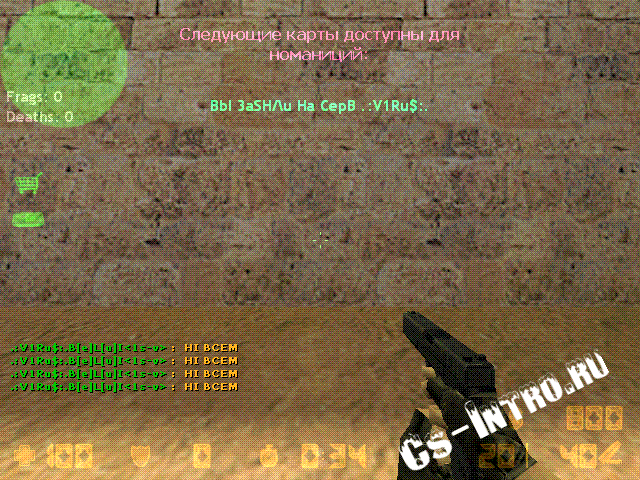
1318874745_admin-chat-color.gif

I can’t find a way to store only 4 messages in a table and when the 5th message arrives move all the elements up 1 position so the first message is removed and the last message is inserted in the end of the table.

so far my code…

local msgs = {}

local number = 1

local message = "message "…number

number = number + 1

local function newMessageEvent(player, msg)


          msgs[player]=msg


          for i, v in pairs(msgs) do 

                 print(i, v) 

          end

          print("--------------------")

end

local button = display.newCircle( 100, 100, 35 )

button:addEventListener ( “tap”, newMessageEvent(“bob”,message)

table.remove() removes the element and shifts all other elements.

http://docs.coronalabs.com/api/library/table/remove.html

but how? the table is non indexed (the keys are player’s name)

Anybody???

It’s not clear from your code why you would want to use keys instead of indexes; even in CS the game would keep track of all messages going back in time some, at which point having a big list of messages makes more sense than player-specific single messages. The whole “move up one” concept is how indexed tables work.

The only way you could avoid using an index table in here somewhere is to guarantee each player has only a single message at any given time, but even that would work better if crossreferenced through an index table.

local allmessages = {} local function newMessageEvent(player, msg) -- Register to the player and message table simultaneously msgs[player] = msg allmessages[#allmessages+1] = msg -- If too many messages, do the dirty work if #allmessages \> 4 then table.remove(allmessages, 1) end end

A bit simple but the idea is that you could use the message table for display but still be able to call the most recent message from the players.

I would agree, that your chat messages should probably be in an indexed table not a keyed table.  

I think you guys are right, my idea of using keys instead of indexes were wrong.

Here is my code which works but not the way i want it…

local allmessages = {}

local textGroup = display.newGroup()

local number = 1

display.newText(textGroup, “”, 50, display.contentHeight-50 , native.systemFont, 30 )

display.newText(textGroup, “”, 50, display.contentHeight-100 , native.systemFont, 30 )

display.newText(textGroup, “”, 50, display.contentHeight-150 , native.systemFont, 30 )

display.newText(textGroup, “”, 50, display.contentHeight-200 , native.systemFont, 30 )

local function newMessageEvent(player, msg)

      allmessages[#allmessages+1] = player…": "…msg

      if #allmessages > 4 then 

        table.remove(allmessages, 1)

      end


      for i=1, #allmessages do

            textGroup[i].text = allmessages[i]

      end

end

local function sendMsg()

newMessageEvent(“milad”, "msg "…number)

number = number + 1

end

local buttonChat = display.newCircle( 300, 50, 35 )

buttonChat.name = “buttonChat”

buttonChat.alpha=0.5

buttonChat:addEventListener( “tap”, sendMsg )

There is 2 problems with the above code…

First: I want the texts to show up in reverse order (the latest messages should show in the bottom)

reverse.png

2nd: I can’t find a way to give different color to playername and message text.

Thanks once again!!!

Well, to solve the order problem you should use table.insert(tablename, index, value) That way you can insert the latest message at the front instead of the back, which should fix your order issues.

To solve the coloring, you should use :setTextColor() in builds prior to 2000+ or :setFillColor() for the latest. But you can’t change the color mid-string. So instead you should just split the name and message into seperate text objects.

ie, if this not 2.0 graphics,

  1. make the display.newText object for the character name

  2. set it to display.BottomRightReferencePoint

  3. make the display.newText object for the character message

  4. set it to display.BottomLeftReferencePoint

  5. set its x/y to the name x/y - they should fit together nicely

table.remove() removes the element and shifts all other elements.

http://docs.coronalabs.com/api/library/table/remove.html

but how? the table is non indexed (the keys are player’s name)

Anybody???

It’s not clear from your code why you would want to use keys instead of indexes; even in CS the game would keep track of all messages going back in time some, at which point having a big list of messages makes more sense than player-specific single messages. The whole “move up one” concept is how indexed tables work.

The only way you could avoid using an index table in here somewhere is to guarantee each player has only a single message at any given time, but even that would work better if crossreferenced through an index table.

local allmessages = {} local function newMessageEvent(player, msg) -- Register to the player and message table simultaneously msgs[player] = msg allmessages[#allmessages+1] = msg -- If too many messages, do the dirty work if #allmessages \> 4 then table.remove(allmessages, 1) end end

A bit simple but the idea is that you could use the message table for display but still be able to call the most recent message from the players.

I would agree, that your chat messages should probably be in an indexed table not a keyed table.  

I think you guys are right, my idea of using keys instead of indexes were wrong.

Here is my code which works but not the way i want it…

local allmessages = {}

local textGroup = display.newGroup()

local number = 1

display.newText(textGroup, “”, 50, display.contentHeight-50 , native.systemFont, 30 )

display.newText(textGroup, “”, 50, display.contentHeight-100 , native.systemFont, 30 )

display.newText(textGroup, “”, 50, display.contentHeight-150 , native.systemFont, 30 )

display.newText(textGroup, “”, 50, display.contentHeight-200 , native.systemFont, 30 )

local function newMessageEvent(player, msg)

      allmessages[#allmessages+1] = player…": "…msg

      if #allmessages > 4 then 

        table.remove(allmessages, 1)

      end


      for i=1, #allmessages do

            textGroup[i].text = allmessages[i]

      end

end

local function sendMsg()

newMessageEvent(“milad”, "msg "…number)

number = number + 1

end

local buttonChat = display.newCircle( 300, 50, 35 )

buttonChat.name = “buttonChat”

buttonChat.alpha=0.5

buttonChat:addEventListener( “tap”, sendMsg )

There is 2 problems with the above code…

First: I want the texts to show up in reverse order (the latest messages should show in the bottom)

reverse.png

2nd: I can’t find a way to give different color to playername and message text.

Thanks once again!!!

Well, to solve the order problem you should use table.insert(tablename, index, value) That way you can insert the latest message at the front instead of the back, which should fix your order issues.

To solve the coloring, you should use :setTextColor() in builds prior to 2000+ or :setFillColor() for the latest. But you can’t change the color mid-string. So instead you should just split the name and message into seperate text objects.

ie, if this not 2.0 graphics,

  1. make the display.newText object for the character name

  2. set it to display.BottomRightReferencePoint

  3. make the display.newText object for the character message

  4. set it to display.BottomLeftReferencePoint

  5. set its x/y to the name x/y - they should fit together nicely