Questions about TextFields and keyboards

Hi everyone!

I’m trying to get a grip on how the textField object actually works. I’m currently using it to record the name of a player when he or she wishes to post a highscore I do however have a couple of questions regarding it.

  1. Is it possible to limit the amount of characters the use can input?
  2. Is it possible to only show the actual keyboard and the textField rather than getting the “fullscreen keyboard + white text box”?

Thanks in advance!

EDIT:

  1. I can’t seem to get the event.phase value in my listener that looks like this

local function test(event) -- printing event returns a table, printing event.phase returns nil if event.phase == "submitted" then native.setKeyboardFocus( nil ) end end

Which is being called by this

local textField = native.newTextField(0, 0, rect.width \* 0.7 , 50 ) textField.userInput = test textField:addEventListener ( "userInput", textField )

[import]uid: 129450 topic_id: 29358 reply_id: 329358[/import]

Hey there, try running this;

[lua]local textField

local function test(event) – printing event returns a table, printing event.phase returns nil
if event.phase == “submitted” then
native.setKeyboardFocus( nil )
elseif event.phase == “editing” then
sLen = string.len(textField.text)
print ("String length: "…sLen)
if sLen >= 5 then
print “Hit letter cap”
textField.text = textField.text:sub(1,5)
end
end
end

textField = native.newTextField(0, 0, 200 , 50 )
textField:addEventListener ( “userInput”, test )[/lua]

1 and 3 are fine but 2 you will need to elaborate on a little further as am unsure of what exactly you are trying to do. [import]uid: 52491 topic_id: 29358 reply_id: 118012[/import]

Thanks Peach!

It worked, you should change the example code for textField and textBox since that’s what made me use textField.userInput = test textField:addEventListener ( "userInput", textField ) which didn’t work.

About 2; I guess I should have been more clear, what meant was that the way I’m using it now half the screen is covered by the keyboard and the other half by a white box where the text is entered. What I would like is for the upper half to consist of my text field being surrounded by the other parts of my game, rather than maximizing the textfield. [import]uid: 129450 topic_id: 29358 reply_id: 118045[/import]

No worries. RE sample code, we’re in the process of updating the docs so I believe that updating sample usage will be a part of that :slight_smile:

RE 2 - the size of the textfield is defined by you, so is there a reason you cannot just make it smaller and position game elements around it?

If it isn’t that simple please try to elaborate further; I’ll do my best to help :slight_smile: [import]uid: 52491 topic_id: 29358 reply_id: 118148[/import]

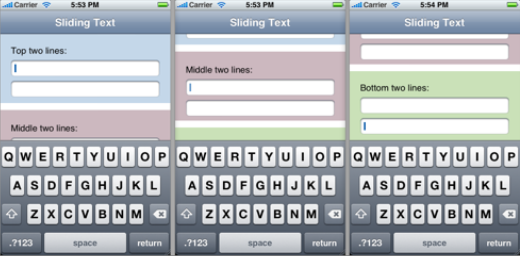
The problem isn’t the text field in it self but rather what happens when it is activated (touched), I would like something like this (the screen doesn’t change other than the keyboard), but instead I get this (the text field seems to be maximized, covering the whole screen) even though before pressing the field in my app it is about the same size as the first picture.

Sorry for not being able to provide better pictures but they were the best I could find. [import]uid: 129450 topic_id: 29358 reply_id: 118156[/import]

Is this on iOS or Android? What version of Corona? I haven’t actually seen a textfield maximize by itself in Corona yet. [import]uid: 52491 topic_id: 29358 reply_id: 118456[/import]

Strange, since it behaves the same on both iOS and android.

I just realized that all my textfields are centered on the y-axis which means that the keyboard would cover them if it didn’t maximize, maybe that’s the problem? Will try it out and get back to you. [import]uid: 129450 topic_id: 29358 reply_id: 118490[/import]

It didn’t work, this is what it looks like on device.

Text field

Selected text field
[import]uid: 129450 topic_id: 29358 reply_id: 118498[/import]

What version of Corona are you using? Could you let me know if this happens with the sample project; CoronaSDK > SampleCode > Interface > NativeKeyboard2 [import]uid: 52491 topic_id: 29358 reply_id: 118640[/import]

I’m using the latest build but it’s been like this for a while (a month or so). The sample project worked like it should, the only obvious difference I could spot between it and my own code was that it didn’t use a separate line for adding an eventlistener so I tried changing that in my code but it didn’t work.

Otherwise the only differences is that I set textField.text, change the referencePoint and sets the position after declaring it, it doesn’t feel like this should matter but I will try to change it next time I get the chance. [import]uid: 129450 topic_id: 29358 reply_id: 118681[/import]

I just tried changing all this but it still maximizes. I then realized that the example you directed me to uses portrait as orientation. I changed it to landscape and then it works the same as in my game so I assume the feature I’m looking for isn’t supported in landscape mode. [import]uid: 129450 topic_id: 29358 reply_id: 121336[/import]

I just tried changing all this but it still maximizes. I then realized that the example you directed me to uses portrait as orientation. I changed it to landscape and then it works the same as in my game so I assume the feature I’m looking for isn’t supported in landscape mode. [import]uid: 129450 topic_id: 29358 reply_id: 121336[/import]