
Hello again… Is it possible to read from a .txt or similar file that is located on a web server? If yes, are there some detailed instructions or documents that shows how to do that?
Okay, I know how to read it
function networkListener(inEvent) if (inEvent.isError) then print("Network error!"); else text = display.newText(inEvent.response, 0, 0, "Trebuchet MS", 12 ) --just prints on device screen like a plain text print(inEvent.response); --just prints in console... end end network.request( "http://xyz.com/cgi-bin/textfile.txt", "GET", networkListener );
But now, how to display it on a device in some table format like this?
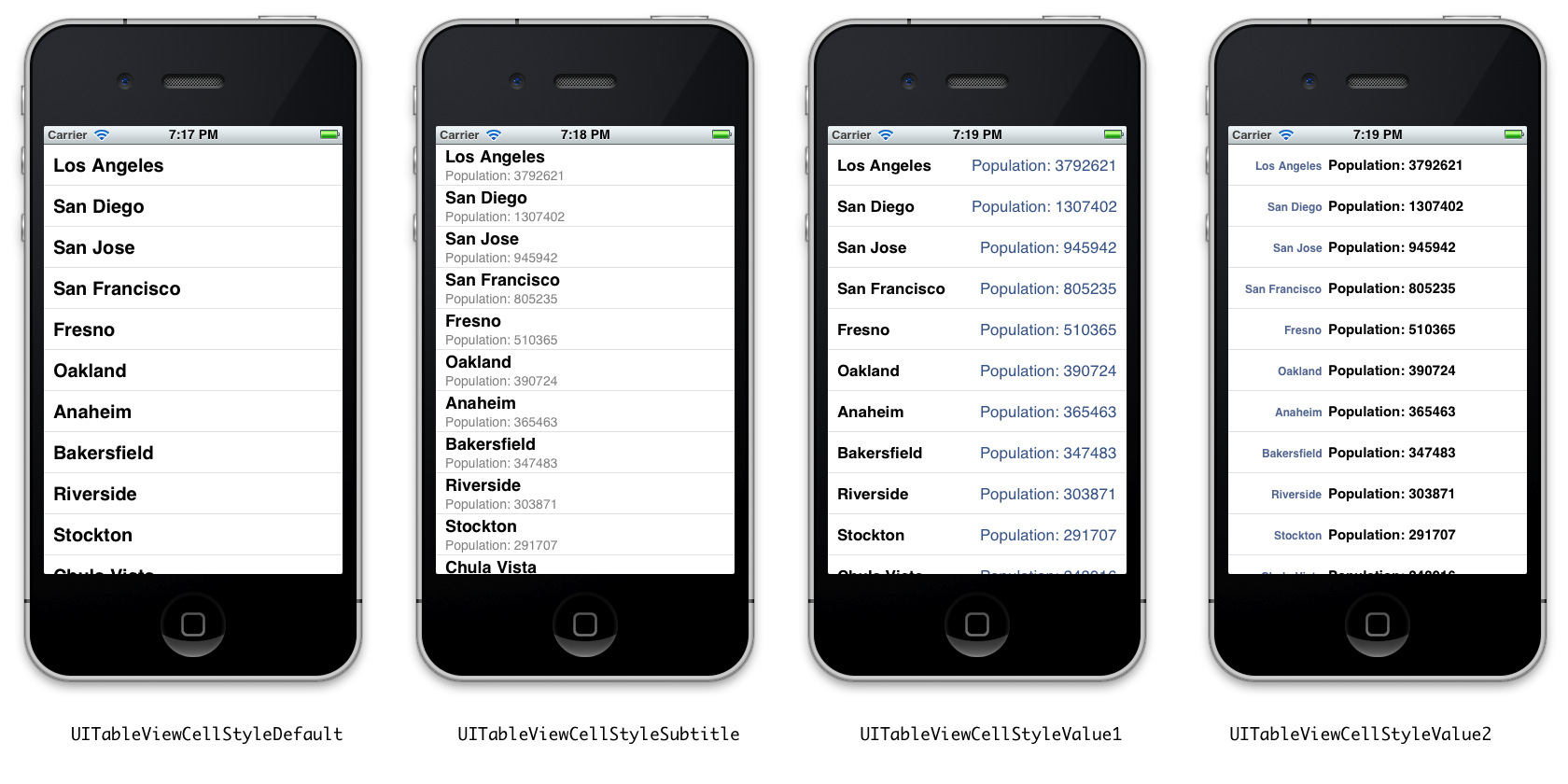
Look for the widget.newTableView() API call
Yeah, thanks. But how can I put every line of a plain text in it? In other words - how to put every next line in a new row?
Well we would need to know how the data is formatted to be specific about anything. If you could save your data in JSON format instead of plain text would make this process much easier. But anyway, you basically have to “parse” the response string and break it down into individual strings. That’s a generic answer, but at this point I don’t know:
How are each line separated?
Do you need to separate various data chunks out of each line? If so, how is that data separated?
You can google around for Lua string recipies and find the split function. It’s also been in a couple of our Tuesday tech tutorials as well. If your lines are separated by a newline (Unix \n also known as a line feed or LF) or a Windows/DOS CR-LF), then you could use this split to bust lines apart.
Take a look at this picture again: http://cupsofcocoa.files.wordpress.com/2012/01/ios-table-view-cell-styles.png
I would like to do something like 3rd view from the left.
For an example, my text file looks like this:
HEADER INFO HEADER INFO HEADER INFO ... ...
Analog to the 3rd view of pasted picture I would like “HEADER” to be “Los Angeles” and “INFO” -> “POPULATION”. I know a lot of C and C# where I worked with files and I know that this can be done with for loop (if 1st HEADER is 1, and 1st INFO is 2, next HEADER is 3 and next INFO is 4, and so on, then every even number must be aligned to the right and every uneven number to the left of every row), but I dont know how to implement that for loop in my code from the 1st post.
If you have some more informations or if you can do some short example, it would be very helpful.
Rob, really, thank you for your instant answers and for your help.
It seems to me that you need to learn about tables. Your whole file will be in a really big string called event.response. You will need to use the string.split recipe I referenced above, to take that long string and convert it into a lua table with each row in the table being one line.
Once you have that you could do a :
for i = 1, #tableOfStrings, 2 do – since you expect there to be two lines for each entry
– look up the code to insert rows into a tableview
end
The tableView will have a function called onRowRender() that you will need to write that will respond to the inserts and passing a index into your string table, it can grab the text out of it and since you know your 2nd part is in that row# + 1, you can access that record in the table and in that onRowRender() function create the necessary display.newText() objects and add them to the row’s group.
Great. Thanks again. 
Okay, I know how to read it
function networkListener(inEvent) if (inEvent.isError) then print("Network error!"); else text = display.newText(inEvent.response, 0, 0, "Trebuchet MS", 12 ) --just prints on device screen like a plain text print(inEvent.response); --just prints in console... end end network.request( "http://xyz.com/cgi-bin/textfile.txt", "GET", networkListener );
But now, how to display it on a device in some table format like this?
Look for the widget.newTableView() API call
Yeah, thanks. But how can I put every line of a plain text in it? In other words - how to put every next line in a new row?
Well we would need to know how the data is formatted to be specific about anything. If you could save your data in JSON format instead of plain text would make this process much easier. But anyway, you basically have to “parse” the response string and break it down into individual strings. That’s a generic answer, but at this point I don’t know:
How are each line separated?
Do you need to separate various data chunks out of each line? If so, how is that data separated?
You can google around for Lua string recipies and find the split function. It’s also been in a couple of our Tuesday tech tutorials as well. If your lines are separated by a newline (Unix \n also known as a line feed or LF) or a Windows/DOS CR-LF), then you could use this split to bust lines apart.
Take a look at this picture again: http://cupsofcocoa.files.wordpress.com/2012/01/ios-table-view-cell-styles.png
I would like to do something like 3rd view from the left.
For an example, my text file looks like this:
HEADER INFO HEADER INFO HEADER INFO ... ...
Analog to the 3rd view of pasted picture I would like “HEADER” to be “Los Angeles” and “INFO” -> “POPULATION”. I know a lot of C and C# where I worked with files and I know that this can be done with for loop (if 1st HEADER is 1, and 1st INFO is 2, next HEADER is 3 and next INFO is 4, and so on, then every even number must be aligned to the right and every uneven number to the left of every row), but I dont know how to implement that for loop in my code from the 1st post.
If you have some more informations or if you can do some short example, it would be very helpful.
Rob, really, thank you for your instant answers and for your help.
It seems to me that you need to learn about tables. Your whole file will be in a really big string called event.response. You will need to use the string.split recipe I referenced above, to take that long string and convert it into a lua table with each row in the table being one line.
Once you have that you could do a :
for i = 1, #tableOfStrings, 2 do – since you expect there to be two lines for each entry
– look up the code to insert rows into a tableview
end
The tableView will have a function called onRowRender() that you will need to write that will respond to the inserts and passing a index into your string table, it can grab the text out of it and since you know your 2nd part is in that row# + 1, you can access that record in the table and in that onRowRender() function create the necessary display.newText() objects and add them to the row’s group.
Great. Thanks again.