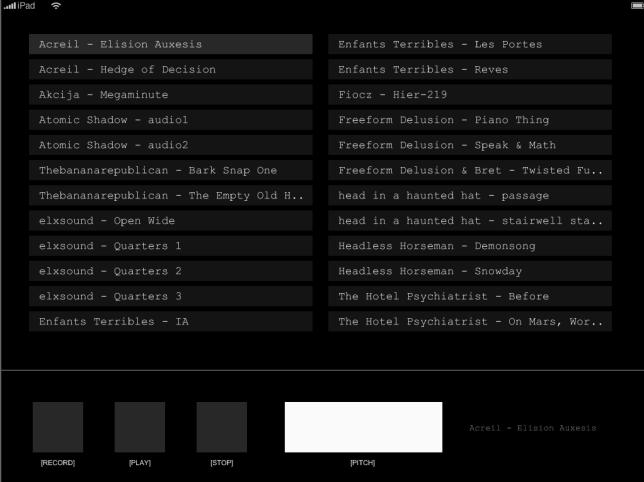
Screen showing up small on iPad 3

Hello,
I just recently released an app (my first) and I have a user reporting that, on their iPad 3 with the most recent iOS, many parts of the application are shunk down.

Here’s what he sees:

And here’s what it is supposed to look like:

Any suggestions?

Thanks,

  • Bret

[import]uid: 168791 topic_id: 32728 reply_id: 332728[/import]

You need to post your config.lua and some code how you are showing the above and also what version of Corona ?

Dave [import]uid: 117617 topic_id: 32728 reply_id: 130126[/import]

Most probably it’s the config.lua. Either the width and height params in the config are set to a higher dimension for ipad, or (just a hunch) “@4x” images are specified and they’re not included in the assets.

As Dave said, paste your config.lua here. :slight_smile: [import]uid: 144908 topic_id: 32728 reply_id: 130128[/import]

You need to post your config.lua and some code how you are showing the above and also what version of Corona ?

Dave [import]uid: 117617 topic_id: 32728 reply_id: 130126[/import]

Most probably it’s the config.lua. Either the width and height params in the config are set to a higher dimension for ipad, or (just a hunch) “@4x” images are specified and they’re not included in the assets.

As Dave said, paste your config.lua here. :slight_smile: [import]uid: 144908 topic_id: 32728 reply_id: 130128[/import]

Thanks for the help. Here’s my config.lua file:

settings =  
{  
 orientation =  
 {  
 default = "landscapeLeft",  
 content = "landscapeLeft",  
 supported =  
 {  
 "landscapeLeft", landscapeRight  
 }  
 }  
}  

and here is my build.settings:

settings = {  
 orientation = {  
 default = "landscapeLeft",   
 supported = { "landscapeLeft", "landscapeRight" }  
 },  
  
 iphone =  
 {  
 plist =  
 {  
 CFBundleIconFile = "Icon.png",  
 CFBundleIconFiles = {  
 "Icon.png",   
 "Icon@2x.png",   
 "Icon-72.png"   
 },  
 UIAppFonts = {  
 "hoog0555.ttf",  
 "monkey.ttf"  
 },  
 UIFileSharingEnabled = true  
 }  
 }  
}  

The app was built using Corona Version 2012.934 (2012.10.12).

There aren’t any images at all in my app. Everything is drawn with rectangles and text. This app is for the iPad only and usually works fine. I’ve tested on both my iPad, plus I had about 10 active beta testers, but I’m not sure if any of them had iPad 3s or iOS 6. The app has sold around 200 copies so far.

Cheers,

  • Bret [import]uid: 168791 topic_id: 32728 reply_id: 130151[/import]

Thanks for the help. Here’s my config.lua file:

settings =  
{  
 orientation =  
 {  
 default = "landscapeLeft",  
 content = "landscapeLeft",  
 supported =  
 {  
 "landscapeLeft", landscapeRight  
 }  
 }  
}  

and here is my build.settings:

settings = {  
 orientation = {  
 default = "landscapeLeft",   
 supported = { "landscapeLeft", "landscapeRight" }  
 },  
  
 iphone =  
 {  
 plist =  
 {  
 CFBundleIconFile = "Icon.png",  
 CFBundleIconFiles = {  
 "Icon.png",   
 "Icon@2x.png",   
 "Icon-72.png"   
 },  
 UIAppFonts = {  
 "hoog0555.ttf",  
 "monkey.ttf"  
 },  
 UIFileSharingEnabled = true  
 }  
 }  
}  

The app was built using Corona Version 2012.934 (2012.10.12).

There aren’t any images at all in my app. Everything is drawn with rectangles and text. This app is for the iPad only and usually works fine. I’ve tested on both my iPad, plus I had about 10 active beta testers, but I’m not sure if any of them had iPad 3s or iOS 6. The app has sold around 200 copies so far.

Cheers,

  • Bret [import]uid: 168791 topic_id: 32728 reply_id: 130151[/import]
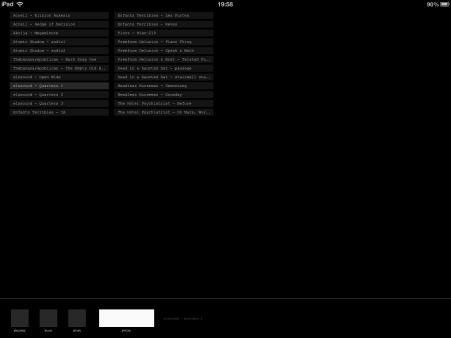
The iPad 3 is a high resolution device, meaning if you designed the app for the 768x1024 size of the iPad 1 + 2 then the iPad 3 will show it at 768x1024, which is very small for it’s screen. The easiest solution is to use scaling. That is what Corona is great for.

In your config you should have something like this.

application =  
{  
 content =  
 {  
 width = 768,  
 height = 1024,  
 scale = "letterbox",  
 }  
}  

Letterbox will scale your content equally to fit the screen of whatever device it loaded on. Since you doing iPad only this should have no odd side-effects. This is because the iPad 3 is the same dimensions as iPad 1 + 2. [import]uid: 56820 topic_id: 32728 reply_id: 130164[/import]

When you don’t provide any scaling information you get the native sizes and your sizes and positions will be all off.

Do what @anderoth said.
[import]uid: 19626 topic_id: 32728 reply_id: 130174[/import]

The iPad 3 is a high resolution device, meaning if you designed the app for the 768x1024 size of the iPad 1 + 2 then the iPad 3 will show it at 768x1024, which is very small for it’s screen. The easiest solution is to use scaling. That is what Corona is great for.

In your config you should have something like this.

application =  
{  
 content =  
 {  
 width = 768,  
 height = 1024,  
 scale = "letterbox",  
 }  
}  

Letterbox will scale your content equally to fit the screen of whatever device it loaded on. Since you doing iPad only this should have no odd side-effects. This is because the iPad 3 is the same dimensions as iPad 1 + 2. [import]uid: 56820 topic_id: 32728 reply_id: 130164[/import]

When you don’t provide any scaling information you get the native sizes and your sizes and positions will be all off.

Do what @anderoth said.
[import]uid: 19626 topic_id: 32728 reply_id: 130174[/import]