Tilt-based gravity stops working once object stops moving

Hello XD I am currently playing around with the gyroscope functions, and I am using this function to change the physics gravity.

function onTilt(event) physics.setGravity((-10 \* event.xGravity), (-10 \* event.yGravity)) end

Runtime:addEventListener(“accelerometer”, onTilt)

I use this to move a ball within a border. This function works fine for me o.o

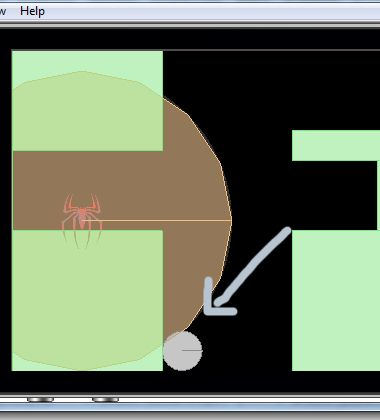
However, once the ball in laying a corner, and has stopped moving, and I try to tilt the screen to get it moving again, it won’t move anymore.

Like, in this position:

If somebody could help me out, it would be awesome >o< [import]uid: 191248 topic_id: 33559 reply_id: 333559[/import]

Hello Diana,
Can you show me a bit more of your code, esp. how you configure all of the physics objects (static “green” objects, and the ball)? Or, if the project is relatively small, just post the entire core code here so we can inspect it…

Thanks!
Brent
[import]uid: 200026 topic_id: 33559 reply_id: 133377[/import]

Yes >w< Here is the code for the physics objects.

--Screen borders  
local lborder = display.newImage("vborder.png", -20, 0)  
physics.addBody(lborder, "static")  
local rborder = display.newImage("vborder.png", display.contentWidth - 1, 0)  
physics.addBody(rborder, "static")  
local uborder = display.newImage("hborder.png", 0, -20)  
physics.addBody(uborder, "static")  
local bborder = display.newImage("hborder.png", 0, display.contentHeight)  
physics.addBody(bborder, "static")  
  
--Walls  
local groundLeft = display.newRect(0,180,150,150)   
groundLeft.myName = "level"  
physics.addBody(groundLeft ,"static")   
  
local groundRight = display.newRect(280,180,200,150)   
groundRight.myName = "level"  
physics.addBody(groundRight ,"static")   
  
local groundLeftUp = display.newRect(0,0,150,100)   
groundLeftUp.myName = "level"  
physics.addBody(groundLeftUp ,"static")   
  
local groundRightUp = display.newRect(280,80,200,30)   
groundRightUp.myName = "level"  
physics.addBody(groundRightUp ,"static")  
  
--Obstacle  
local obstacle = display.newRect(365,110,15,70)   
obstacle.myName = "obstacle"  
obstacle.destroyed = false  
physics.addBody(obstacle ,"static")  
  
--Ball  
local ball = display.newImage("ball.png")  
ball.x = 300  
ball.y = 50  
ball.myName = "ball"  
physics.addBody(ball, {bounce = 0.5})  

Well aside of this I got the A* Pathfinding D: So the project is around 400 lines of code D; [import]uid: 191248 topic_id: 33559 reply_id: 133378[/import]

Hi Diana,
Can you actually send me the entire project (zipped)? This isn’t quite enough to determine what’s happening. Please send it to brent (at) coronalabs (dot) com.

Thanks!
Brent
[import]uid: 200026 topic_id: 33559 reply_id: 133432[/import]

Read this:

http://developer.coronalabs.com/content/game-edition-box2d-physics-engine

"By default, Box2D bodies not involved in a collision will “sleep” after a couple of seconds. This reduces overhead, but in some cases you may not want this behavior. For example, the “ShapeTumbler” sample code will not work well if bodies are allowed to sleep, since sleeping bodies do not respond to changes in the direction of gravity.

You can override this behavior on a given body with [lua]body.isSleepingAllowed = false [/lua], but you can also override this globally for all bodies in the world by using an optional boolean parameter in start:" [import]uid: 181948 topic_id: 33559 reply_id: 133438[/import]

@treb.stewart might have nailed it. The body (because it’s shown in grey) is asleep in the simulation. I assumed that a change in gravity would wake up sleeping objects, but apparently not. So, try that a let us know if it works or not.

Brent [import]uid: 200026 topic_id: 33559 reply_id: 133448[/import]

Hello Diana,
Can you show me a bit more of your code, esp. how you configure all of the physics objects (static “green” objects, and the ball)? Or, if the project is relatively small, just post the entire core code here so we can inspect it…

Thanks!
Brent
[import]uid: 200026 topic_id: 33559 reply_id: 133377[/import]

Yes >w< Here is the code for the physics objects.

--Screen borders  
local lborder = display.newImage("vborder.png", -20, 0)  
physics.addBody(lborder, "static")  
local rborder = display.newImage("vborder.png", display.contentWidth - 1, 0)  
physics.addBody(rborder, "static")  
local uborder = display.newImage("hborder.png", 0, -20)  
physics.addBody(uborder, "static")  
local bborder = display.newImage("hborder.png", 0, display.contentHeight)  
physics.addBody(bborder, "static")  
  
--Walls  
local groundLeft = display.newRect(0,180,150,150)   
groundLeft.myName = "level"  
physics.addBody(groundLeft ,"static")   
  
local groundRight = display.newRect(280,180,200,150)   
groundRight.myName = "level"  
physics.addBody(groundRight ,"static")   
  
local groundLeftUp = display.newRect(0,0,150,100)   
groundLeftUp.myName = "level"  
physics.addBody(groundLeftUp ,"static")   
  
local groundRightUp = display.newRect(280,80,200,30)   
groundRightUp.myName = "level"  
physics.addBody(groundRightUp ,"static")  
  
--Obstacle  
local obstacle = display.newRect(365,110,15,70)   
obstacle.myName = "obstacle"  
obstacle.destroyed = false  
physics.addBody(obstacle ,"static")  
  
--Ball  
local ball = display.newImage("ball.png")  
ball.x = 300  
ball.y = 50  
ball.myName = "ball"  
physics.addBody(ball, {bounce = 0.5})  

Well aside of this I got the A* Pathfinding D: So the project is around 400 lines of code D; [import]uid: 191248 topic_id: 33559 reply_id: 133378[/import]

Hi Diana,
Can you actually send me the entire project (zipped)? This isn’t quite enough to determine what’s happening. Please send it to brent (at) coronalabs (dot) com.

Thanks!
Brent
[import]uid: 200026 topic_id: 33559 reply_id: 133432[/import]

Read this:

http://developer.coronalabs.com/content/game-edition-box2d-physics-engine

"By default, Box2D bodies not involved in a collision will “sleep” after a couple of seconds. This reduces overhead, but in some cases you may not want this behavior. For example, the “ShapeTumbler” sample code will not work well if bodies are allowed to sleep, since sleeping bodies do not respond to changes in the direction of gravity.

You can override this behavior on a given body with [lua]body.isSleepingAllowed = false [/lua], but you can also override this globally for all bodies in the world by using an optional boolean parameter in start:" [import]uid: 181948 topic_id: 33559 reply_id: 133438[/import]

@treb.stewart might have nailed it. The body (because it’s shown in grey) is asleep in the simulation. I assumed that a change in gravity would wake up sleeping objects, but apparently not. So, try that a let us know if it works or not.

Brent [import]uid: 200026 topic_id: 33559 reply_id: 133448[/import]