
You know how sometimes you’re reading an article and one of the words are highlighted blue and if you click on it, it takes you to a certain website. I want to do with my message. I want a certain word to direct a user to a certain website. How do I do that?
In HTML (the language of the web) this is known as a Hyperlink (or just “link”). Corona’s display.newText() does not support this. You can either:
a. Create a display object with your text up to that point. Create a second display object, color it a different color and provide a touch handler for it that would call system.gotoURL() when the link is tapped. Finally create another display object for the rest of the text. This a lot of work.
b. Search the forums for some existing libraries created by our wonderful community (Maybe in code exchange) that takes care of all of the dirty work needed to do “a.” above. We can’t support them since it’s third party code, but this may work for you.
c. Create the text in HTML (CSS and JavaScript as necessary) and use a native.newWebView() to show the text. This would likely be the easiest to do, but native.newWebViews do have their limitations (always on top, link will open a new website in the webView etc.)
Rob
Rob
I produced a rudimentary solution (using someone else’s html parser) to this some time ago.
This:
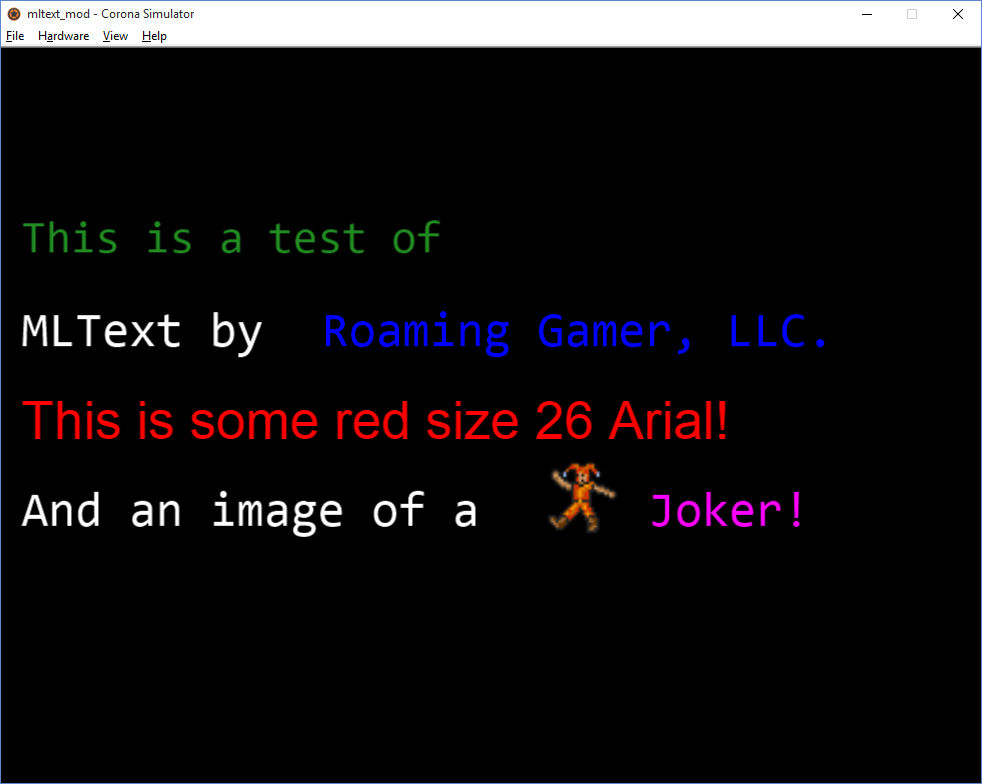
local mlText = require "mltext.mltext" local myMLString = '\<font size="22" color="ForestGreen"\>This is a test of\</font\>\<br\>\<br\>' .. 'MLText by \<a href = "www.roaminggamer.com"\>Roaming Gamer, LLC.\</a\>\<br\>\<br\>' .. '\<font face = "Arial" size="26" color="red"\>This is some red size 26 Arial!\</font\>\<br\>\<br\>' .. 'And an image of a \<a href = "www.roaminggamer.com"\>\<img src="joker.png" alt="A Joker" height="40" width="40" yOffset = "-12"\>Joker!\</a\>' local group = display.newGroup() -- Base settings for text without \<font\> statements. local params = { font = "Consolas", fontSize = 24, fontColor = { 255, 255, 128 }, spaceWidth = 14, lineHeight = 22, linkColor1 = {0,0,255}, linkColor2 = {255,0,255}, } local tmp = mlText.newMLText( group, myMLString, 10, 60, params )
Produces this:
Get it here:
http://github.com/roaminggamer/RG_FreeStuff/raw/master/AskEd/2015/10/mltext_mod.zip
In HTML (the language of the web) this is known as a Hyperlink (or just “link”). Corona’s display.newText() does not support this. You can either:
a. Create a display object with your text up to that point. Create a second display object, color it a different color and provide a touch handler for it that would call system.gotoURL() when the link is tapped. Finally create another display object for the rest of the text. This a lot of work.
b. Search the forums for some existing libraries created by our wonderful community (Maybe in code exchange) that takes care of all of the dirty work needed to do “a.” above. We can’t support them since it’s third party code, but this may work for you.
c. Create the text in HTML (CSS and JavaScript as necessary) and use a native.newWebView() to show the text. This would likely be the easiest to do, but native.newWebViews do have their limitations (always on top, link will open a new website in the webView etc.)
Rob
Rob
I produced a rudimentary solution (using someone else’s html parser) to this some time ago.
This:
local mlText = require "mltext.mltext" local myMLString = '\<font size="22" color="ForestGreen"\>This is a test of\</font\>\<br\>\<br\>' .. 'MLText by \<a href = "www.roaminggamer.com"\>Roaming Gamer, LLC.\</a\>\<br\>\<br\>' .. '\<font face = "Arial" size="26" color="red"\>This is some red size 26 Arial!\</font\>\<br\>\<br\>' .. 'And an image of a \<a href = "www.roaminggamer.com"\>\<img src="joker.png" alt="A Joker" height="40" width="40" yOffset = "-12"\>Joker!\</a\>' local group = display.newGroup() -- Base settings for text without \<font\> statements. local params = { font = "Consolas", fontSize = 24, fontColor = { 255, 255, 128 }, spaceWidth = 14, lineHeight = 22, linkColor1 = {0,0,255}, linkColor2 = {255,0,255}, } local tmp = mlText.newMLText( group, myMLString, 10, 60, params )
Produces this:
Get it here:
http://github.com/roaminggamer/RG_FreeStuff/raw/master/AskEd/2015/10/mltext_mod.zip