
This is pretty much what I was seeing. I, too, was expecting the mask to be extended in all directions as I believe that’s what the documentation says. [import]uid: 8271 topic_id: 33455 reply_id: 133691[/import]
Can I get some clarification on masks? does the mask image need to be the same size as the image it is attached to?
The image i am attaching the mask to is 768 X 1024… the mask it self is only 100 x 100 (black circle
with white background)… when I attach the mask… the mask gets attached to the bottom right of the image… see image
http://www4.picturepush.com/photo/a/11558962/640/11558962.png
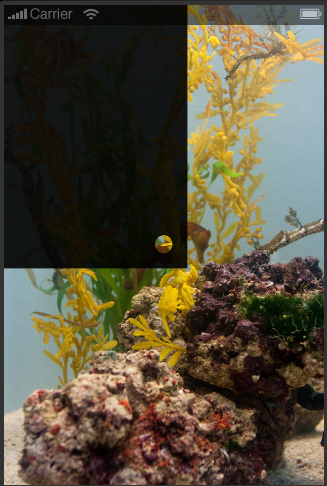
I have set the maskx and masky… what am I doing wrong?
I want the black image to be on the whole screen, and the mask to be in the center
my code is as follows
[code]
local image1 = display.newImage( “bkgd.png” )
– dark overlay
local image = display.newRect(0, 0, 768, 1024)
image.x = display.contentWidth /2
image.y = display.contentHeight /2
image:setFillColor(0, 0, 0)
image.alpha = 0.9
– apply mask to front image
local mask = graphics.newMask( “circlemask3.png” )
image:setMask( mask )
image.maskx = image.contentWidth * 0.5
image.masky = image.contentHeight * 0.5
[/code] [import]uid: 67619 topic_id: 33455 reply_id: 133652[/import]
This is pretty much what I was seeing. I, too, was expecting the mask to be extended in all directions as I believe that’s what the documentation says. [import]uid: 8271 topic_id: 33455 reply_id: 133691[/import]