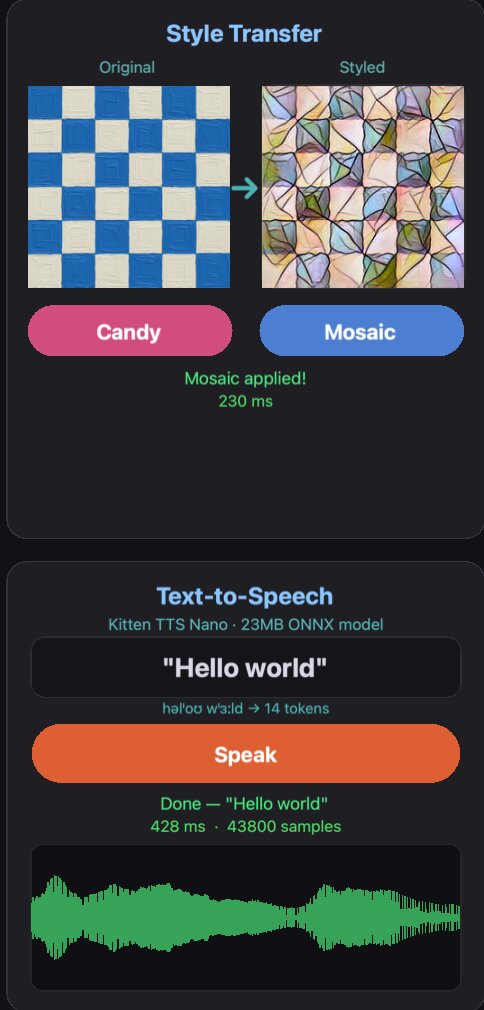
I’ve released plugin.onnxruntime, a native C plugin that brings https://onnxruntime.ai/ inference to Solar2D. Load and run any ONNX model directly in your app — style transfer, image classification, text-to-speech, or any other ML model exported to ONNX format.
Thank you for the plugin. I test run the “main.lua” in your “example” folder on my Windows PC Simulator. It results in an error below,
error loading module 'plugin_onnxruntime' from file 'C:\Users\xxx\AppData\Roaming\Corona Labs\Corona Simulator\Plugins\plugin_onnxruntime.dll':
%1 is not a valid Win32 application.
What should be my next step? Thank you.
PS> Verified that both “onnxruntime.dll” and “plugin_onnxruntime.dll” are indeed in my plugins folder.
I have tried the 3 released versions of 32-bit DLLs. The first 32-bit gave “Runtime error” of “The specified module could not be found.”. The later 2 versions of 32-bit DLLs crashed my Windows Simulator right away.
What is it that I have missed? Thank you again.
PS> I am running the latest example main.lua on “OnnxDemo-Win32-Example.zip”. Also, verified that all the DLLs in my plugin folders are 32-bit.
It now works in my Windows Simulator with the latest update of 32-bit win-32 DLLs.
A question on the “Text-to-Speech” portion of the demo, it give a “Load failed” message on my PC windows simulator. Is it meant for Android only, and would not work in windows? Thank you.
PS> I have not yet build and test run it on Android.
I have built Android app from my windows simulator. It immediately encountered a “Runtime Error” after launch on an Android physical device,
error loading module ‘plugin.onnxruntime’ from file '/data/app/xxx-xxx/lib/arm64/libplugin.onnxruntime.so:
dlopen failed: cannot locate symbol “luaL_newmetatable” referenced by '/data/app/xxx-xxx/lib/arm64/libplugin.onnxruntime.so" …
What do you think where the cause of the problem is? Thank you again.
PS> I have verified that both “libplugin.onnxruntime.so” and “libonnxruntime.so” files are present in “arm64-v8a” and “armeabi-v7a” folders on the built Android app.
TTS Load failed fix:
The TTS model requires ONNX opset 20, but the previous Windows DLL used ORT v1.16.3 (opset 19 only). This is now fixed in v7 — please update:
Clear your Plugins cache before updating: %APPDATA%\Corona Labs\Corona Simulator\Plugins\
Important note on Windows performance: Solar2D Windows is x86 (32-bit), which means no AVX/SSE
optimizations. Both the Simulator and packaged EXE have the same performance limitation.
Style transfer takes several seconds, and TTS may take even longer. For production ML
inference, target iOS (CoreML acceleration) or Android.
Thank you. I have updated “built.settings” to use v7. However, it encountered “Runtime error” running on windows simulator,
error loading module ‘plugin_onnxruntime’ from file ‘C:\Users\xxx\AppData\Roaming\Corona Labs\Corona Simulator\Plugins\plugin_onnxruntime.dll’:
A dynamic link library (DLL) initialization routine failed.
Thank you again.
PS1> I have confirmed that all the DLLs have been updated to v7 in my plugin folder.
PS2> When I revert the plugins to the latest v6, it was working as before. However, the error above appear again when I update them to v7.
manually copy plugin_onnxruntime.dll to the folder where the exe file is located. I don’t have a Windows runtime environment here. Besides, Windows has a lot of issues due to x86 compatibility problems.
Yes, windows can be a pain at times. I am not sure about which “exe” file or folder you are refering to, in the windows simulator environment,
In order to reproduce the problem running in the windows simulator environment, (1) I revert them to the v6 working version in my plugin folder, run the simulator to show it is working, and (2) put the v7 version back and run the simulator to see if the problem is repeatable. (3) I also try mix and match the various pairs from v6 versions and v7. (4) The cycle above is repeated 3 times.
The problem with v7 is repeatable (in the windows simulator). Sorry about the troubles caused. Thank you.
PS> I have kept all versions of win32 plugins from v6 (noting the results of each versions), and the one from v7.