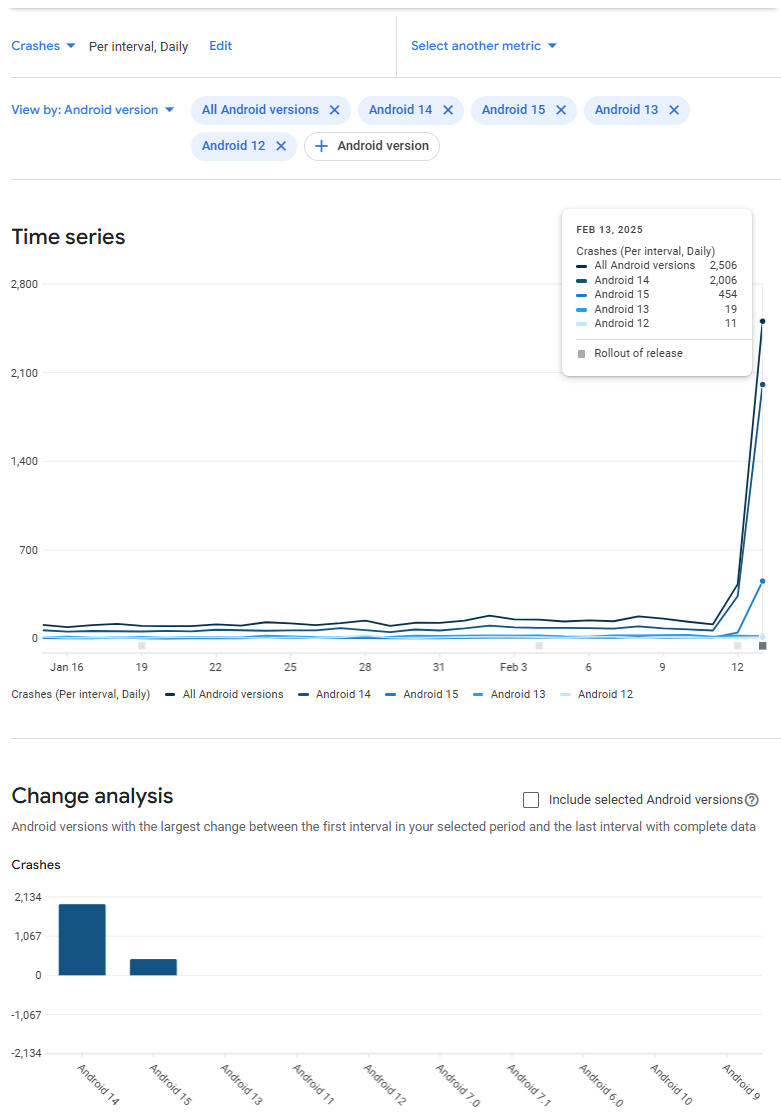
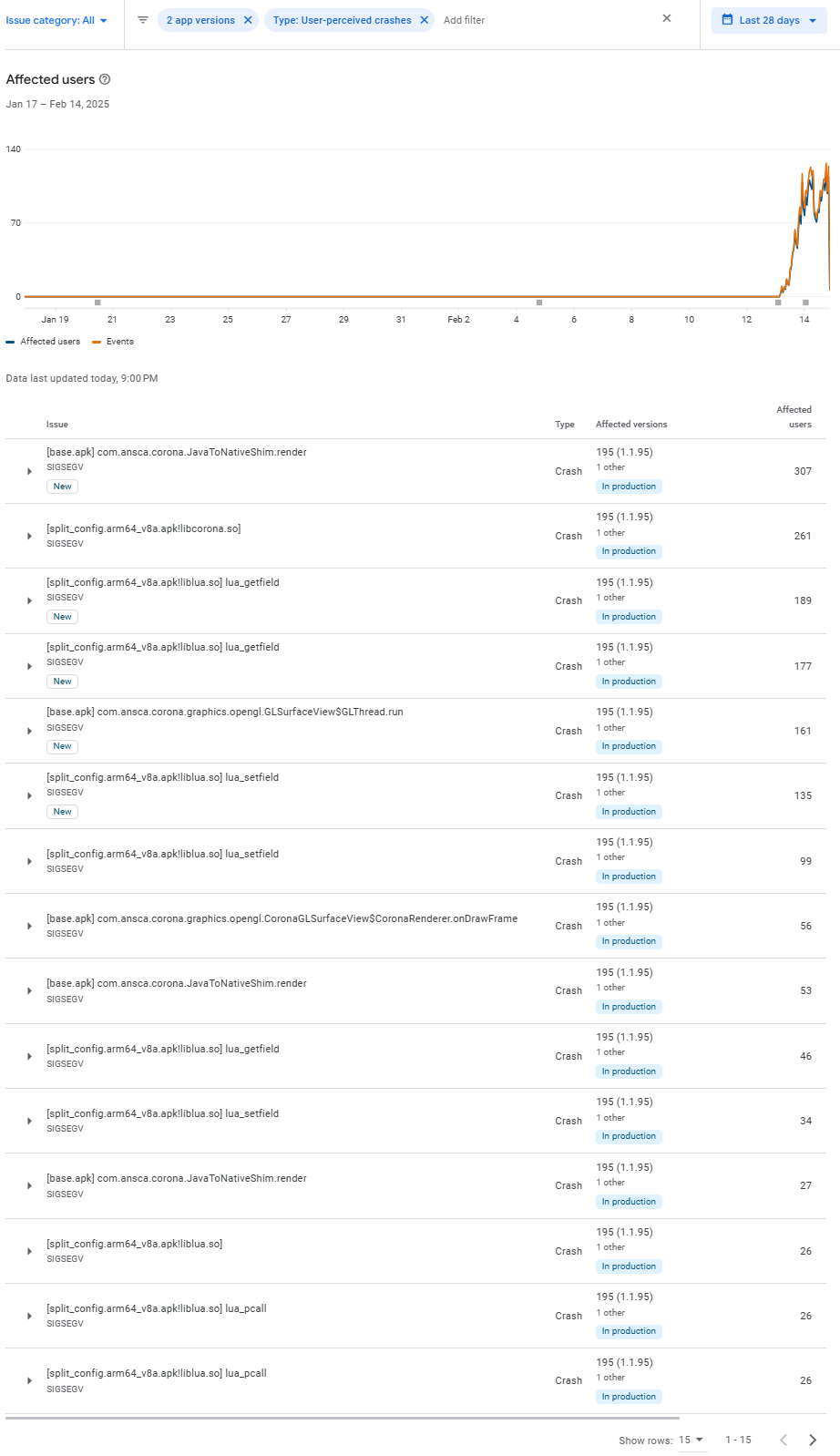
After receiving reports from users with Samsung Galaxy devices, I tested the issue using the “Hello World” sample project.
Issue Details
When pressing the Android “Recent Apps” button (III), the app unexpectedly crashes. (Please refer to the attached video.)
However, if I exit the app using the “Home” button (□) and then resume it via the “Recent Apps” button (III), it works fine without any issues.
Build Versions Solar2D 2023.3699 → Works normally. Solar2D 2023.3700~3713 → The app crashes when using the “Recent Apps” button.
(To test older build versions, I replaced the android-template.zip file. Reference. Android 14 (API Level 34) - #62 by GamingStudio17)
My Test Devices
Device with issue: Samsung Galaxy S24 Ultra (android14)
Other tested device: Redmi Note (android13) (No issues found)
This bug didn’t occur in the past, so after receiving reports from users, I tested previous builds one by one and was able to identify when the issue first appeared.
I would really appreciate any help in resolving this issue. Thank you!
I have already posted on Discord an issue I am suffering that I think its related to yours. When trying to publish a new app on Google Play I get rejected because they report me the app crashes. This app of mine uses no plugins, IAP, nor anything special. Also the same app has been published on ios.
I have tested on Android 15 & 8 and works with no problems.
But I have no Android 14 to test and see the issue my self.
If someone wants to test the app you can download from here: Unique Download Link | WeTransfer
Anyway, after reading your post gonna try with Solar2D 2023.3699
It’s interesting that it starts happening from build 3700 onwards, because 3700 had a pretty critical fix for ANRs. Before that, it was very difficult to stay under Google Play’s bad behaviour threshold.
If I recall correctly, the “fix” was to kill the app if it was hanging for 4s - because Google Play (or maybe Android generally) only consider an app to be “not responding” if it hangs for 5s or more.
If this change is the cause of your app crashing, it would suggest that something is causing your app to freeze when it resumes (and as a result the above fix is killing the app). I would suggest plugging the phone into your computer and checking the logs for any errors that might point to the cause. I use this adb command to filter out all of the non-Solar2D parts of the log:
As suggested by @chodongwon82, I rebuilt my app using Solar2D 2023.3699 and got below error:
Could not find com.beust:klaxon:5.0.1.
So I replaced the below zip file with the latest version from Corona-3714 and was able to get rid of the issue!
/Applications/Corona-3699/Native/Corona/android/resource/android-template.zip
I haven’t been able to perform a full test on my app to determine if any other issues, but so far it appears to be working fine.
If something is causing the Hello World sample to crash, I fear it might be a core issue. It might be related to Controller like @clang suggested for a similar issue.
I tried my game bilgi on an Android 14 Samsung device and used logcat to debug like @alanFlickGames suggested. My previous report on Discord was from Amazon QA testing it on Windows 11 Android emulation.
I’ll share the steps to reproduce, code, error dump and other things I noticed. Here:
Steps to reproduce:
1- Open the game.
2- Swipe up to see all apps working on the background. (Don’t send to background!)
3- Select the game again to bring it to full screen.
4- Crash!
02-04 02:06:12.582 10631 10678 V Corona  : > Class.forName: network.LuaLoader
02-04 02:06:12.582 10631 10678 V Corona  : < Class.forName: network.LuaLoader
02-04 02:06:12.582 10631 10678 V Corona  : Loading via reflection: network.LuaLoader
02-04 02:06:12.595 10631 10678 I Corona  : Platform: SM-F731B / ARM64 / 14 / Adreno (TM) 740 / OpenGL ES 3.2 V@0676.42 (GIT@7b26bdd942, Iab69c31769, 1693222181) (Date:08/28/23) / 2024.3710 / Türkçe | TR | tr_TR | tr
02-04 02:06:12.599 10631 10678 V Corona  : > Class.forName: shared.google.play.services.base.LuaLoader
02-04 02:06:12.603 10631 10678 V Corona  : > Class.forName: licensing.LuaLoader
02-04 02:06:12.605 10631 10678 V Corona  : > Class.forName: CoronaProvider.licensing.google.LuaLoader
02-04 02:06:12.605 10631 10678 V Corona  : < Class.forName: CoronaProvider.licensing.google.LuaLoader
02-04 02:06:12.607 10631 10678 V Corona  : Loading via reflection: CoronaProvider.licensing.google.LuaLoader
02-04 02:06:12.615 10631 10678 I Corona  : Default translation is set to defined value 'en'
02-04 02:06:14.034  4581  4726 I System.out: Broadcasting: Intent { act=com.sec.intent.action.CP_CHAN_INFO flg=0x1000000 (has extras) }
02-04 02:06:14.038  4581  4726 I System.out: Broadcast completed: result=0
02-04 02:06:15.758  4581  4636 I System.out: Broadcasting: Intent { act=com.sec.intent.action.CP_CHAN_INFO flg=0x1000000 (has extras) }
02-04 02:06:15.762  4581  4636 I System.out: Broadcast completed: result=0
02-04 02:06:26.241  2747  2909 W System.err: java.lang.NullPointerException: Attempt to invoke virtual method 'java.lang.String android.content.ComponentName.getPackageName()' on a null object reference
02-04 02:06:26.241  2747  2909 W System.err: 	at com.samsung.android.server.wifi.SemWifiOptimizer$6.noteResumeComponent(SemWifiOptimizer.java:19)
02-04 02:06:26.241  2747  2909 W System.err: 	at com.android.server.usage.UsageStatsService$LocalService.reportEvent(UsageStatsService.java:3123)
02-04 02:06:26.241  2747  2909 W System.err: 	at com.android.server.am.ActivityManagerService.updateActivityUsageStats(ActivityManagerService.java:3524)
02-04 02:06:26.241  2747  2909 W System.err: 	at com.android.server.am.ActivityManagerService$LocalService.updateActivityUsageStatsWithIntent(ActivityManagerService.java:21166)
02-04 02:06:26.241  2747  2909 W System.err: 	at com.android.server.wm.ActivityTaskManagerService$$ExternalSyntheticLambda26.accept(R8$$SyntheticClass:0)
02-04 02:06:26.241  2747  2909 W System.err: 	at com.android.internal.util.function.pooled.PooledLambdaImpl.doInvoke(PooledLambdaImpl.java:384)
02-04 02:06:26.241  2747  2909 W System.err: 	at com.android.internal.util.function.pooled.PooledLambdaImpl.invoke(PooledLambdaImpl.java:204)
02-04 02:06:26.241  2747  2909 W System.err: 	at com.android.internal.util.function.pooled.OmniFunction.run(OmniFunction.java:87)
02-04 02:06:26.241  2747  2909 W System.err: 	at android.os.Handler.handleCallback(Handler.java:958)
02-04 02:06:26.241  2747  2909 W System.err: 	at android.os.Handler.dispatchMessage(Handler.java:99)
02-04 02:06:26.241  2747  2909 W System.err: 	at android.os.Looper.loopOnce(Looper.java:230)
02-04 02:06:26.241  2747  2909 W System.err: 	at android.os.Looper.loop(Looper.java:319)
02-04 02:06:26.241  2747  2909 W System.err: 	at android.os.HandlerThread.run(HandlerThread.java:67)
02-04 02:06:26.241  2747  2909 W System.err: 	at com.android.server.ServiceThread.run(ServiceThread.java:46)
02-04 02:06:26.242  2747  2909 W System.err: java.lang.NullPointerException: Attempt to invoke virtual method 'java.lang.String android.content.ComponentName.getPackageName()' on a null object reference
02-04 02:06:26.242  2747  2909 W System.err: 	at com.samsung.android.server.wifi.tcp.SemWifiTransportLayerMonitor$3.noteResumeComponent(SemWifiTransportLayerMonitor.java:69)
02-04 02:06:26.242  2747  2909 W System.err: 	at com.android.server.usage.UsageStatsService$LocalService.reportEvent(UsageStatsService.java:3123)
02-04 02:06:26.242  2747  2909 W System.err: 	at com.android.server.am.ActivityManagerService.updateActivityUsageStats(ActivityManagerService.java:3524)
02-04 02:06:26.242  2747  2909 W System.err: 	at com.android.server.am.ActivityManagerService$LocalService.updateActivityUsageStatsWithIntent(ActivityManagerService.java:21166)
02-04 02:06:26.242  2747  2909 W System.err: 	at com.android.server.wm.ActivityTaskManagerService$$ExternalSyntheticLambda26.accept(R8$$SyntheticClass:0)
02-04 02:06:26.242  2747  2909 W System.err: 	at com.android.internal.util.function.pooled.PooledLambdaImpl.doInvoke(PooledLambdaImpl.java:384)
02-04 02:06:26.242  2747  2909 W System.err: 	at com.android.internal.util.function.pooled.PooledLambdaImpl.invoke(PooledLambdaImpl.java:204)
02-04 02:06:26.242  2747  2909 W System.err: 	at com.android.internal.util.function.pooled.OmniFunction.run(OmniFunction.java:87)
02-04 02:06:26.242  2747  2909 W System.err: 	at android.os.Handler.handleCallback(Handler.java:958)
02-04 02:06:26.242  2747  2909 W System.err: 	at android.os.Handler.dispatchMessage(Handler.java:99)
02-04 02:06:26.242  2747  2909 W System.err: 	at android.os.Looper.loopOnce(Looper.java:230)
02-04 02:06:26.242  2747  2909 W System.err: 	at android.os.Looper.loop(Looper.java:319)
02-04 02:06:26.242  2747  2909 W System.err: 	at android.os.HandlerThread.run(HandlerThread.java:67)
02-04 02:06:26.242  2747  2909 W System.err: 	at com.android.server.ServiceThread.run(ServiceThread.java:46)
02-04 02:06:26.676  2747  4203 W System.err: java.lang.NullPointerException: Attempt to invoke virtual method 'java.lang.String android.content.ComponentName.getPackageName()' on a null object reference
02-04 02:06:26.676  2747  4203 W System.err: 	at com.samsung.android.server.wifi.tcp.SemWifiTransportLayerMonitor.getCurrentPackageInfo(SemWifiTransportLayerMonitor.java:15)
02-04 02:06:26.676  2747  4203 W System.err: 	at com.samsung.android.server.wifi.tcp.SemWifiSwitchForIndividualAppsService.handleMessage(SemWifiSwitchForIndividualAppsService.java:52)
02-04 02:06:26.676  2747  4203 W System.err: 	at android.os.Handler.dispatchMessage(Handler.java:106)
02-04 02:06:26.676  2747  4203 W System.err: 	at android.os.Looper.loopOnce(Looper.java:230)
02-04 02:06:26.676  2747  4203 W System.err: 	at android.os.Looper.loop(Looper.java:319)
02-04 02:06:26.677  2747  4203 W System.err: 	at android.os.HandlerThread.run(HandlerThread.java:67)
02-04 02:06:47.293  2747  4292 W System.err: java.io.FileNotFoundException: /proc/10631/io_record_control: open failed: ENOENT (No such file or directory)
02-04 02:06:47.299  2747  4292 W System.err: 	at libcore.io.IoBridge.open(IoBridge.java:574)
02-04 02:06:47.300  2747  4292 W System.err: 	at java.io.FileOutputStream.<init>(FileOutputStream.java:259)
02-04 02:06:47.300  2747  4292 W System.err: 	at java.io.FileOutputStream.<init>(FileOutputStream.java:208)
02-04 02:06:47.300  2747  4292 W System.err: 	at java.io.FileWriter.<init>(FileWriter.java:96)
02-04 02:06:47.300  2747  4292 W System.err: 	at com.android.server.am.Pageboost$IoRecord.write(Pageboost.java:1711)
02-04 02:06:47.300  2747  4292 W System.err: 	at com.android.server.am.Pageboost$IoRecord.getResultFromKernel(Pageboost.java:1935)
02-04 02:06:47.300  2747  4292 W System.err: 	at com.android.server.am.Pageboost$PageboostHandler.handleMessage(Pageboost.java:2463)
02-04 02:06:47.300  2747  4292 W System.err: 	at android.os.Handler.dispatchMessage(Handler.java:106)
02-04 02:06:47.300  2747  4292 W System.err: 	at android.os.Looper.loopOnce(Looper.java:230)
02-04 02:06:47.300  2747  4292 W System.err: 	at android.os.Looper.loop(Looper.java:319)
02-04 02:06:47.300  2747  4292 W System.err: 	at android.os.HandlerThread.run(HandlerThread.java:67)
02-04 02:06:47.300  2747  4292 W System.err: 	at com.android.server.ServiceThread.run(ServiceThread.java:46)
02-04 02:06:47.301  2747  4292 W System.err: Caused by: android.system.ErrnoException: open failed: ENOENT (No such file or directory)
02-04 02:06:47.301  2747  4292 W System.err: 	at libcore.io.Linux.open(Native Method)
02-04 02:06:47.301  2747  4292 W System.err: 	at libcore.io.ForwardingOs.open(ForwardingOs.java:563)
02-04 02:06:47.301  2747  4292 W System.err: 	at libcore.io.BlockGuardOs.open(BlockGuardOs.java:274)
02-04 02:06:47.301  2747  4292 W System.err: 	at libcore.io.IoBridge.open(IoBridge.java:560)
02-04 02:06:47.301  2747  4292 W System.err: 	... 11 more
What else I noticed:
When you navigate through open apps in the background but don’t switch, the game is still running and the music can still be heard, but it stops after a few (4?) seconds because the game crashes.
In the ‘Recent Apps’ screen, switch to another app and the music can still be heard. The game is not being sent to background.
Send the app directly to the background and bring it back, it doesn’t crash.
I tried @alanFlickGames Flick Solitaire. The same behavior applies. It crashes.
I followed the same steps with Candy Crush Saga to see how other engines/frameworks behave. In this case, the game audio is immediately paused when ‘Recent Apps’ screen is on screen. Game doesn’t crash.
Conclusion:
I believe Solar2D framework is not pausing the application or the sound layer properly when the user opens the ‘Recent Apps’ (or say, switch between apps UI). As @chodongwon82 reported, the behavior might vary between Samsung and other Android devices but this is definitely not handled the right away on Android 14 Samsung devices and it’s not working right on Android emulation for Windows 11(Amazon App Store).
I’ll put all of this together and create an issue on Github repo, hopefully tomorrow.
Interestingly, the problem doesn’t happen as long as the multitasking manager doesn’t pause the app, such as Google Pixel with Android 14/15, which you might want to keep in mind when trying to reproduce.
And the problem should be that the App actively exits rather than crashes, you can use bugreport to get a report after the reproduced and see if there is a record, it should not be marked as a crash. This can be partially confirmed by the fact that from about 3700 onwards, the ANR decreases while the crash rate does not increase. So you can check if there are other issues, or maybe Google Play is using the word crash incorrectly?
Yeah the build only targets Android 14 with the fix,
I tried on my Pixel running Android 15 and it does not seem to crash. Guessing it maybe a Samsung power saving thing?
Will try the fix on my Pixel 15 device and if it does not cause any weirdness will increase it android 14 >=
I was a bit busy and just got back. I have now tested it today with Build 2025.3717, and everything worked perfectly. The test devices used were S24 Ultra (Android 14) and S25 (Android 15).
After updating to build “Solar2D 2025.3717,” the number of crash reports has increased significantly. However, strangely, there are no user reviews mentioning crashes. On the contrary, I even received an updated 5-star review stating that the issue of the app closing on Samsung phones has been fixed since this patch. It’s quite confusing.